-
Posts
959 -
Joined
-
Last visited
6 Followers


About MrEprise

-

MRBS won't allow booking past a certain date
MrEprise replied to MrEprise's topic in Network and Classroom Management
I saw the default options in the config php file but as they didn't change anything at the time, I just commented them out for the moment. I'll keep that in mind though. -
MRBS won't allow booking past a certain date
MrEprise replied to MrEprise's topic in Network and Classroom Management
I didn't think to check that. It works now thank you. -
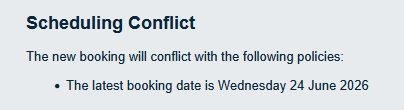
I'll ask the question but I don't know if I'll get a response, probably because no one uses it anymore. We're moving back to using MRBS since the cost of TES Room Booking System is a cost we could do without right now. I basically took a backup of the webserver running MRBS back in 2021 when we moved to the TES product and I've fairly recently got it back up and running (along with necessary updates I might add.) The issue we're running into is that it won't let normal users book anything past a certain date in the past (see below) and I can't find where this is defined in order to allow bookings past that date. We are running a slightly modified version (that I didn't set up) that takes into account a Week A/Week B setup so I don't want to have to start again if I can help it. Is there anyone who uses it or has used it in the past who knows what I need to change for this to work?

-
Student needs to use Glucose Monitor thru WiFi
MrEprise replied to fiza's topic in How do you do....it?
As someone who now has access to the Firewall that @KevinB above used to, it looks like 162.254.184.132 was the IP allowed through the Firewall. -
They did the same to my Dad with a slightly different pitch of "Did you know a change in the law allows us to offer you broadband at a reduced rate compared to BT?" My Dad started to get swung by this until I stepped in, asking a bunch of questions the guy had vague answers to before telling them where they could go.
-
They've been reusing model numbers for a while. The OptiPlex 7010 could be the one released mid 2012 or the one released in April 2023. Who knows, it's a gamble.
-
"Error trying to get OneDrive settings" after user rename.
MrEprise replied to MrEprise's topic in Cloud Services
...And it's fixed. Not by Microsoft I might add, just by waiting 5 days for it to re-provision itself. What a load of rubbish. -
"Error trying to get OneDrive settings" after user rename.
MrEprise replied to MrEprise's topic in Cloud Services
I knew I wouldn't get an answer for this. Currently with Microsoft trying to sort it out. The files are there, they just won't re-provision to the account. -
Can I have a copy of the server files, then I can continue playing?
-
Oh, that'll be why I can't connect.
-
"Error trying to get OneDrive settings" after user rename.
MrEprise posted a topic in Cloud Services
Having a bit of a panic attack while trying to sort this one. Renamed a user who either got married or divorced over the summer, and it's something I've done numerous times without issue but this time after the rename, they can't access their OneDrive and I get "Error trying to get OneDrive settings" if I try to access it via 365 admin. I've gone into SharePoint admin and verified that their personal folder still exists as far as that tells me but if I try to access the personal folder, I get "404 FILE NOT FOUND". I've tried renaming the user back but it's not changing the account name or personal site URL back and I've tried removing the OneDrive licence and adding it back in. Reason for the panic attack? We have no backups of any of our 365 tenant anymore. We did have Barracuda until January of this year where the trust stopped paying for it because it was deemed "too expensive" and there hasn't been any budget to buy any sort of replacement for it. We did also have access to our backup archive until yesterday when they'd sent an email informing us that we'd be losing it all. So you can imagine how I might be feeling right around now. 😢 -
Depends when they're added to your MIS and when the sync runs. We usually have to give it between 24 to 48 hours before they appear on ours.
-
Oh fun. Our trust had only just moved over to the complete Pebble solution since Cunninghams was a bit on the pricey side. I wonder what we'll end up with next?
-
We started off with a branch of Future Zone which back in the day, had the same vibe as Gamestations had. I felt like I was on first name terms with all the staff that worked there, plus the store manager was a family friend from years before. Then it became Electronics Boutique. The staff were there for a few more years until they started messing things up and the workers I knew had gone elsewhere. Then it became a Game and it just wasn't the same. Around that time, we also had a Gamestation open up and it felt just like the Future Zone we used to have. Always super busy as well compared to Game which was often almost empty. Then the inevitable happened and we lost our Gamestation and the really nice staff that worked there.
-
Brenda Fricker, Oscar winner for My Left Foot, dies aged 81
MrEprise replied to 6Foot2's topic in General Chat
She was also the Pigeon lady in Home Alone 2 which I imagine a lot of people will know her primarily from that.