scottpowers82
-
Posts
69 -
Joined
-
Last visited
Content Type
Forums
News
20th
EduGeek EDIT Conference
Blogs
Everything posted by scottpowers82
-
We used to keeps ours turned off here, but starting with Windows 7, I opted to go ahead and keep the firewall enabled. We had a bad experience here a number of years ago where a virus had gotten into the network and, since the firewall was disabled, was able to spread to each and every machine in our high school. We had to go and run a virus removal tool manually on each machine to fix the problem. It can be a little more work to make sure you have your exceptions setup correctly, but it is much more worth it than to have to come in on a Sunday because all of your Internet access had been shut down due to too much virus activity. Nope, not fun at all
-
Hello everyone, I'm having a little problem here with a Lenovo X120E Netbook and my Windows 7 Image. I am able to apply my image to the machine with no problem, but it doesn't seem to want to automatically load the driver for the wireless card. I have configured my Task Sequence to use the DriverGroup1=Windows 7 x86\%Make%\%Model% method and I can see in the BDD log file that it does in fact read the WMI info correctly. It then maps the correct path to where I have the driver stored in my Deployment Workbench and I can see in the log file that it copies it to the local hard drive while imaging, but it never seems to load once the image is finished. I can either load it by hand or use Windows Update and it finds the driver just fine, but I was trying to avoid having to do that with 60+ netbooks. So, anyone have any ideas why it won't load the driver? This is one area where I always seem to have problems, but I can eventually get it working on our other models, but this one just keeps not working. Any help or advice would be most appreciated as I am trying to have all of these done by tomorrow afternoon.
-
Thanks Chris. That ended up being the problem.
-
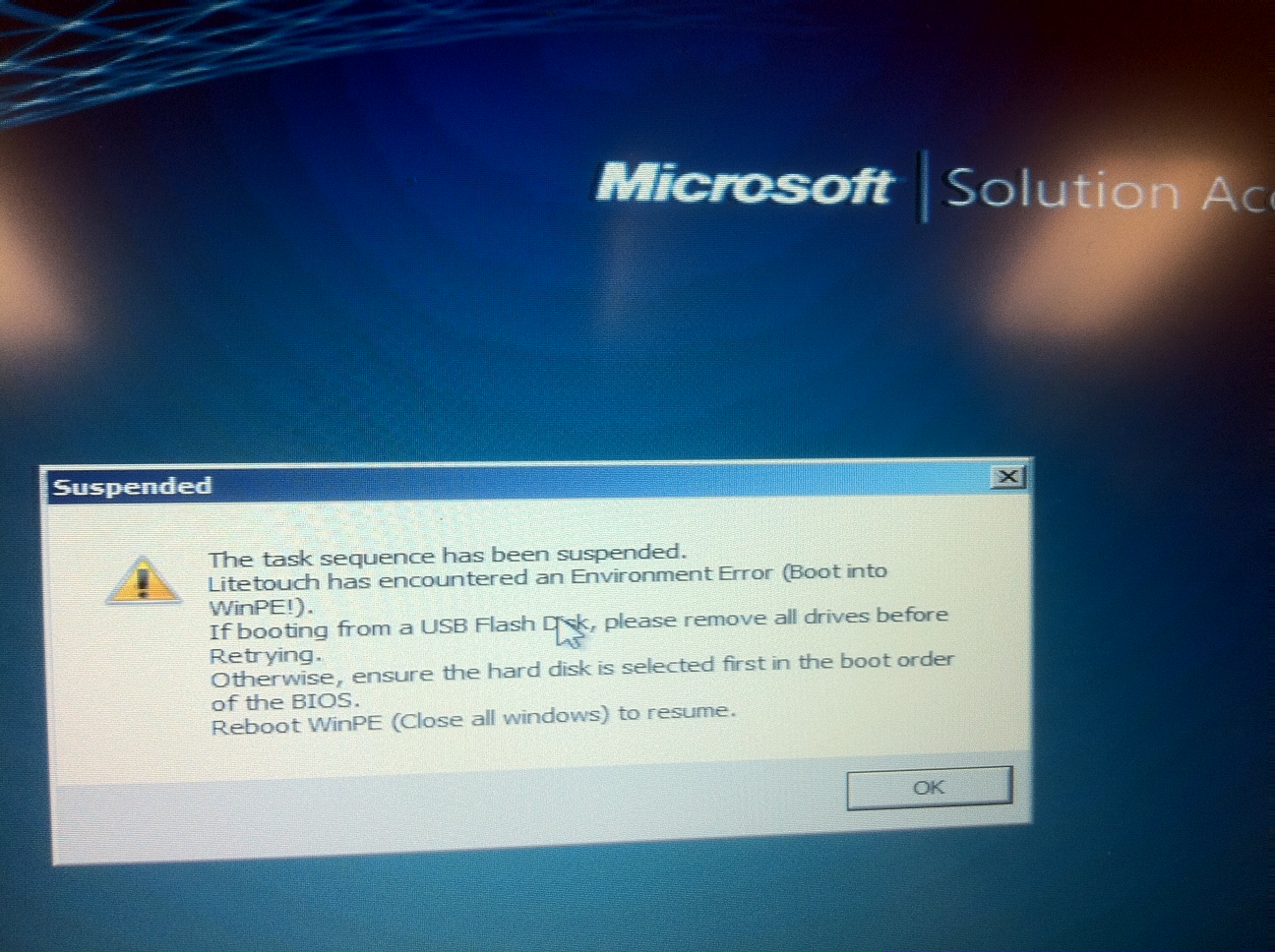
OK, so, I have a Windows 7 Image that I have been developing for quite some time and that I have working on several types of machines. I can image many machines with usually no problems. However, I have run into problems lately imaging our new Lenovo X120e Netbooks. When I first ran my image on the netbook to see what drivers it picked up, I didn't run into any problems except I noticed that the wireless driver did not install. No biggie, so I downloaded the driver, added it to MDT2010 (using drivergroups based on make/model) and tried to re-image the same machine again to see if it correctly picks up the wireless driver before I go ahead and image the other 60 machines I have. However, this is when I run into a little snag. After PXE booting the machine and selecting my boot image, I get this screen now: I just can't figure it out as it only happens to these netbooks and only if I have imaged them once before. I can take another of the netbooks out of the box and image it and have no problem (still not getting wireless...but that's another issue), but for some reason, they just don't want to be imaged a second time. Also, just a note, but the error comes up before I can even select my task sequence or any other option for that matter. Any ideas?

-
Yes, but when you import your image of Windows 7 into MDT, it will automatically generate the catalog for you (which you can manually do in the WSIM tool) and only a computer running a 32bit version of the WSIM tool can create the catalog for your 32bit image. Question though: Are you importing an image that you just created? Or are you just trying to import the Windows 7 DVD into MDT? Also, if you are importing a captured image, are you choosing to import with or without the setup files?
-
You don't need two shares to run both architectures. When you are using the 64bit version of the Windows System Image Manager (The thing you use to edit the sysprep files), it can only create a 64bit catalog of windows. It can import both 32bit and 64bit versions, but the catalog itself must be made on its respective architecture. I actually have a VM (32bit, Windows 7) that I use just for creating the 32bit catalogs and then import them into my 64bit 2008 R2 server. Try making your catalog file on a 32bit machine and then see if you can import them into your server. Should do the trick for you...
-
Have you tried updating your boot images? Sometimes when I have had any kind of an odd issue, I have tried to update the boot image and it has fixed a problem for me a couple times. Also, I had a problem recently with driver injection (I was mixing XP and Win7 drivers in WinPE) and even though I had updated the boot image to the way I knew it should work, it just wouldn't. I then had MDT do a full rebuild of my boot image and it seemed to fix the issue. It's worth at least giving it a try...
-
Try Windows Live Movie Maker or Windows Live Photo Gallery (Available Here: Windows Live Essentials 2011 - Download free Microsoft programs I know for sure that Live Movie Maker has this feature, but I imagine that Live Photo Gallery does as well. Once you go into Live Movie Maker, look for the Webcam Video button on the main toolbar. Should do what you want I think
-
Drive Stays Mapped After Imaging with MDT 2010
scottpowers82 replied to scottpowers82's topic in Windows 7
Anyone have any ideas on this? I now no longer have the logs share showing up mapped to the user after imaging (I think that was a seperate issue with my image). However, I am still having my deploymentshare mapped to anyone who logs into the system after it has been imaged. Both the _SMSTask and MININT folders are correctly removed following the deployment, so I know that is in fact doing its "clean up" after the deployment, but it keeps mapping my deployment share after the imaging. Also, it doesn't matter who I login as (teacher, admin, student), the share still shows up. Any suggestions? EDIT: OK, I take that back, turns out that computers are still retaining the _SMSTasking and MININT folders after imaging. One more thing to figure out before I try and image these 60 computers that I was supposed to have done today -
OK, I have kind of a weird problem here that I just can't figure out for the life of me, even though I am sure it is (hopefully) simple to fix. I am currently using MDT 2010 to deploy my Windows 7 image. However, every time I image a machine, I have noticed that both my deployment share and the Logs folder of my deployment share stay mapped to any user who logs into the system. Those shares are not mapped when I capture the system (although they are obviously used during parts of the deployment itself), so I'm not sure why they are mapped after I image the system. Anyone have any suggestions? Thanks in advance
-
"Can't Open ACPI ATK0100 kernel Mode Driver"
scottpowers82 replied to scottpowers82's topic in Windows 7
OK, I think I may have found the problem. I removed any entries that installed the drivers I had in both my Unattend file and my Task Sequence and this time, the message did not pop up when I imaged two machines. So, my next question would be: what is the best method for installing drivers when imaging a computer with Windows 7 using MDT 2010? Is it better to assign them in a Task Sequence? Or in the Unattend file? (I think I had it in both which could have also caused the problem) If in the Unattend file, is it better to do it during the Offline Servicing phase? Or the auditSystem phase? Again, thanks for all the help This has always been one area I was never "sure" on how to setup, so sorry if anything I say sounds confusing at all -
"Can't Open ACPI ATK0100 kernel Mode Driver"
scottpowers82 replied to scottpowers82's topic in Windows 7
Which "old drivers" are you referring to? Also, what do you mean when you say "install it as a Win7 App"? EDIT: I'm actually running a test now where I have removed all of the drivers from Task Sequence and my Unattend file (I think). Hopefully, I'll see if the error comes up again or not on this test. Will report back here what I find... -
"Can't Open ACPI ATK0100 kernel Mode Driver"
scottpowers82 replied to scottpowers82's topic in Windows 7
Steve, Thanks for the quick response. Actually, I am trying to make this image so that it can go any pretty much any machine and dynamically install the drivers. However, I have tried to image the same VM that I had just pulled the image from (so definitely the same hardware there) and I still get the error message. I kind of thought the same thing as you: that the system was somehow picking up some off hardware and installing the software, but the problem is still there even when I re-image the same machine I had just pulled the image from. -
Ok, so I have kind of a weird one that I am just at a loss on how to fix. I am updating our Windows 7 Pro image for this coming school year and I thought that I had it all finished a few days ago as I was capturing my final image as a custom wim file. However, when I went to image a computer (or any other computer or VM for that matter), I now get an error that pops up for every user saying "Can't Open ACPI ATK0100 kernel Mode Driver." You can click OK and everything is fine after that until you reboot it again and you have to hit OK again. I created my image using VMWare (which is what I usually do) and it did not present this problem before I captured it. Also, I have noticed that after I image a computer (and get the error message again), I noticed that "ATK0100 ACPI Utility" had also been installed and listed under Add/Remove Programs. I double checked my images just to be sure and that program is definitely not there when I capture the wim file, but it somehow gets added in while imaging. It just doesn't make sense to me on how it gets there. So...anybody have any advice or ideas? Thanks in advance Scott
-
We had the same problem here when we upgraded to Windows 7 in one of our labs. We ended up just upgrading to Smart Sync (the next version of Syncroneyes) and it seems to be working out just fine so far.
-
Thanks for all of the help guys. Sorry it took me so long to get back here with a little update. Problem didn't seem to go away on our laptops, so we are reverting back to XP on those. However, we are still going to keep one of our Labs on Windows 7 as our Chinese Language software requires Windows 7. Hopefully, will be able to figure out the problem a little quicker with it only in one lab.
-
Thanks DrCheese. I just disabled the offline files for our laptop carts (students don't need offline files anyway) and also set up Group Policy Preferences to Create a DWORD entry like you said to format the database. I will be leaving in a few minutes to head over to our Middle School to test it out while my XP image (a backup in case this doesn't work) finishes grabbing updates. However, I have just tested on one here at our High School and it logged me on with a temporary profile. Everything seemed to still be mapped, but it does make me worry... Will let you know how things go...wish me luck!
-
So has anybody had any luck with this yet? In all of my testing that I did when originally setting up our MDT and Windows 7 images, I never once encountered this error. However, upon putting our Win7 Pro image on 2 of our laptop carts at our Middle School, we seem to be getting this same issue. As with the others, it is completely random. Student A can log into a laptop and have their their home drives attempt to map (it even shows up under Computer), but it never actually connects them. You can see the drive there under Computer, but the student has no access to it at all and it then maps all of their folders down to the local folders which is a real problem (especially when they saved their document to the computer and can't find it when they login somewhere else...and they don't know which computer they were on the day before so I can retrieve it for them). We have both teachers and students becoming increasingly frustrated by this issue as a class will use 15 laptops and maybe 1/3 of them will have the problem. However, if that 1/3 logs in somewhere else, they are fine. I have checked permissions, GPOs, anything that I can try, but I just can't figure it out (sorry if I'm venting). The problem has become bad enough that we are actually considering going back to XP for the meantime to get rid of the problem as none of our XP machines exhibit the issue. I really don't want to have to do that as I have put countless hours into learning how to setup MDT with Win7 and many many tests that never had this issue. So, in short...anybody got any ideas? Thanks, Scott Our Setup: 2000 Level Domain (not sure if that is part of the problem or not...didn't think it would though) 4 2003 Domain Controllers along with one old NT Server that we use for certificates (can't wait till we can get rid of that old thing!). Mixed Environment - Mostly Windows XP Pro, but trying to get to Windows 7.
-
Windows 7 renamed our user network folders to my documents
scottpowers82 replied to dombera's topic in Windows 7
I just put the following command line into a batch file and attached it to a user logon policy at the top level of our domain to fix this problem: del %HOMESHARE%%\desktop.ini /A This should delete the desktop.ini file for you and make the folders readable again once they logon (and the script runs automatically). However, you should test it first to make sure it works alright in your environment.