Zebadee
-
Posts
55 -
Joined
-
Last visited
Content Type
Forums
News
20th
EduGeek EDIT Conference
Blogs
Everything posted by Zebadee
-
Copied the default.aspx from myfiles folder from the full download but still no joy. Is there anything I can check in IIS to make sure somethings not gone awry?
-
I don't think so. Have tried it in firefox and Chrome as well and get the same problem! I cherry picked the new 7.5 files from the update zip, and just went down the change log adding or removing them as necessary. I noticed that the myfiles folder was missing from the change log. Could i have missed something else, unless other people have done the same thing and it works ok for them...? Andy -
-
Hi Nick, Here is the capture from IE9 whilst navigating to /hap/myfiles and clicking on 'My Drives' Andy -

-

Can't alter 'department' from n/a on home page
Zebadee replied to Zebadee's topic in Home Access Plus+
Ok, typed something directly into the department box in the AD and this replicated back into HAP. Looks like it's just typing it from within HAP that is the problem as it's not saving back to the AD Andy -
--Change../images/icons/netdrive.pngMy DocumentsN\10.40-Change../images/icons/netdrive.pngRMPublicP\-1-Change../images/icons/netdrive.pngAdmin DataS\-1-Change../images/icons/netdrive.pngRMStaffT\-1-Change../images/icons/netdrive.pngRMShared DocumentsW\-1-Change../images/icons/netdrive.pngRMDeliveryX\-1 Hope that makes sense. Looks more spread out and easier to read on the web page, but it wouldn't copy that way! Andy -
-
Hi Nick, I know you said it's a developer preview, but should I be able to see the different network drives? I click on 'My Drives' and just get a rotating set of red arrows - but nothing seems to load. Is this by design at this stage? Andy
-
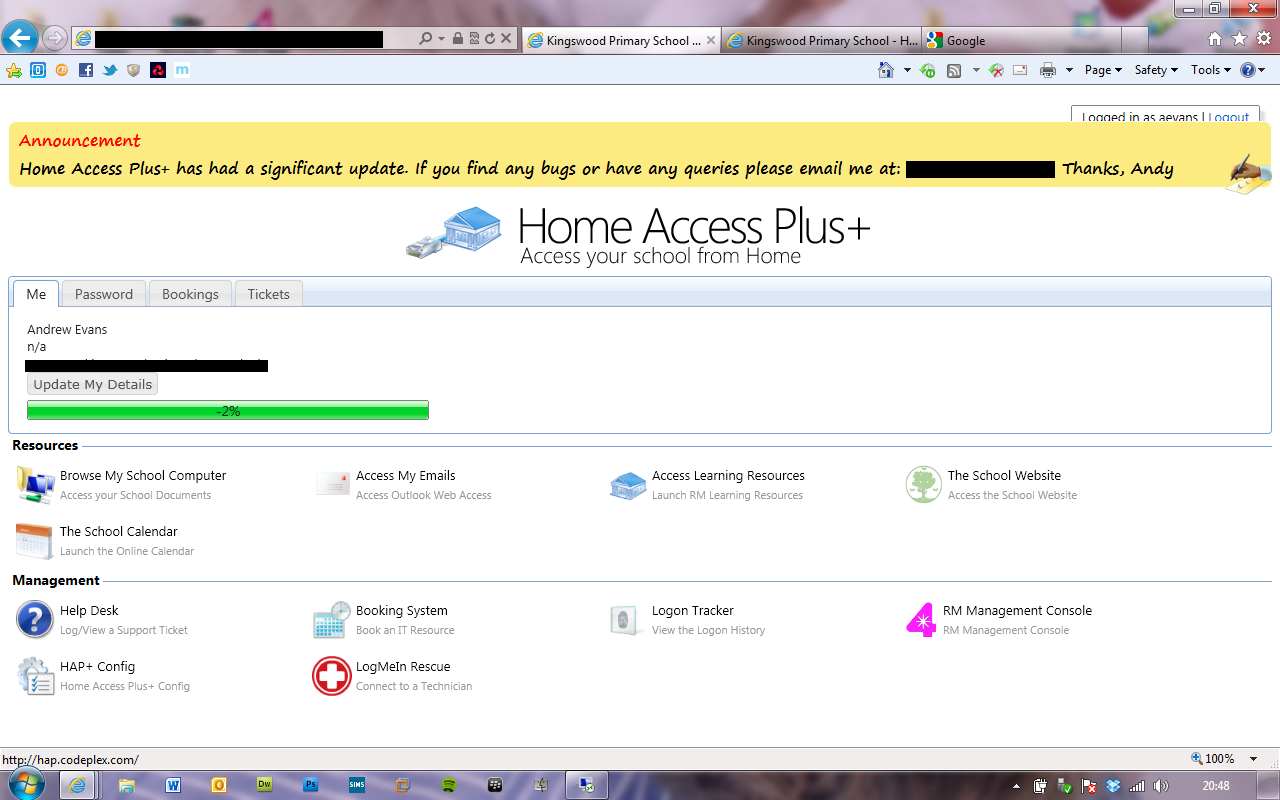
Hi Nick, Underneath my name on the main page, it says 'n/a'. If I click to change the department it doesn't save the info I put in and keeps it as n/a. I've tried changing what is written in the description box within the AD, but this isn't reflected in HAP. Any idea how we can change this? We are a primary school, but it would be nice if teachers could change this. In the AD, the 'description' section says 'Staff Teaching User' for all staff, but HAP doesn't even say this, just 'n/a' Any ideas? Cheers, Andy
-
Home Access Plus v7.1, observations, bugs(?) and queries!
Zebadee replied to mattgrimley's topic in Home Access Plus+
I have the home directory set as the N: but i can't get the initial green bar on the HAP homepage to show a meaningful number. I've tried logging in as non-system admins to see if that was the problem. Should the green bars for other drives in my computer have a percentage figure or should they be completely green? -
I just noticed that any publisher files do not have the publiser icon. HAP also doesn't seem to recognise those particular file types as it just says 'file' underneath the filename, as opposed to 'Microsoft Word 97-2003 Document' underneath a word file. I also copied an Easiteach .png icon file from the old extranet folder so that easiteach documents would show with the correct icon as well, but these also are blank icons (plain sheet of white paper), that just say 'file' underneath the filename. All the files download ok and open in their correct program, it's just the aesthetics from within HAP. Any ideas? Zeb
-
Home Access Plus v7.1, observations, bugs(?) and queries!
Zebadee replied to mattgrimley's topic in Home Access Plus+
When anyone logs on, the green bar that I assume is supposed to show the percentage of drive space left just says '-2'. I think might be becuase I haven't added anything into the quota servers field in the setup.aspx. What info do i need to poulate this with in order for the green bars to be meaningful? Cheers, Zeb -
Home Access Plus v7.1, observations, bugs(?) and queries!
Zebadee replied to mattgrimley's topic in Home Access Plus+
Yeah, I might be wrong but I think this is the forward slash / backward slash error that has cropped up previously. Go to the hapconfig.xml file in the app_data folder and navigate to the bit where your drives are listed. They should read \\servername\share and NOT //servername/share. I think the setup gui kept swapping. Not sure if it's fixed in the latest version Nick has uploaded to the codeplex though. Hope that sorts it for you. -
Home Access Plus v7.1, observations, bugs(?) and queries!
Zebadee replied to mattgrimley's topic in Home Access Plus+
I've put in a redirect on the Extranet virtual directory within IIS to point to the new web address (folders.domainname/HAP). But if i go to the old web address (folders.domainname/Extranet) I still get a dialog box asking for my username and password. When i put them in it then takes me to the new login page for HAP. How can I get the redirect to go straight to the new login page without initially prompting for a username or password? -
Home Access Plus v7.1, observations, bugs(?) and queries!
Zebadee replied to mattgrimley's topic in Home Access Plus+
Hi Nick, Just a couple of things that I've spotted. 1. When i add an announcement, the yellow bar partially covers the 'logged in as... |logout' box in the top right corner of the screen (See screenshot) 2. Low down on the priority list, but the favicon doesn't seem to be picked up in IE (running IE9 on my laptop) A great update Nick, the setup.aspx is a brilliant addition. Will keep testing the other parts of HAP. Andy
-
I had this exact same problem - followed these instructions in another thread on this forum and it solved the problem.
-
Home Access Plus v7.1, observations, bugs(?) and queries!
Zebadee replied to mattgrimley's topic in Home Access Plus+
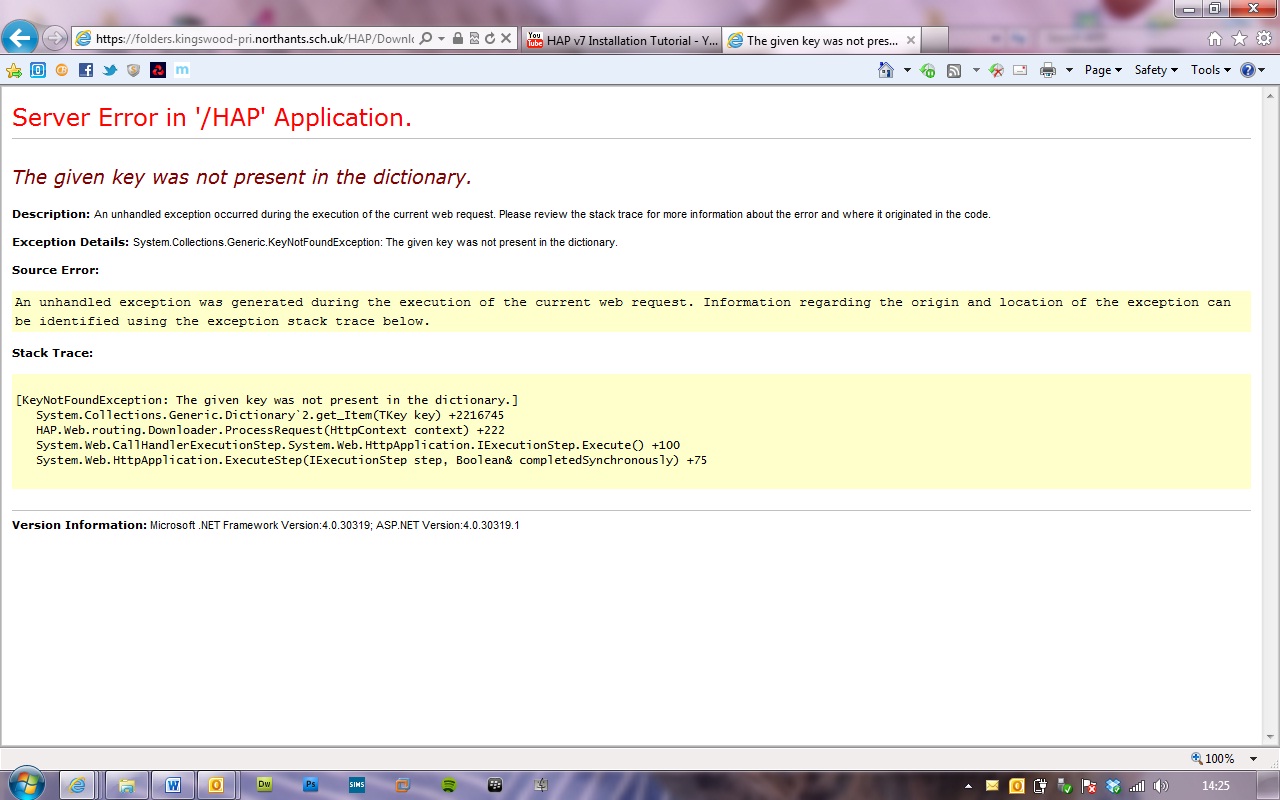
When trying to download any file I get the following error message. EDIT - FIXED. Back slashes instead of forward slashes in unc path (or the other way round!)
-
Home Access Plus v7.1, observations, bugs(?) and queries!
Zebadee replied to mattgrimley's topic in Home Access Plus+
Hi Nick, i've managed to search the AD by deleting the part in the web.config that was mentioned in a previous post on here. Now i'm having a problem trying to delete links. I get a 'bad request' message box. Also when i change the groups from CHS students etc to my own,i click on update, by the groups don't actually update as when i click on the same link, the CHS groups have reappeared. I'm upgrading the server from IE7 to IE8, but wondering if you have any ideas. Running Server 2003 IIS6 Cheers, Andy EDIT: Scrub that, I've edited the xml file manually and it's done the trick. -
LP+ Alternatives
Zebadee replied to synaesthesia's topic in East Midlands Broadband Consortium (EMBC)
Have these letters been sent to Primary Schools as well, because if they have then i haven't received any information. Although looking at who the letters are addressed to, it's not much surprise!! Is it possible for you to send me any of this info please so that i can keep up to speed. I am completely in the dark with regards to costings and what is going to happen. Unfortunately i can't make the IT Managers Meeting next week, Many Thanks, Andy -
We're upgrading to CC4 at Easter and after discussion have decided to go down the 'Fresh install' route rather than migrating our old server's data onto a new server and then upgrading to CC4. Station rebuilds, packages and users i can deal with, my problem is with our admin (sims) server. It's currently set up as a DC on our current domain. Now when Mr RM comes to commission our new server, we will have a new server with a different name and (RM say to avoid certain issues?) a new domain name. How easy is it to set up our admin server as a DC on our new domain? Apart from joining the new domain in System properties, how much messing about needs to be done in AD before i essentially end up with what i've got now, albeit with a different domain name. Many thanks Already having nightmares, and the install is 8 weeks away
-
SUMS - Add user query
Zebadee replied to Zebadee's topic in East Midlands Broadband Consortium (EMBC)
Thanks Tony, Have checked our site settings, and our email address format is actually set to [username]@[domain]. Not sure if their is a glip between what i am seeing on screen, and what is actually happening when i add staff users. I've just created another staff user, who has a very obscure, and probably unique surname, and the username has just been created with 01 stuck on the end. Any help would be much appreciated. Andy - -
Just added a new staff user for the second time. Both times, it created the username and automatically put '01' at the end of the teachers surname. As a result, their email address is: [forename inital][surname][email protected] Prior to SUMS, any staff users we created would just use the inital and surname without a number suffix (providing a user didn't already have the same combination) My question is why SUMS seems to be adding number suffixes to all staff users? If the username hasn't been used already, what is the need for a number suffix? Also, and perhaps I'm being rather vain, it doesn't make for a very nice looking email address!! Is there any way to change this? Any thoughts? Andy -
-
We have a member of staff who has a hotmail plus email account which that have set up in outlook. As it is a 'subscription' account they are able to use pop3 settings to downloads their email: pop3.live.com & smtp.live.com. They say it works fine at home, but at work they can only receive emails, not send emails. The smtp server requires authentication, and the incoming pop3 server has SSL. Anybody got an idea how to configue this to work through embc; fiddled with the outgoing server settings (ie, changing it to smtp.embc.uk.com) but no luck. Cheers Andy
-
Cheers, will do Andy
-
Thanks Guys, I'll have a look at enable, but i may sit tight for a bit until i find out how they're going to migrate the vle & embc. (Sorry, i swore and said the 'm' word!) There's no point me setting everyone up with email via the portal if the lpplus email is going to take precedent, and vice versa. Makes me wonder how we survived without it all; RM login, VLE login, Portal login...and it's all a variation on the same theme!! Next job - ring Synetrix and sort out website. Groundhog Day, me thinks!!
-
We currently have our email provided by RM. This contract ends next week and so i've spoken to Synetrix about moving it over to EMBC and accessing it through them. I just can't seem to find any info about creating email addresses though. I want to be able to create email addresses but not necessarily logins to the portal. Do the two go hand in hand or have i missed something? Searched the portal documents but can't find anything. Cheers, Andy
-
Hi Tony Did you find out anything about the EMBN issues with email? Cheers Andy