xarzu
-
Posts
7 -
Joined
-
Last visited
Content Type
Forums
News
20th
EduGeek EDIT Conference
Blogs
Everything posted by xarzu
-
 Right. I found the "Save As" option. Which created a copy. Then I found the option to turn the flow on, which is also required. Much thanks !!
 -
Is it possible to make Microsoft Flow based on an existing flow by simply copy and pasting the flow or saving it under another name? Is it possible to make Microsoft Flow based on an existing flow by simply copy and pasting the flow or saving it under another name? I want to make a virtually identical Microsoft Flow with the only difference being the destination Microsoft List that I am using as a database. This is a short question. But I think there is not much that needs to be explained. If you need more clarificiation, please let me know. There is a "Save" button but I do not see any "Save As" option.
-
I am having a problem with matching data types in a Microsoft Automated Flow because it seems to ignore the number data type. We have created a successful flow which matches the data that is entered from a jotform UI/UX. Then the flow enters the information successfully into a Microsoft List row. Everything is fine and we tested it with a small amount of the data. Afterwards, I went ahead and started adding files and matching them with the incoming data. The problem is noticed when I started to enter number fields instead of short strings. Look at the screen shot I am including. The values for Total TIme and "Flight time last 12 months" had no corresponding data type and the only difference between these and the other fields is the fact that these two fields are numbers and the others are short strings.

-
How do I launch a flow when a new item is posted on SharePoint? I want to write a flow such that when someone posts an article on SharePoint, a predetermined set of persons are emailed that it has been done. Can someone give me some advice on how to accomplish this? I think the solution should be direct and obvious to those well-versed in Microsoft Automation. I thought I would ask around. I have some experience experimenting with Flows and Microsoft Automate. So I think I can follow directions. I think it would be best to pose this question and then look into educating myself on my own whilst a response is being made from my casting a proverbial net. Here is what I have been told: "Rather than using Power Automate, could you use the built in Alert Me feature. Populate the names to receive it and only notify when “new items are added”. This way you can set it up as immediate or daily summary." This sounds great. Can you direct me to information on this? You say it is a built-in feature. Where is it built in? Is it an App in the family of Apps in SharePoint?
-
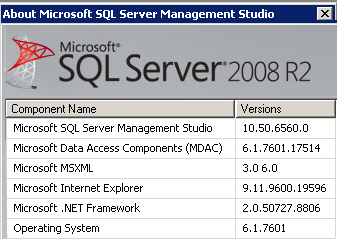
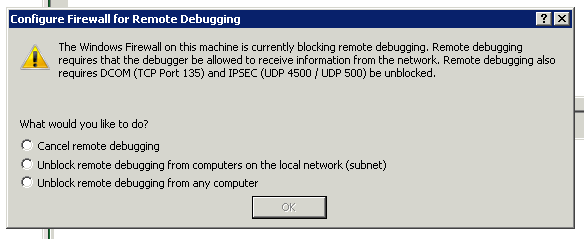
This is working with Sql Server version 2008 R2 Here are the other versions of software that might be helpful: How is remote debugging allowed on Microsoft SQL Management studio? This question might be misunderstood. I am not sitting at the computer where Microsoft SQL Management studio resides and I am attempting to debug a remote database. That is not the issue I am having at all. Instead, I have remoted into a client's server by their request and also I am trying to debug an issue they are having. You see, this is how things are evolving in our world. More and more there are situations where a developer is working from home and has to remote into a client's system do get some work done. When I open up their studio software on their side, if I try to debug or execute a command, I get this error message: I want to be able to instruct them, on their side, what they need to do to make this problem go away. Please advise.
-
You need to have a new group that is not coding and is not web development but just using apps. How do you make the background of an object transparent in Adobe Illustrator? I have been having issues with using the Magic Wand tool in Adobe Illustrator as well as the lasso tool. Basically, I am trying to put a small graphic into a new Illustrator file. The first thing I tried to do is to use the magic wand tool. But I found out that this did not work on a jpeg image since it did not have any individual objects to select. So I tried something new. I opened the file in Adobe Photoshop and used the lasso tool to select an area. Then I coped this area. Then I tried to paste it into Adobe Illustrator. But the background was not transparent for the pasted image. How do I make the background transparent. I made this small video to show what I am talking about: I noticed that the background is a layer in the image I made in photoshop. I tried turning it off or making it invisible, but that did not help. http://i67.photobucket.com/albums/h292/Athono/hidebackground_zps0338ed4b.png http://i67.photobucket.com/albums/h292/Athono/backgroundinphotoshop_zps04ea33fd.png
-
I am trying to go from 32 bit Vista to 64 bit Windows 7. The 32 bit Vista was installed by mistake. My system can handle a 64 bit OS. Now I have finally found the time to upgrade. But the 64 bit intallation DVD can't be read from my OS. Any Advice? I have tried setting up my CMOS so that I can boot from the DVD but I have run into some issues. First of all, when I look at my keyboard during the boot procedure, I noticed that the little light which indicates that one row of buttons are to be used for F1 - F12 keys, the little green led light goes on and off. Sometimes, during the boot process, it is on, sometimes it is off. The CMOS procedure tells me I can hit F12 and set the boot order. I can hit F12 but when I go into that menu, I notice my keyboard is dead. The CPU does not accept any commands from me. So I need to power off and power on and try again. The CMOS procedure tells me I can hit DEL and that launches the whole CMOS utility. There I can set the boot order so that the DVD is run first. But when I save and exit, I notice my keyboard is dead again. This time, the screen is showing things being set and loaded and I am prompted to hit any key to show I am sure that I want to boot from the DVD. I hit the Y key and I hit the spacebar, but it becomes clear that my input is ignored since my keyboard is being ignored. And the ol' Vista OS is loaded. Please advise. Is there any way to set things up in the VISTA OS to force a boot from the DVD? I guess I can load the OS in save mode and format the C drive, but if I do that I might risk having a dead computer since the CMOS does not seem to be trusting enough to boot from the DVD drive even if you tell it to. Microsoft has this page of links: Installing Windows: 7 recommended links And then there is this link: 32-bit and 64-bit Windows: frequently asked questions And the Notes section specifies that I need boot off the DVD drive: "•To install a 64-bit version of Windows 7 on a computer running a 32-bit version of Windows, you'll need to start, or boot, your computer using a 64-bit Windows 7 installation disc or files." So, how do I make this happen? When I completely power off and restart without going through CMOS, it seems to go further. The DVD player spins for a while, but in the end, after a few warning and error messages, it always comes to a point where it seems to prompt me if I am sure I want to boot off the DVD, the keyboard input is not recognized, and I return to my VISTA desktop.