bwestlake
-
Posts
530 -
Joined
-
Last visited
Content Type
Forums
News
20th
EduGeek EDIT Conference
Blogs
Everything posted by bwestlake
-
Computers Randomly loosing GPO Settings
bwestlake replied to bwestlake's topic in Windows Server 2008 R2
its not a profile problem, it does it on all accounts that log on to this computer, it was fine yesterday and this morning just appeared period 2.. quite confusing, ill remove all profiles and have a look then. students H:\ Drive mappes Removing the profiles makes no differance at all. i have also removed it from the domain renamed it re added it and moved it back to the organisational unit and no change.. -
A few computers randomly around the school are loosing their group policy settings, Students are then able to change settings on the local machines which is a big issue.. Before anyone mentions it, Yes Group Policy is applied to these computers and users. but this is the third or fourth machine to randomly do this. When the machine is WDS' it all becomes fine so we have no idea what the problem could be. Help Please, Many Thanks.
-
Username scheam is firstintial.lastname.33161 (eg. b.westlake.33161) using auto hotkey to change the mouse sensitivity user specific: ################################################# Script ################################################# #NoTrayIcon SetEnv User=%username% goto "%User%" "%b.westlake.33161%": DllCall("SystemParametersInfo", Int,113, Int,0, UInt,1, Int,2) exit "%b.westlake.s%": DllCall("SystemParametersInfo", Int,113, Int,0, UInt,20, Int,2) exit ################################################# script is stopped due to "Error: The following variable name contains an illegal charater: "User=b.westlake.33161"" The dots in the username are the illegal character(s), this is called Concatenate, i cant work out / find how to over rule this feature. Help Anyone
-
In the mouse_sensitivity.exe program it has these written in it Win+F1 ::DllCall("SystemParametersInfo", Int,113, Int,0, UInt,14, Int,2) ;normal sensitivity Win+F2 ::DllCall("SystemParametersInfo", Int,113, Int,0, UInt,1, Int,2) ;slow sensitivity Win+F3 ::DllCall("SystemParametersInfo", Int,113, Int,0, UInt,20, Int,2) ;fast sensitivity How would you write these in a script and what type of script would it be?.... I tried using batch files but couldn't get it to perform.
-
Hi all, we have a couple of students who are having difficulty using the mice around the school due to sensitivity. I have found a program that changes the sensitivity if you press a combination of buttons Win+F1 = Normal Sensitivity Win+F2 = Slow Sensitivity Win+F3 = Fast Sensitivity but the problem is when they come to log off this sensitivity will stay and not reset back to normal, this is what i have came up with so far... LOGON.BAT = START \\dc1\NETLOGON\mouse_sensitivity\mouse_sensitivity.exe LOGOFF.BAT = taskkill /IM mouse_sensitivity.exe i need something that will press the two buttons in a script for both logon and logoff
-
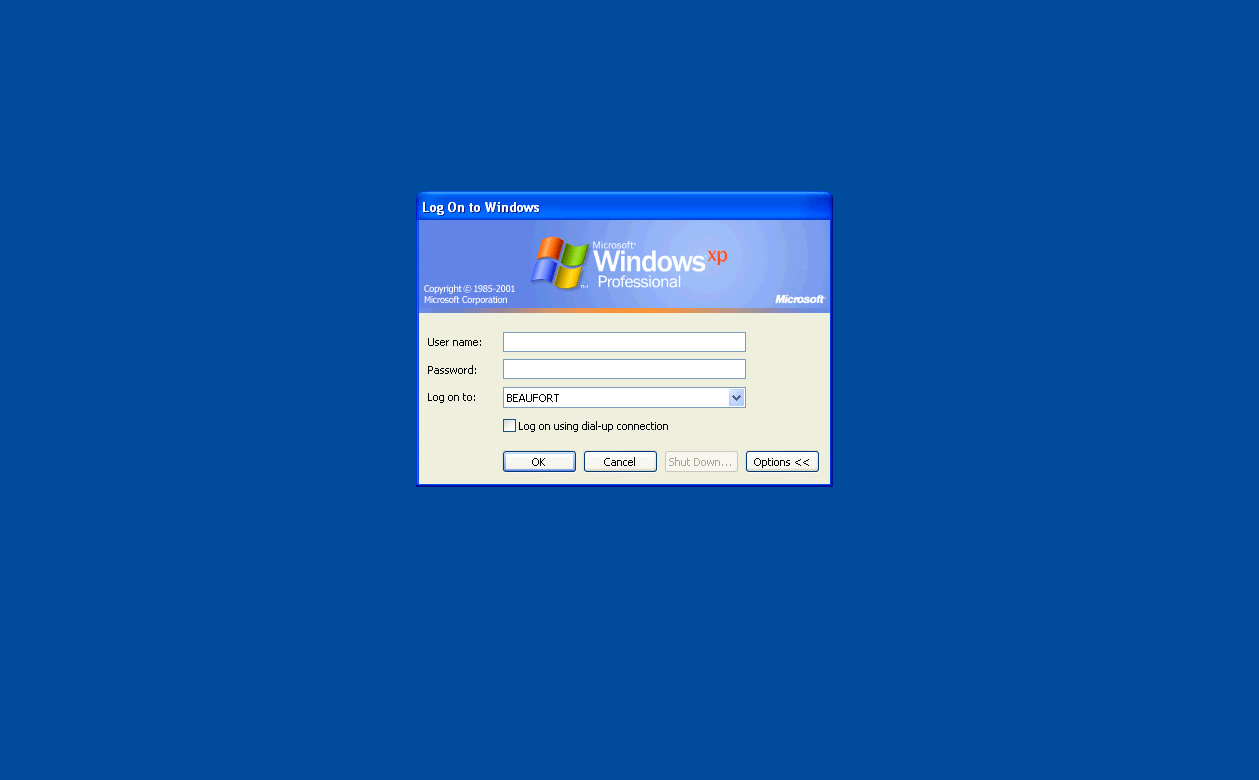
Hi, Were having a little trouble when upgrading a couple of laptops it wont let us click the ShutDown button on the LogOn Screen as it is Gradeout (See Image Below) Its not set in GPO as it only does this on a few machines and we dont have many GPO's

-
Hi, As loads of you have probaly seen... when you use folder redirection on the homeshare as documents it renames the users homeshare to my documents server side, you can still access it by going \\staff\data\%username% but when you look at them it comes up as a continuous list of my document folders, i know you can remove the desktop.ini ... but we dont want it as a logon or logoff script we want it to be a scheduled task.. the batch file i have created at the moment is: ECHO Y | del "\\Staff\Data\desktop.ini" /S /A:H but this deletes all desktop.ini including the ones in the home share for pictures music ect.. i have hurd that you can just changed the permisions on the desktop.ini file to some thing like: FOR /F "tokens=1 delims= " %a in ('dir /b "\\staff\data\"') DO XCACLS "\\staff\data\%a\desktop.ini /D Administrator:R /Y" would this work?