theeggmaster
-
Posts
641 -
Joined
-
Last visited
Content Type
Forums
News
20th
EduGeek EDIT Conference
Blogs
Everything posted by theeggmaster
-
We do everything through our Website and GAFE. Staff and Students get different views and different access to Google Sites. Works seamlessly.
-
The only information I can see is 802.11ac and 5Ghz. Support for proxies or enterprise wireless would be brilliant. I'd love to cast our Chromebooks cheaply.
-
 It also does PC HDMI Mirroring and Airplay in the same unit, as well as having dual radios so your device connects to the Airtame, and you can still access the wireless network/Internet.
 -
I've been keeping an eye on this too - Airtame
-
I definitely would. I've just had an extension built on the back of the house and I installed 10 Cat 5e network points into the extension, going back to an HP Gig switch. It just means rock-solid reliability for my Xbox 360, printer, Raspberry Pi media centre etc. If you're copying large files around then you know that you've got a consistent connection, and frees up the WiFi for Wii U, iPad and Chromecast. I've got powerline adaptors for any devices that are upstairs, and the router is wired directly into the Gig switch too. My EE box has one Gig port, and the rest are 10/100, so I know that there won't be any Internet bottleneck either.
-
You could look at something like the Clevertouch Plus, which has Android built in. You can get Reflector for Android and do the Airplay Mirroring as I mentioned before with AirParrot.
-
If you have a Windows PC connected to the screen, then you could put Reflector 2 onto the PC. That'll take mirroring connections from Android, Chromebooks and iOS devices. Then get a copy of AirParrot on each laptop which will enable them to AirPlay their screens to Reflector 2. That covers you from pretty much any angle/device. *edit* You can get free 7 day trials for the software to see if it works for you
-
Sounds like something more fundamental as our SIMS server is running on 8Gb and it loads in about 20 seconds. Have you got anything else running on the virtual environment? Is it running from local or shared storage? Is the firewall active on the SIMS box? What connectivity is between the machine you're loading SIMS on and the SIMS server? *edit* does the SIMS server have the SIMS workstation client installed directly on it? If so, how long does that take to load?
-
We use Burconix and it's simple, free and works fine for us.
-
Starting Over WITH Virtualisation...
theeggmaster replied to GRitchie's topic in How do you do....it?
I agree with this. We're a medium-sized secondary school, and we have two virtual hosts with 128Gb RAM in them, attached to a SAN and set up for failover. We also have a Microserver which I use for testing, but I wouldn't put anything on it that I would run in production. -
If you've got anti-virus installed on the server, it could be scanning the SQL database when you're accessing it, which you obviously don't want? Have you set up any exceptions to stop it from doing this?
-
Hi all, Can I just say a massive thankyou to everyone who contributed to this thread. It's the first day of our summer break, so I've taken the plunge and demoted the two old DC's. I removed them from the Global Catalogue, had to uninstall certificate services from one DC (it wasn't being used anywhere) and then ran DCPROMO on both servers. I then removed them from DHCP and all seems fine. Logged on over 100 PC's 4 or 5 times and apart from a bit of slowness logging on for a couple, the logon scripts are all processing.
-
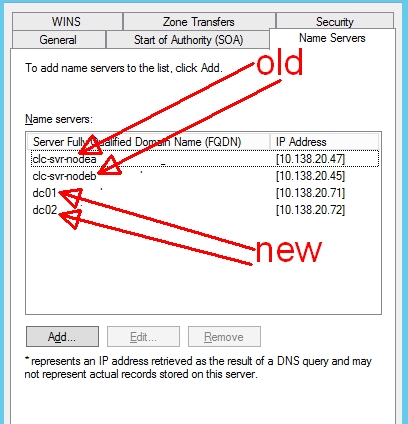
DNS replication seems to be fine and transferring around all of the boxes. The FSMO roles all transferred without a hitch. The 2003 boxes are still Global Catalogue servers in AD. All signs seem to point to me needing to remove them from GC, from DNS, and demote them. We're not pushing any DNS settings through GPO.
-
I have the same as you in zone transfers.
-
Thanks very much. I've been loathe to demote anything until I managed to get logons working when they couldn't contact the problematic old DC. If it's precisely because they can't contact the old DC that is causing the problem, I might have to bite the bullet (in the summer holidays) and demote both old DC's.
-
In Server Options, the new DC's, the old DC's and the server 2000 DC's that preceded those are in as well! I'll clean those up. In Scope Options, the new DC's and the old DC's are in.
-
Here's the broken attachment...

-
Here's a screenshot of the cmd window [ATTACH=CONFIG]30794[/ATTACH]
-
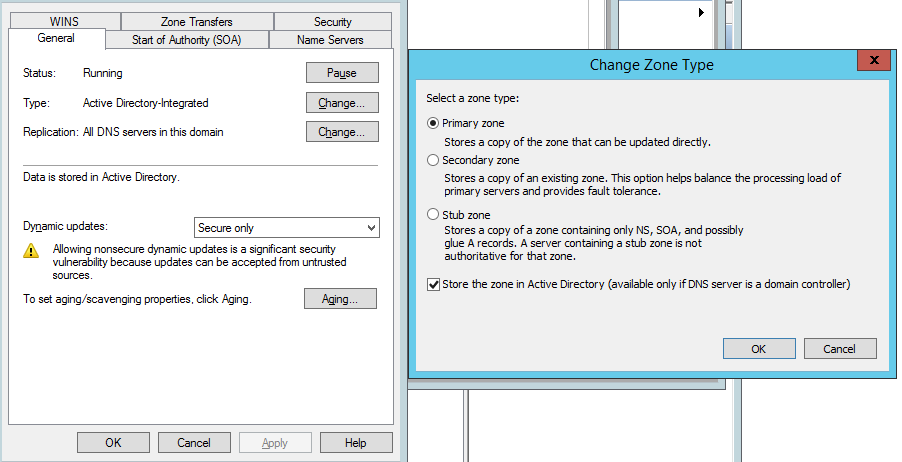
They are set to be AD integrated and to replicate to all DNS servers in our AD domain on the 2003 servers.
-
Everything seems fine apart from: Where I get: The DNS server refused to transfer the zone to your computer. If this is incorrect, check the zone transfer security settings for on the DNS server at IP address . Allow zone transfers is not ticked on DNS
-
@pantscat I've checked through the error logs, and they're either printer driver errors or KDC etype errors because Server 2003 doesn't support the same Kerberos types as Server 2008/2012 (The message is While processing a TGS request for the target server krbtgt/...) Other than those errors, dcdiag is clean on all servers.
-
Definitely virtual. I've used VMWare in the past, but I'm now using Hyper-V on Server 2012 R2 Core and it works brilliantly.
-
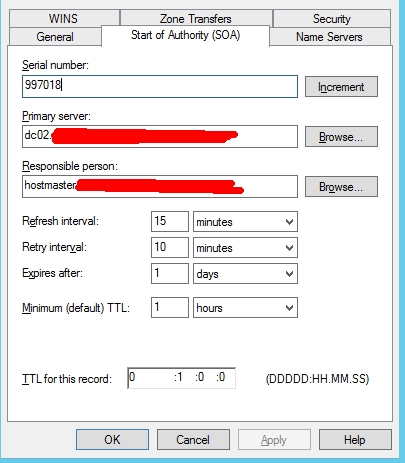
The new DC's are pointing at each other for DNS, not the old servers. By de-promote or remove the master schema, I'm assuming you mean moving all of the FSMO roles? I've transferred them onto the new DC's, but when I run Dsquery * cn=infrastructure,dc=forestdnszones,dc=MY_domain,dc=com –attr fsmoroleowner it shows the old DC as the fsmoroleowner I haven't tried re-joining one of the clients, as some of them are intermittently working and not working.
-
School Asset Finance for IT Equipment
theeggmaster replied to soveryapt's topic in How do you do....it?
Yes, I've spoken with Maxxia in the past and their offering sounded very good. However, our Local Authority has preferred and financially checked leasing companies, so we had to use those instead. We've leased our wireless system over 3 years (which has just come to an end) and I'm currently doing a lease for 30 iMacs due to budget restrictions. I've also ran two parental contribution leasing schemes for mobile devices (iPads, Chromebooks, Android tabs). The companies I've used are Investec and Syscap for the mobile devices, and Siemens for the iMacs.