newpersn
-
Posts
4,403 -
Joined
-
Last visited
Content Type
Forums
News
20th
EduGeek EDIT Conference
Blogs
Everything posted by newpersn
-

Creating DHCP Scope - Scope Parameters are Incorrect
newpersn replied to newpersn's topic in Windows Server 2019
Nope, Cant see it overlapping. For this range i was trying to use /19 -
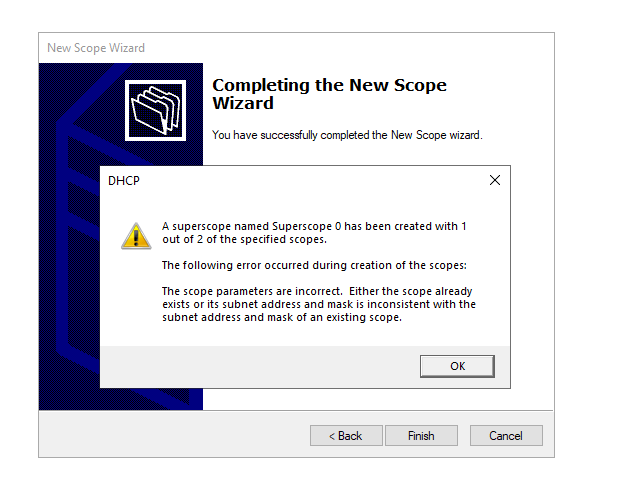
Hello, I'm trying to create a few new DHCP scope ready to move away from SWGFL. Currently have 2 vlans running. x.x.4.0 / 22 x.x.8.0/ 21 When we try and create a new network scope i get a error below - I have tired creating both x.x.20.0-x.x.29.255 and x.x.20.0-x.x.39.254 (we will be creating a few more ranges as we are adding more vLANs Thanks Newp I cant see anything that would be using that scope.

-
Unable to create Dynamic Membership Rule (Intune)
newpersn replied to newpersn's topic in Cloud Services
Thank you - That worked, Missing the space Something so simple... -
Hello. Trying to create a dynamic membership rule in Intune When i try and validate the rule i get a question mark and also errors when i try and save the group. Comes up with "Unable to complete due to service connection error. Please try again later" Am i doing something wrong? - Please point me in the right direction..
-
Hi Michael, Dynamic Channel and Power are turned on. - See screenshots below. I saw this - I was thinking of turning it on. We only use open on our Visitors WIFI (they get a code from reception) so that shouldn't be a issue)
-
Hello, We have had a few reports of this so i thought i would ask now.. We use a mix of Cambium XE3-4 and XV3-8 around the school. We try and keep one area to one type of AP and other parts to the other AP, We do have 2 of the same AP's in large study centre's. We have noticed that the WIFI doesn't like handing over to other AP's (Either the same type or the other model) - Can take a minute for the devices to connect back to the WIFI. We do nearly have a AP in each room so it shouldn't be a connection issue. Is there anything that can be done in the settings for the handover?
-
Hello, Just been asked to post this by our Digital lead. Did you do a DPA against AI Platforms that you use? Based on this, Which ones do you use and which ones do you not use due to the DPA?
-
Hello Just been asked a question regarding downtime settings and i cant see anything jumping out at me. Can you set downtime restrictions via Intune or Senso? Ideally set at individual basis rather than a whole year group. Like - Cant login to the laptop between 9pm and 8am? Thanks Newp
-
And bad_address has returned. Back to the drawing board. its also effecting our main vLAN now.
-
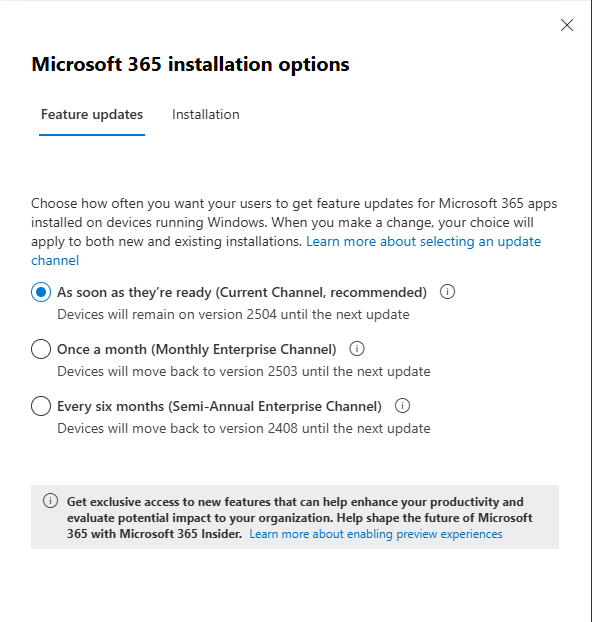
Don't think so - That's all i have set that i can find. Interestingly: Be interested to know where the Monthly Enterprise Channels as i thought i have moved everything back to Current channel via GPO...
-
Hello We have just spotted that our computers have Office 365 installed but all have different versions installed. Some have 24xx and some have 25xx. Is there a way we can manage this without? Group policy is setup like this: And Office 365 Could anyone share there settings?
-
I have just changed the vLAN for our vistors SSID as it was set to the BYOD, (Not sure who set that and how long it been on it) and checked a few switches in case of any rogue. Not had any Bad address within the last 20 mins. (Fingers crossed it was a Rouge AP.)
-
We haven't spotted anything plugged in, But this VLAN is byod network which is broadcasted over the wireless network
-
Hello Got a strange issue that is effecting one of out VLANS, Since Tuesday we been getting spammed with BAD Address in DCHP. We have tired removing failover between the 2 dc's and nothing has changed. Rebooted both DC's just in case its a software bug, Currently looking at Wireshark but no having much luck with trying to filter to see where its coming from. Any ideas?
-
Ok - Mini update, New users logging on to the computer S drive will map fine. Users that have already been logged on to - Wont map. Until gpupdate /force is ran, and its fine until the next time the users logged in. I have added a delete "S drive" in the drive mappings in first and map S drive in second. I am tempted to change the connect.ini to point to UNC until i wipe computers.
-
Nothing extra is set via GP. Nothing jumping out when gpresult - All looks corrects on the computer i just tested with.
-
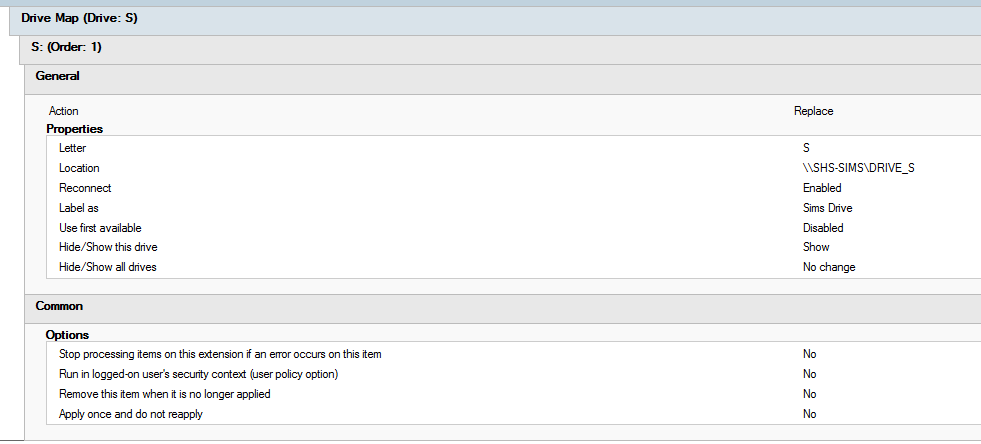
Hello, Weird one here. We have just replaced our Sims server and its got a new name. (We map the S drive to Sims server) We have updated group policy for it to update/replace and its not applying automatically. (Both DC's are fine and replicating without any issues) - Even created a new policy with just that drive map and its still not working. When we force a client pc to update it will apply the network drive but wont apply when they log on. Is there something missing somewhere? Thanks Newp
-
We are hosted though pbxhosting, and looks like we was migrated last night to a new IP address.... and RM/SWGFL have blocked it. We are half back up and running (Internal calls, and external calls are working but unable to dial out....) Roll on when we move away from RM/SWGFL and get more control over things like these...
-
Interesting - Phones are missing off the phone part of the admin panel, Trunk was showing as down this morning - but now showing a green tick, Under voice and chat - SBC is showing Red but everything else is Green.
-
Anyone with 3CX phone system having issues? Come in this morning to our phones down. Rebooted the SBC server but still nothing.
-
We was looking at VSX for the 2 core switches. Looking at our current core now - we have firewall rules between main and BYOD Network (DNS,Print Server, Papercut Webprint) NAT Rule - Masquerade from BYOD That's all i can see that's being used.
-
We are nearly ready to purchase our replacement core switches. We have a virtual RouterOS core currently and often plays up. (Have to virtualy turn it off and back on again before it will start passing traffic.) We also do have the SWGfL router as well. (Yes, previously, the team had this setup.) Virtual core x.x.4.1 Swgfl core x.x.7.254 2 vlans being used as well 1 using the grids range BYOD range x.x.8.0/21 which is routed though the virtual core to go out on 7.254 Also, we would be looking at adding more vlans once we change the Internet provider. We are also looking at moving away from SWGfL for internet/filtering, but this is another topic for another day. Back on topic. We are looking at 2x Aruba CX 6300M 24-Port SFP+ JL658A and stacking them. My question: How easy is it to configure these switches? We were looking to get some external help to install and configure these switches but seeing how simple or hard it is to do this ourselves. Hope this makes sense. (No sarcastic comments, please. 😂)
-
Funny - We are on the same one (23.0.7) Being upgraded during half term...
-
That's the only thing i haven't tried is to reboot the print server as only one copier is effected. I will reboot later on and test again. I will log it with Konica and updated.
-
Web interface works fine - Can log in and checked against another photocopier and cant see any difference between them. It seemed to to have changed overnight. Fine one day - broken the next? Thanks