-
Posts
104 -
Joined
-
Last visited
Content Type
Forums
News
20th
EduGeek EDIT Conference
Blogs
Everything posted by garbage46
-
Hi all, I’m heading to BETT next week (Wednesday 21st and Thursday 22nd) and wanted to see if anyone else working with Power BI and MIS data would be up for a quick meet-up. I’m currently building dashboards and reports using Report Builder and Bromcom’s OData/API feeds. I’d love to grab a coffee (or a beer) with anyone doing similar work to share ideas, compare notes on OData/API quirks, and see what others are achieving in this space. If you’re going to be there and fancy a 20-minute chat let me know below or drop me a DM. Cheers, Pete
-
 https://www.fcat.org.uk/job-vacancies/trust-it-technician-2 Join Team FCAT - We are looking to appoint a Trust IT Technician to support the excellent delivery of our IT support service. This role will be focused on providing support across the 5 primary schools of FCAT, however you will be required to provide support to other academies or the central services of the trust. FCAT is a large Multi Academy Trust with 10 academies (primary, secondary and all-through schools) and our central services team, located in Lancashire, England - we are committed to promoting excellence in teaching, learning and leadership. Our website will share more information with you www.fcat.org.uk You will be part of the central IT Team, working with the Trust IT Operations Manager and FCAT Lead in Data and IT to provide an effective, efficient and successful IT support service, resolving IT issues to ensure that our staff are able to work and our pupils are able to learn. You will also be part of FCAT’s wider IT support team of 8 technical support staff based in our secondary and all-through academies. This wider network will provide opportunities for additional support, sharing of knowledge, learning from more experienced team members and collaboration on projects.
 -
[bromcom] Query re importing data into Google Sheets
garbage46 replied to CarterUSM's topic in MIS Systems
const sheetName = "Sheet1"; // replace with sheet/tab name const rptLiveUrl = "LIVE_FEED_URL"; // replace with report Live Feed URL const schoolID = "12345"; // replace with Bromcom 5 digit School ID const userAccessKey = "U5ER-ACC355-K3Y-G0E5H3R3"; // replace with your Bromcom User Access Key from My Account function letsGo() { populateSheetWithCSV( SpreadsheetApp.getActiveSpreadsheet().getSheetByName(sheetName), rptLiveUrl, schoolID, userAccessKey ); } function populateSheetWithCSV(sheet, csvUrl, user, pw) { var resp = UrlFetchApp.fetch(csvUrl, { headers: { // use basic auth Authorization: "Basic " + Utilities.base64Encode(user + ":" + pw, Utilities.Charset.UTF_8), }, }); var doc = XmlService.parse(resp); var data = doc.getRootElement().getAllContent(); var dataRows = []; var maxLength = 0; for (var j = 0; j < data.length - 1; j++) { var length = data[j].getValue().trim().split("\n").length; if (maxLength < length) { maxLength = length; } } // Get all the data into a 2D Array for (var i = 0; i < data.length - 1; i++) { var dataContent = data[i].getValue().trim().split("\n"); if (dataContent.length > 1) { dataContent = dataContent.map((s) => s.trim()); if (dataContent.length < maxLength) { var diff = maxLength - dataContent.length; for (var k = 0; k < diff; k++) { dataContent.unshift(""); } } dataRows.push(dataContent); } } // clear existing data leaving the Header Row intact var columnToCheck = sheet.getLastRow(); if (columnToCheck > 5) { sheet.deleteRows(2, columnToCheck - 1); } // set the values in the sheet starting with row 2 so the coloumn headers are left untouched sheet.getRange(2, 1, dataRows.length, maxLength).setValues(dataRows); } -
[bromcom] Query re importing data into Google Sheets
garbage46 replied to CarterUSM's topic in MIS Systems
I can help with this. You are looking at the wrong menu. Check for Apps Script under the Extensions menu To help further I have rewritten to Google Apps script they provide. I also have a script to pull from the API into Google Sheets. -
You're welcome. Another tip, first you should go through the manual export data process for student attendances so you have a template csv and data structure to work with.
-
Yes! It's one of those features that's right in front of you, hidden in plain sight in what I have come to label as the "implemented by a developer who does work in education" features of Bromcom. In the student modules, you can select one, many or all students then from the actions menu select manual data import From here you can select a CSV with your data to import. IMPORTANT: Be sure to remove the tick from the "Exclude following characters from whole document (& ( ) % | / \ ^)" option. This is ticked by default but includes the two most important attendance marks On the next screen you can choose "Student Attendances" from the data destination. Now you map the columns from your CSV to the fields in Bromcom. See images →

-
SIMS to Bromcom routines pre migration- Checking and Cleansing?
garbage46 replied to William1's topic in MIS Systems
If you don't have them start collecting email addresses for those with parental responsibility. For those that you do have, make sure they're linked to the correct contact record and not the pupil record. As mentioned above this will be worthwhile for MCAS. Make a note of your UDFs and any unsual fields you use in SIMS. We have a few schools that store contact date of birth, not sure why, but that isn't a field in Bromcom so we needed to create a UDF. I used the API to bulk import these. If you're that way inclined I recommended getting connected with the API for extracting and POSTing data. Our biggest issue is enrolment history. It wasn't included in the migration and we have lots of managed moves across our LA. It's still a bit a mess we need to unpick. -
I am reluctant to say it out loud, but Bromcom now appears to be more responsive and faster than we've ever experienced
-
Has anyone successfully found a way to import a csv of attendance data into Bromcom? We're looking at up to 5 days of registers to import for 5 high schools I have access to the API but there are lots of additional fields I can't find such as calendarID, collectionID, calendarModelID, calendarStartDate and so on. thanks
-
Our SIMS agreements end on 31st March 2024. We are moving to Bromcom. Our timetabler would like to continue using Nova-T6 at least until the new timetable in Bromcom is fully released. Does anyone know of there is any sort of license requirement to use NOVA T Satellite as a standalone product with no link or connection to SIMS?
-
What do you guys use in your schools for checking whether families are eligible for free school meals?
-
not quite national news,
-
Ignore this. I used my initiative, picked up the phone and actually called Wonde.
-
Hi all, I am looking for suggestions or recommendations for a school wide sound system to be used for an emergency lockdown alarm, similar to the fire alarm system. The existing fire alarm system can only output one sound, the evacuate the building sound. We need to broadcast a "stay in the classroom and lock the doors" sound. The only suggestion we have so far is one the systems listed here, but that seems pricey for a primary school. https://audioinstallations.co.uk/audio/commercial-audio-systems/background-music-systems/school-lockdown-systems/
-
As mentioned above, definitely check out Data Studio / Looker Studio. It's not are feature rich as Power BI, but they're adding new features on a regular basis. If you are a Goolge school you can control access and sharing in the same way as any other Google Doc / Sheet. Data sources as Google Sheets can really effective, when linked to an daily scheduled MIS report output to CSV. MIS CSV Report save output to a Google Drive share. Google Sheet with AppsScript to update content from CSV hourly/daily etc. Import by filename: function importCSVFromGoogleDrive() { var file = DriveApp.getFilesByName("ReportData.csv").next(); var csvData = Utilities.parseCsv(file.getBlob().getDataAsString()); var sheet = SpreadsheetApp.getActiveSheet(); var columnToCheck = sheet.getLastRow(); Logger.log(columnToCheck); if(columnToCheck > 5) { sheet.deleteRows(2, columnToCheck-1); } sheet.getRange(1, 1, csvData.length, csvData[0].length).setValues(csvData); } Import by File ID function import_htrCohortSummaryChart_Sum23() { var spreadsheet = SpreadsheetApp.getActiveSpreadsheet(); var sheet = spreadsheet.getSheetByName("Cohort Summary Summer"); sheet.getRange('A1').activate(); var file = DriveApp.getFileById('foo123bar456'); var csvData = Utilities.parseCsv(file.getBlob().getDataAsString()); var sheet = SpreadsheetApp.getActiveSheet(); var columnToCheck = sheet.getLastRow(); Logger.log(columnToCheck); // if (columnToCheck > 5) { // sheet.deleteRows(2, columnToCheck - 1); // } sheet.getRange(1, 1, csvData.length, csvData[0].length).setValues(csvData); }
-
Sixth form requests for info?
garbage46 replied to jpryan's topic in Data Protection & Information Handling
There is a statutory guidance from the Department for Education which supports/encourages data sharing to careers guidance and monitoring FE and employment with training although the emphasis is clearly focussed on LA's, other public bodies are mentioned. I have doubled checked the wording in our agreement document in relation to the points raised by FN-GM: Sharing is only "for pupils who are leavers and have either enrolled at FE Provider or have confirmed their place to start at FE Provider within the next few months." There is a legal expectation that young people under 18 are in formal education or employment with training. In our context data sharing is justified as it is intended facilitate a collaborative approach to the support young people in our local area and optimise their educational opportunities. https://assets.publishing.service.gov.uk/government/uploads/system/uploads/attachment_data/file/1127489/Careers_guidance_and_access_for_education_and_training_providers_.pdf https://assets.publishing.service.gov.uk/government/uploads/system/uploads/attachment_data/file/561546/Participation-of-young-people-in-education-employment-or-training.pdf -
Sixth form requests for info?
garbage46 replied to jpryan's topic in Data Protection & Information Handling
I am DPO for our MAT. We have a specific data sharing agreement with the local FE providers. This outlines the what and why (reasons) for sharing. I also checked to ensure the data shared wouldn't negatively affect any individuals enrolment/application. They generally want the information to ensure they can put the right support in place for students who have applied for courses. Worth noting, only share personal data of students who have applied to the FE provider, do not send personal data on all students. -
Cloud MIS and SISRA (x-post from Data Managers Forum)
garbage46 replied to garbage46's topic in MIS Systems
There is a groups section of EduGeek. Not sure how I managed to find it. Try this link Groups - EduGeek.net -
We're looking at moving away from SIMS next year. Leading contenders are the usual suspects. SISRA contract is up for renewal - 3 year renewal. Anyone here experienced enough with the newer MIS providers to give advice on whether SISRA is needed for KS4 performance analysis? SISRA is a great tool, but could become an unnecessary expense if we have the same functionality out of the box with a SIMS alternative.
-
We're looking at moving away from SIMS next year. Leading contenders are the usual suspects. SISRA contract is up for renewal - 3 year renewal. Anyone here experienced enough with the newer MIS providers to give advice on whether SISRA is needed for KS4 performance analysis? SISRA is a great tool, but could become an unnecessary expense if we have the same functionality out of the box with a SIMS alternative.
-
I have just started conversations with Everything ICT to support our MIS procurement process. I have been impressed with their guidance and resources so far. Check out the gov.uk Find a DfE approved framework for your school tool
-
[sims] Adjudicator's decision - application accepted - what next?
garbage46 posted a topic in MIS Systems
On Friday 31st March I received an email from [email protected] stating: Question for those have have received a similar application accepted email: did you receive anything more than this? Seems like we should have something more substantial or official than a short email. -
Google Apps Script - Send email based on cell word
garbage46 replied to timbo343's topic in How do you do....it?
@timbo343 this is why your existing code only works for one or the other sections of Starters or Leaver. The IF statement ending with return. -
Google Apps Script - Send email based on cell word
garbage46 replied to timbo343's topic in How do you do....it?
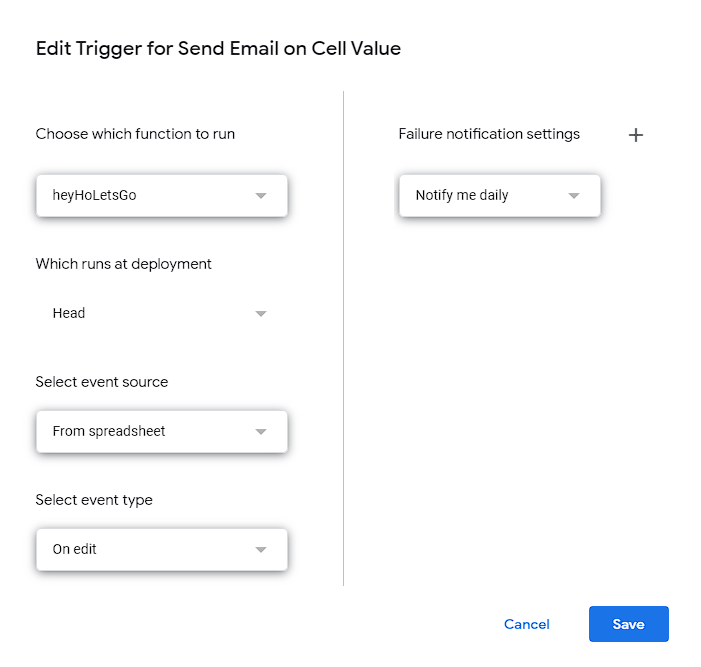
I guess a crucial step is also creating the "on edit" trigger to run the heyHoLetsGo function
-
Google Apps Script - Send email based on cell word
garbage46 replied to timbo343's topic in How do you do....it?
OK, that video helps clarify what you are trying to achieve. You want to copy the video and have code which does the following: Trigger the script each and every time there is an edit anywhere in the entire Google Sheet. Check the column of the edit is Column I (9) AND the edited cell value is equal to "Starter" OR "Leaver". Send an email to alert selected recipients of a new starter/leaver is the above criteria is met. This script doesn't care what the name of the sheet (tab) is or how many sheets there are. The sheet name is included as part of the event (e). The code snippet below returns edited sheet name to the variable currentTab as it is simply the active sheet at the time of the edit. var activeSheet = SpreadsheetApp.getActiveSheet(); var currentTab = activeSheet.getName(); This script relies on checking column I which is referenced in the script as either: e.range.columnStart == 9 (9 here because rows/cols start at 1) or data[8] (8 here because arrays start at 0) At this stage, to keep the IF check simple, the Starter/Leaver column on all sheets must be the same column for this script. function heyHoLetsGo(e) { // Check if edit was made in column I and contains keyword Starter or Leaver if (e.range.columnStart == 9 && e.value == 'Starter' || e.value == 'Leaver') { var data = e.source.getActiveSheet().getRange(e.range.rowStart, 1, 1, 15).getValues(); var activeSheet = SpreadsheetApp.getActiveSheet(); var currentTab = activeSheet.getName(); Logger.log("Sending email") // for debug sendEmailNotification(currentTab, data[0]); } else { Logger.log(e.value + " is not a valid trigger") // for debug } } function sendEmailNotification(currentTab, data) { var surname = data[0]; var forename = data[1]; var startDate = Utilities.formatDate(data[4], "GMT+1", "dd/MM/yyyy"); var subject = ''; var message = ''; if (data[8] == 'Starter') { var subject = 'New Student Starter'; var message = 'Hello, \n\nStudent ' + forename + ' ' + surname + ' is due to start at the school on ' + startDate + '. \n\nPlease see this document to perform your update: https://docs.google.com/spreadsheets/d/.......'; } if (data[8] == 'Leaver') { var subject = 'New Student Leaver'; var message = 'Hello, \n\nStudent ' + forename + ' ' + surname + ' is due to leave school on ' + startDate + '. \n\nPlease see this document to perform your update: https://docs.google.com/spreadsheets/d/.......'; } // MailApp.sendEmail('[email protected]', subject, message); // MailApp.sendEmail('[email protected]', subject, message); // MailApp.sendEmail('[email protected]', subject, message); /** Below print email to the executions logs for debug */ Logger.log("Subject:" + subject); Logger.log("Body:" + message); } You will need to uncomment and add the email addresses for email to actually send once testing is completed. NOTE: This script will run every time there is a change and could fail when changing cells in quick succession if the script hasn't finished running from a previous trigger.