pbaddhan
-
Posts
15 -
Joined
-
Last visited
About pbaddhan

-
Thanks Chris! I did what you suggested and fog is working anywhere on the network now.
-
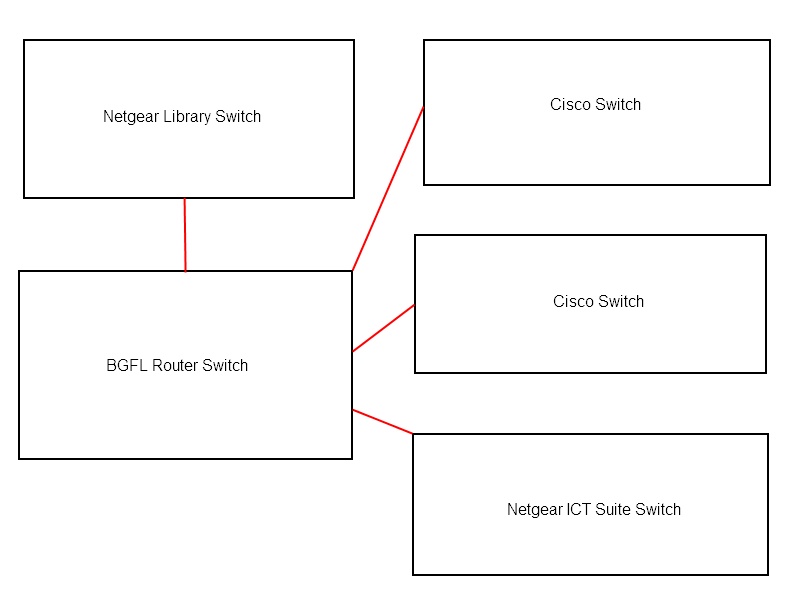
I have installed Fog 0.31 on a laptop using Ubuntu. I am having a strange problem with fog. If the fog server is connected to the network switch in the ICT Suite then I can only image PCs connected to that switch. If the fog server is connected to the library network switch, then I can only image PCs that are connected to the library network switch. If the fog server is connected to the ICT Suite network switch and I select quick host registration and inventory from the PXE boot from a library PC then the process freezes when loading the bzimage. I don’t have any problems when using Symantec Ghost to pxe boot or imaging PCs on any part of the network. Does anyone have any ideas? I have attached a basic image of the current network switch setup if that helps.

-
Thanks Scott_Serco and ChrisJ. It turns out that the eSchools.xml soapwsdl section of the file was not configured correctly. https://127.0.0.1/API/services/WebService?wsdl - old configuration https://127.0.0.1:8443/API/services/WebService?wsdl - new/working configuration
-
The loopback address is already in the API.XML file as shown below:- When I go to https://127.0.0.1/API/services/WebService I get the following message:- Server Error 500 - Internal server error. There is a problem with the resource you are looking for, and it cannot be displayed. When I go to https://127.0.0.1:8443/API/services/WebService I get the following message:- The website cannot display the page HTTP 500 Most likely causes: •The website is under maintenance. •The website has a programming error. What you can try: Refresh the page. Go back to the previous page. I assume IIS has been installed with the default setup by Link2ICT. My knowledge of IIS is pretty much non-existent.
-
Sorry, Scott_Serco I still need more help it looks like something is still not working with the API. I have been advised by eSchools that the following URLs below should be working and I get a HTTP 500 error when I click on the URLs on the admin server. Any ideas as to what the problem is and a potential fix. https://127.0.0.1:80/API/services/WebService http://127.0.0.1:8080/API/services/WebService
-
Thanks alot Scott_Serco. It's working now! I can't believe the fix was something so simple. I have been trying to get the Facility Connect API to work for weeks. Your a life saver! Finally the eSchools learning platform can be installed and I can get the Teachers and SMT of my back.
-
I am having problems getting the Facility Connect API to work with the eSchools learning platform. I have updated the api.xml with the settings that were given to me by the eSchools learning platform and I keep getting the 404 error message. The api.xml settings have been checked and are correct. Can anyone help me to resolve this problem as Link2ict do not offer any support on this?
-
Windows 7 Pro to Windows XP Pro downgrade help!
pbaddhan replied to pbaddhan's topic in Licensing Questions
Thanks for the quick replies! I am on the case now! -
Windows 7 Pro to Windows XP Pro downgrade help!
pbaddhan replied to pbaddhan's topic in Licensing Questions
There was no Dell Windows XP Re-installation CD in the box. -
The School has purchased 16 Dell Optiplex 380 PCs and all of them have come with Windows 7 Pro preinstalled. I would like to install Windows XP Pro as part of the downgrade program. I already have a Windows XP Pro OEM CD Media, but how do I get the product for Windows XP Pro? Do I need to contact Dell or Microsoft? Also no Windows XP Pro downgrade disc was provided by Dell.
-
Password protect a folder within a shared folder
pbaddhan replied to pbaddhan's topic in Windows Server 2000/2003
Thanks for the quick replies and the advice. -
Password protect a folder within a shared folder
pbaddhan posted a topic in Windows Server 2000/2003
Basically the school has a shared folder called staffcommon, which only staff can access, and within the staffcommon shared folder there is another folder called sen, which has all the sen data stored in it. Due to Data Protection I need to do the following:- 1) Audit which user is changing files/accessing the sen folder 2) Put a password on the folder or make it so that users have to enter their login credentials to access the sen folder everytime they try to access the folder. Is it possible to do the above? -
Zimbra Email BGFL?
pbaddhan replied to mtdmitchell's topic in West Midlands Regional Broadband Consortium (WMnet)
I have been sent the email account info for pupils and staff. I am still looking on how to implement the email addresses for pupils as they are complicated to remember. The only method that I have come up with is to create a txt file and copy the email address into the txt file and save the file in each pupils home drive. Then use bginfo to display the email address when the pupil logs in. I have not started this as it would take forever to do and I don't know if there is an esafety issue about displaying a pupils email address on the screen, while they are logged in? Any thoughts/ideas or suggestions would be welcome. -
Dinner Time? What's that?
-
Primary School 470 pupils 50 staff Tempus network with 110 workstations including admin and laptops 13 whiteboards and 15 projectors 1 admin server (win2k3) 1 curriculum server (win2k3 r2) joomla, moodle, zimbra, bgfl plus 1 Technician, ME!!! (5+ Years) It helps a lot if the staff have a basic understanding of IT. Most staff here are scared of IT and come running even if a simple error message appears on their computer. Some staff are patient with IT fixes, other staff want it done ASAP! So in my experience it depends on the staff at the School. Parminder