J-14P
-
Posts
29 -
Joined
-
Last visited
About J-14P

-
FYI this is now broken again with KB5129241.
-
So far only Fargo DTC4500e card printers. Annoyingly while we are still enrolling. But most of our printers are MFDs through papercut, they are not affected.
-
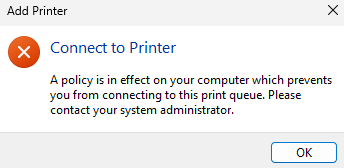
Yesterday our computers installed KB5124008. Now they won't map any network printers, manually or through GPO. The drivers are pre-installed locally and the printers are mapped through GPO to a print server. When we try and map, we get an error stating a policy is in place preventing it. No GPO changes. Uninstalling the update fixes the issue. Anyone else being affected? I can't see anything from Microsoft to suggest this is an expected change?

-

Fusion 360 - removal of Streamer deployment for Labs
J-14P replied to dan400007's topic in Educational Software
Thank god, the Fusion admin installer was so much worse than the custom install method. -
I agree, not ideal I don't like doing reg tweaks but as usual will probably take a while for it to be included as a policy.. if it ever is... (Looking at you start menu alignment)
-
I couldn't get the gpo to force list to work, so it seems setting reg key "AllAppsViewMode" to 2 in "HKEY_CURRENT_USER\Software\Microsoft\Windows\CurrentVersion\Start" seems to set start menu to "list" mode, the user can set it back themselves. I'm just applying on logon through gp.
-
I think it used to save to WindowsApps, but now changed to AppData according to online?
-
Education Edition is a modified Bedrock version iirc, so it would make sense it saves the same way. That would explain the 2Gb file sizes, as Minecraft saves can get pretty large the more you explore.
-
We had this exact same problem, you can store them on a network if you use a symbolic link (not supported and a dodgy method) but the speed just makes it impossible to use. It works from an IT point of view, but for a user it's terrible. We ended up buying all the creative arts students a 1TB external drive.
-
How strange, not sure why it never worked for me? Didn't have many shortcuts so not an issue.
-
I had the issue from day 1 of Windows 11 testing, so not sure why it is only affecting you now.
-
Are the icons being sourced from the network? iirc Windows 11 doesn't allow shortcuts to have icons sourced from a network location anymore. I had some issues with this and ended up having to have a GPO that copies the shortcuts from the network on logon to the local drive. Think there was possibly a GPO to allow it to work again.
-
25H2 - New GPO to remove MS default apps from system
J-14P replied to TheRobins's topic in Windows 11
I tried this, and couldn't get it to work. -
25H2 - New GPO to remove MS default apps from system
J-14P replied to TheRobins's topic in Windows 11
Trust me I have tried 😅 We don't have synced OneDrive, we're mostly on-prem still. As far as I understand the OneDrive apps requires C:\ drive access, which we don't allow. I think we also have a legacy GPO laying around blocking it for regular users. -
25H2 - New GPO to remove MS default apps from system
J-14P replied to TheRobins's topic in Windows 11
I have tried to push for it but there isn't much buy in from the top.