johnfermor
-
Posts
39 -
Joined
-
Last visited
About johnfermor

-
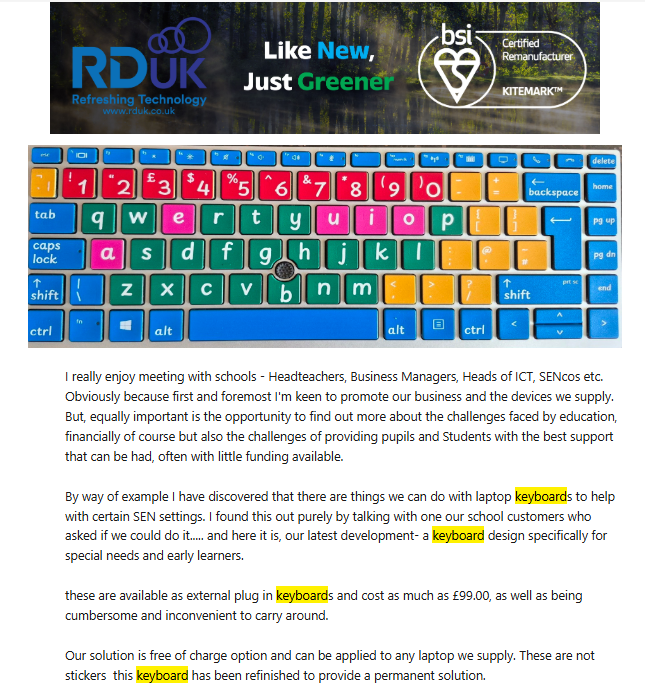
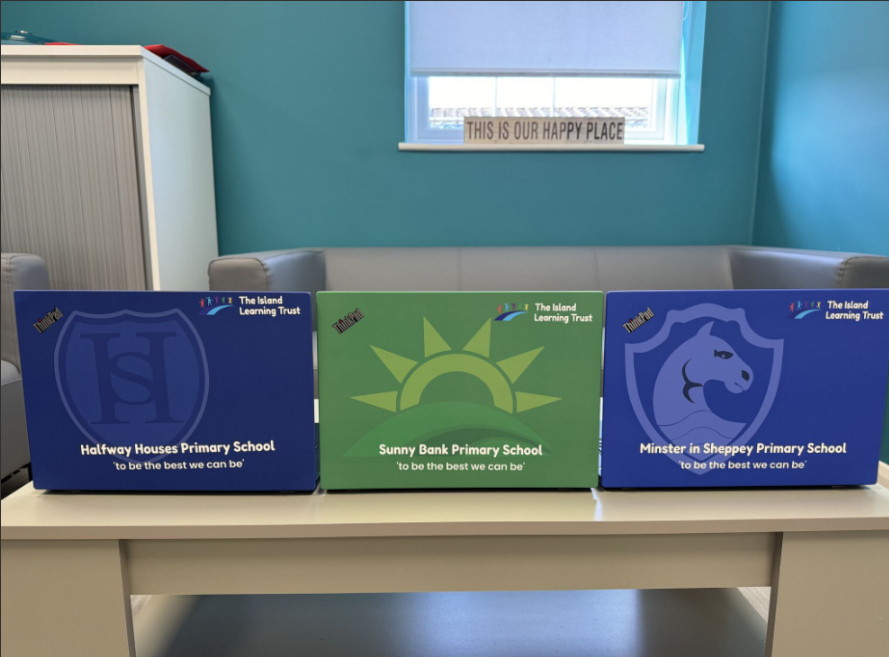
Sounds ideal then. They are also happy to drop in with a (your school-branded) laptop sample or two so you can actually see what the quality is like. Also, a choice of laptop keyboard (normal or dyslexic) at no extra cost. A good local company with a real feeling for what schools need. Here's an example ..

-
We've had many dealings with RDUK in Kent. https://www.rduk.co.uk/ They provide remanufactured desktops and laptops and provide generous warranties. Their laptop branding is fantastic too (no cost!).
-
Welcome back Kev! Hope you're ok. Count me in please! LanView was excellent and I know it was sorely missed when development was stopped all that time ago. Looks great and I would really like to see this develop. John
-
Hi, I think this could be useful for anyone in a similar situation. I use Stirling PDF running on Docker on our old SIMS server. There’s also a standalone Windows version available (https://stirling.com/download). It provides a wide range of tools - including converting, merging, removing blank pages and redaction. As long as you can convert your files into PDF (Stirling\Print to PDF will do this), you can then use the redaction feature. I use it for all kinds of PDF tasks, although it’s not particularly strong at converting PDFs back to DOCX. You simply upload your documents into the interface and select the tool you need - redaction in this case. Redact has two modes - automatic and manual. Enter your name or email address into the text-to-redact field and click Redact. Make sure you enable the “Convert PDF to PDF-Image” option, otherwise the text may still remain searchable. Once the automatic redaction is complete, you can switch to manual mode and draw boxes around any additional text you want to remove, then download the updated PDFs. It also includes a regex feature that allows you to paste in regular expressions - this is where it becomes particularly powerful. I use this alongside an app I developed which generates compatible regex patterns for use in Stirling. It imports staff and student data from a CSV file into a SQLite database and automatically creates multiple aliases. This allows me to use regex to redact everyone who hasn’t been selected in the app. The configurable aliases make it possible to cover variations such as “Smith, John”, “John Smith”, “J Smith”, “JSmith”, and so on resulting in fewer false positives. With the use of additional tools currently being tested - such as automatic monitoring of the DPO mailbox and tagging to separate staff emails from student messages - I’m aiming to reduce this laborious task from days down to a few hours. John
-
Thanks for suggestions. Yes we are still using roaming profiles but are looking to migrate to cloud so this will hopefully be a mute issue. I'm guessing my best route would be a logoff script as suggested which would delete that content. Either this or I create a common 'minecraft' account and students login using this. They will still need to login using their M365 account in order to play Minecraft. Uncertain of the implications of this (or a combination of both delete profile an single account) but it would mean students login as themselves in normal use without a significant delay and login as 'minecraft' when they are wanting to use play it. It is very popular with students so I would hate to have to remove it. But I cant stand much more of teachers 'our class laptops take the whole lesson to login and we have no time left for the lesson' discussions. John
-
Thanks for the response. The problem is that the laptops they are using have limited space. I've already discussed this with staff and will rebuild and no longer deploy Minecraft on these going forward. Apart from the long logon times, I lately had a student who couldn't save a Word document as it was completely out of space! They also seem quite adept at installing add-ons which I'm also looking at. Was hoping that this profile content could be redirected to their HOME folder so Minecraft could still be used but not affect them logging on every time. John
-
Hi all Our students use Minecraft but I find that it is bloating roaming profiles by as much as 2GB! This obviously has implications for logging on. Minecraft Education Edition appears to save content in the AppData\Roaming\Minecraft Education Edition. Seems madness that Microsoft would save here. Has anyone managed to deploy it and redirect so it doesn't save there? Anyone else using it who has a workaround for this? John
-
netsweeper and EISNET network
johnfermor replied to martinpage23's topic in Internet Related/Filtering/Firewall
I have now migrated 4 schools to MGfL which all use NetSweeper. I haven't seen this behaviour on any of their EISNet networks. I did see something similar to the OP though and this was down to the old version of the nMonitor client that was sent to us. We kept seeing intermittent "Your connection isn't private" notifications on known 'good' sites (such as office.com) but pressing F5 reloads the page correctly. Devices without the nMonitor client (office admin, etc) were unaffected. Just ensure you deploy the latest client. Best of luck. -
Just thought I'd add my 2 cents .. Commonly, if the PXE build launches but fails on a command prompt, either: a) the storage driver is missing - Running DISKPART should confirm this and will show no drives or b) the NIC driver is missing - Do an IPCONFIG at the command prompt. If no I/P address is returned, the NIC driver is missing. In both of these scenarios, you will need to add the relevant drivers to the PXE build image. Adding drivers: Using a Windows ISO, build the device *manually* and install all missing drivers (see these in devmgmt.msc). On the newly-built device, run DoubleDriver and backup the non-Windows drivers to C:\Drivers (these are selected by default). Run a cmd prompt and enter "wmic computersystem get manufacturer, model > c:\Drivers\ManufacturerModel.txt". This will create a text file containing the WMI Manufacturer and Model of the device (used below). In MDT: (If it doesn't already exist) Create a folder in the "Out of Box Drivers" folder named using the MANUFACTURER property in the text file above. It MUST be exact. Under the new MANUFACTURER folder, create a new folder named as the MODEL property in the text file above. It MUST be exact. Import the drivers from C:\Drivers in the MANUFACTURER\MODEL folder created above. Do a FULL Update to your Deployment Share. In WDS: Import the newly-created MDT boot image into the "Boot Images" tree node. When you try rebuilding the device with new image, you should see the status "Importing Drivers" and will take a little while as it does its thing. If the status "Importing Drivers" flashes up and disappears immediately, there probably is typo in the Manufacturer or Model folders you created above and the drivers WILL NOT be available to the build process. Hope this helps.. John
-
Was quite an advocate of Lenovo until recently. Reported a damaged laptop screen to them within the guarantee period as there was a couple of lines stretched from left to right. Lenovo refused to repair it siting "damage to the bezel"; there was no damage whatsoever. I sent close-up photos of the device and pointed out that there was clearly no damage but they wouldn't budge. When I explained that the laptop also had 1 year accidental damage cover and it was covered, they replaced the screen. I expressed my dissatisfaction with their original assessment and was told "It all depends from damage to damage we would consult with out managers before making a final decision." They made it quite clear that they were not going to cover it under the normal guarantee and that was the end of it. This behaviour really worries me as they weren't even prepared to discuss it's repair without the accidental damage cover. I get it. Physical damage, drops, scrapes, etc aren't normally covered but this had no physical damage at all - the panel was faulty and they would have done nothing to honour their guarantee.
-
Email when someone logs on?
johnfermor replied to johnfermor's topic in Network and Classroom Management
What sort of cost is Userlock? Have just been on their website and they've buried the 'pricing' tab. Also, they require an email enquiry for cost information. I just want a ballpark so I'm not wasting any ones time if it's £000's. I can't work with companies that work like this. -
Email when someone logs on?
johnfermor replied to johnfermor's topic in Network and Classroom Management
Maybe record each login to a database too? -
Email when someone logs on?
johnfermor replied to johnfermor's topic in Network and Classroom Management
You mean parsing the event logs? I guess I could write a service that does that. Would rather trigger something with a login script that way I can record station, and display any awaiting notifications as appropriate. -
Hi all Does anyone know of a way to notify me when a certain user log-on? Have a Windows network with Win 10 clients currently. If not, would there be any interest in this if I roll my own? I envisage it would allow net admin to receive a notification when (selected) users login and the ability to send messages to them when they login. John
-
Same issue at both my schools. At the change password prompt, were getting the "This password is a common one" when entering something random such as "lpOUIYTRFCVNdddghh__@@999222"! Curiously, last week when this was first reported I was able to do the mandatory password change using laptop connected to phone hotspot - thereafter it behaved properly. This morning at my other school I have tried the same trick but it fails. I am able to change the password and I get "Profile Updated" but am then shown the "Change Password" option again and get no further. We use LA ISP with Smoothwall and the only response from Pearson was the link above. Hadn't even recognised it as a problem and were quite adamant it was school Internet problem and nothing to do with them. On another note, who in their right mind thinks it a good idea to implement such major breaking changes just prior to exams?! John