Protec
-
Posts
557 -
Joined
-
Last visited
Content Type
Forums
News
20th
EduGeek EDIT Conference
Blogs
Everything posted by Protec
-
I was thinking it might be something to with resolution but the computer is left on 24/7 so should be staying at the same resolution. The Sky box too wouldn't work either when I plugged it into that port. Both devices output in 1080p max. I hope this is a one off.
-
Yeah it is quite annoying that it can’t seem to be disabled easily. There’s not much a student could do really though. I tried a student account and I was able to visit printer settings and the ip cameras but they are password protected anyway.
-
It randomly started working again. I'd guess it's a firmware issue.
-
In my living room, I have an LG 55' 4K that I purchased and installed 16/11/2019. It's been great but this morning I went to look on the HDMI 3 input and it appeared black. HDMI 3 has my Dell Optiplex connected which is running CCTV software for the house. Since the screen was black I thought the computer was at fault. However, after rebooting the PC it stayed black so it changed the HDMI cable to HDMI 2 and the image appeared. It must be the actual port on the TV that is faulty! To confirm this, I plugged the SKY box into the faulty port and same thing again - a black screen. The TV does detect a signal but it's just a black screen. Anyone know what is could be or is my less than 6 month old TV already faulty?
-

YouTube Lags when displays are duplicated
Protec replied to Protec's topic in AV and Multimedia Related
Why does the issue stop if the task bar is shown? If the displays are set to extend, with 2 different videos playing, there is no lag either. -
YouTube Lags when displays are duplicated
Protec replied to Protec's topic in AV and Multimedia Related
The drivers were already up to date and my PC has Hyper V installed. -
YouTube Lags when displays are duplicated
Protec replied to Protec's topic in AV and Multimedia Related
Duplicated in Windows 10 by pressing WIN + P. Both monitors are connected to the graphics card which is an ASUS GTX 750 Ti. This only happens in full screen. VGA and HDMI. The frame rate issue stops when the task bar is visible. -
When playing YouTube videos with the displays duplicated, the video frame rate drops significantly. The strange thing is when you press the Windows button on the keyboard to make the taskbar appear, the frame rate goes back up to normal. Anyone have any idea what is causing this?
-
Maybe try the Xerox colour laser printers. I've found them really reliable and the ones at the school are quite old and get hammered. https://www.xerox.co.uk/en-gb/office/printers/phaser-6510 I absolutely hate Inkjet Printers. Ink jets drying up, lines through page, expensive ink, ink "sponge" where the ink is soaked up and wasted. I switched to a Brother DPC 1612w few years ago and love it. No ink to dry up which is good as it sometimes goes some time without being used. So far it's got 140 pages printed on the clock and 8/10 on the toner usage and the toner is the original one to the printer. I do print quite a few documents with solid colour so if your just printing mostly text, the toner will last longer. The printing quality is great and it's miles faster at printing that an Inkjet printer. It's only a mono printer but all I needed.
-
I have an LG one and it's great. I purposely chose an LED TV as they're usually the cheapest and I don't really like OLED and they can get burn-in over time and the TV regularly shows content with static areas. Mine is this one or very similar: https://www.currys.co.uk/gbuk/tv-and-home-entertainment/televisions/televisions/lg-55um7000plc-55-smart-4k-ultra-hd-hdr-led-tv-10199314-pdt.html
-
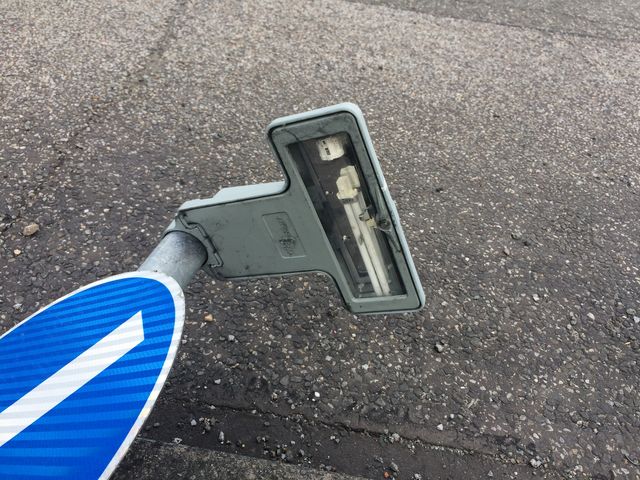
On a road near my house, someone has clearly managed to drive straight over the illuminated sign. The lamp has also come out of the holder from the impact.

-
If it's not being used for anything graphically intensive, just put a GT 610 or something in it.
-
Make sure the wires for the antennas are secure. Anything in the BIOS?
-
Could you try lowering the clock speed?
-
Must be the driver circuit for the lamp then.
-
Make sure the fan is on auto and not high altitude or high speed fan mode. When the fan is running too fast, it can cause the lamp to over cool making it flicker.
-
Just wondering, how did you all get into becoming an IT technician? Apprenticeships? College?
-
https://www.conyers.org.uk/vacancies/front-line-it-systems-support-technician/
-
The drives in my main desktop run about 10 hours a day. It's had 4 Seagates and all of them got bad sectors. 2 of them are still in use but are not reliable as they both have bad sectors and one has over 70k hours. Another PC has a Toshiba in and that PC runs 24/7 and constantly records video from the CCTV. The drive has been fine.
-
All of the ones I have had die were Seagate. My WD, Toshiba, Hitachi and my ancient Maxtor drive continue to work.
-
I have two Seagate hard drives from my PC that have failed recently. The one on the left had around 13,000 hours when it died. It just started to re-spin every now and again and eventually went into a loop of re-spinning. It was left in the PC for a while until it eventually was undetected by the computer. The one on the right was installed later and went faulty today and now has 1 bad sector, only had 9198 hours! Suddenly I couldn't access my files and eventually it started working again. Not very impressive considering neither drives are that old. Left one made: 12/2013 and right one made: 12/5/2016. I'm sure this isn't a fault with my computer as other drives in the computer have been working reliably. Luckily I have my data backed up in several locations in and out of the PC. Any ideas what is causing such fast failure or is Seagate really this bad?
-
Try running sfc /scannow in command prompt?
-
I can type around 70 wpm and that's using my two index fingers and left thumb. Accuracy is quite good and I don't have to look at the keyboard very often. I am trying to touchtype to try and get faster though.
-
Just wondering how many people here touch type?
-
Sounds like it could be interference. Make sure you’re using a high quality adapter that has shielding.