jkmoch
-
Posts
25 -
Joined
-
Last visited
About jkmoch

-
As you may have noticed in my response to Sysman_MK, the problem was in the url. I had the urls matching, but Joomla didn't like the specific reference to the index.php file, apparently. Thanks for your time.
-
Thanks. When I change the live_site variable to not refer specifically to index.php and removed index.html from the root directory, it worked. What I wanted to do was to use the file index.html as a kind of "barrier" to hide the site while we were working on it. Our apache server is set to look first for index.html and then index.php. Obviously Joomla doesn't like to see the direct reference to index.php. I figured out that to hide the site, I put it into a folder (I called it site1.5). This way going to the site now displays a dummy page via index.html and going to /site1.5 displays the Joomla site. I should have realized this, but at least now I know. Thanks for your help. I'm sure I'll need it soon as I am re-gearing up my knowledge of Joomla (now 1.5) to work on this site again.
-
Thanks - I just went through your list, and discovered that they are all writable , so that's apparently not the problem. I spot-checked a few of those on my working version on my Mac and discovered they were the same, including the configuration.php file.
-
Thank you - I just checked the permissions and ownership of the root folder as well as the template folders and the images folder within that and found that all are read-enabled for everyone. They are also owned by the same user. So, I don't think that's the problem, but I'm only guessing that when the joomla is looking for the site template that it's located somewhere in there.
-
Downloaded Edugeek-Joomla1.5.9 package and it works fine on my personal Mac. I uploaded it to a unix server into the webspace for our school (both the files in htpdocs as well as the database). Changed the configuration.php file as noted in the Edugeek wiki. When you access the site you clearly see the content, but it just runs down the screen without the css template. I was even able to click a link (mathematics) and the contents of that page appeared, but still without the template. I went to the axe_rescheek_blue folder in templates and tried to just display the logo in the images folder and that was fine. When I try to access the site via the administrator I come up with the Joomla 1.5 banner along with our school name. Only the icons for the tasks don't appear, though the links seem to work. I clicked on Article Manager - the menu items site menus content, etc don't work, but the ones such as unarchive, archive do (I tried parameters). This is both Safari and Firefox on a Mac as well as IE and Firefox on Win-XP. The Apache 2.2.3 webserver is running PHP5.2.0 and MySQL 5.0.3 as reported by executing a phpinfo() command. Can someone help? Thanks
-
resetting mysql with joomla/edugeek installation
jkmoch posted a topic in EduGeek Joomla 1.0 Package
Previously had joomla/edugeek installed, but it's not working (recent upgrade to Leopard, fooling around, leaving things go too long are possible reasons). Anyway, I download fresh copies of MAMP (in Applications after renaming the original MAMP file as MAMP-prev) and the Edugeek zip file. When I try to install it and enter a mysql username, password and db name, I get a message that the username and password are incorrect. I don't recall what the old username and password are. I tried a slightly different database name but still got that message. How do you clear out the mysql usernames/passwords? I had thought that by downloading a fresh MAMP which supposedly includes a fresh mysql that I could enter anything, but obviously some old usernames and passwords are store somewhere. Please help. Thanks Joe -
The demo today went well - we noticed that the main menu was not purple, when you ran the mouse over the words they came up green and also the items on the left under "Whazzup" are green. Could you please consider making changes to the css file (I guess that's where it is) to correct these? I'm going to try to find a way of easily comparing the your css and the original css to see where the changes are and maybe that'll tell me where to make additional changes??? Much to learn. Thanks for helping me (us) out.
-
Holy Cow - Thanks for the GREAT service! I'm actually heading off to the school to talk about this site with them and they'll be surprised to see the purple. I hope this is satisfactory for them. Excellent service! Thanks! PS - I'm sure I'll have more problems and issues as I learn both Joomla/Edugeek and assembling a website. I just noticed that you responded to my request on the images, but I'll have to try that a little later today as I have to go. Thanks! Joe
-
changing content item with pix on left and right
jkmoch replied to jkmoch's topic in EduGeek Joomla 1.0 Package
Yes - that works. However, what I'd also like to do is start with a blank/new content item and place pictures and text similar to, for example, what I see on the Art page. Essentially, I want to be able to include a css style specification so that text flows around an image. This seems to be easy to do as long as the image is on the left, but if you try to put an image on the right as in the example, well, I can't make it do that. Any help would be much appreciated. Thanks -
Not very, but I think I can find someone who is. What needs changing? I think it may be just the blank header in the templates and a file named moduletitleby.jpg Is that it or are there more? Any hints? like how to get the two-tone look that the templates have? Thanks for your help.
-
The school staff also asked how difficult it is to change the color from green to some shade of purple/lavendar. I'm guessing that it is probably pretty difficult since the color at least for the main header is determined by an image and not a CSS statement which provides the color to the template. I hope I'm wrong. Thanks
-
changing content item with pix on left and right
jkmoch posted a topic in EduGeek Joomla 1.0 Package
I'm back trying to work up a site for a school. I'm using eg_green. In the curriculum menu we'd like to modify many of the sample areas. For example, in art (and English, and others) there's a graphic on each side at different points within the text. We tried to change the graphic with no luck (though I was able to mess around with the css/html manually and get it done - however, not a good thing for most people). I tried to import another graphic but the editor doesn't provide me with any style information so that I can do things like your samples show. If there's a detailed how-to guide for this, please let me know - I must have missed it. It would be real nice to be able to start with a blank content item and easily create nicely formatted content as you have in your demonstration samples. Thanks -
Do you mean the latest version based on Joomla 1.0 or the Joomla 1.5 upgrade? Are there instructions for how to upgrade your site with a newer version?
-
Looks like the link from the main menu was what I was missing. I missed that when I was comparing it to the Parents Menu example. My comment about the alpha ordering had to do with step 5 of part two of your explanation. I don't quite understand what you mean but it works now and that's great. I'm sure I'll have more questions, but things are starting to come together slowly for me. Thank you very much.
-
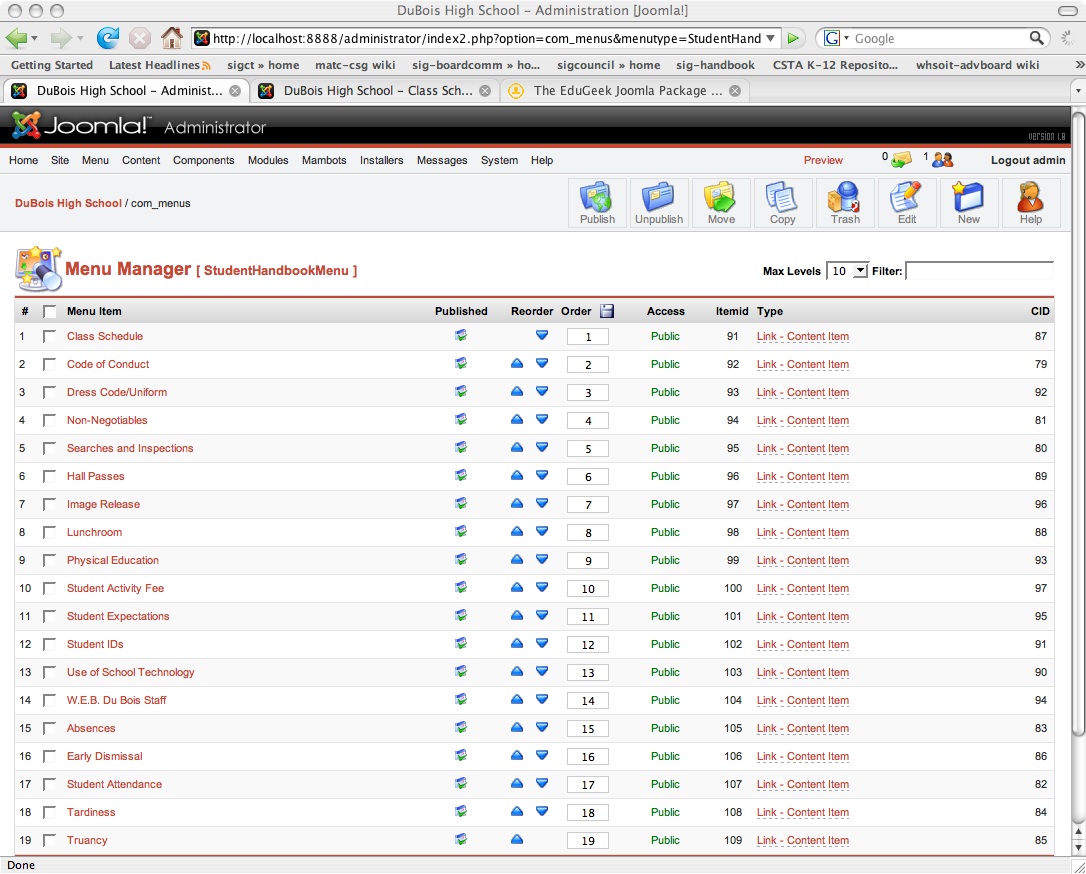
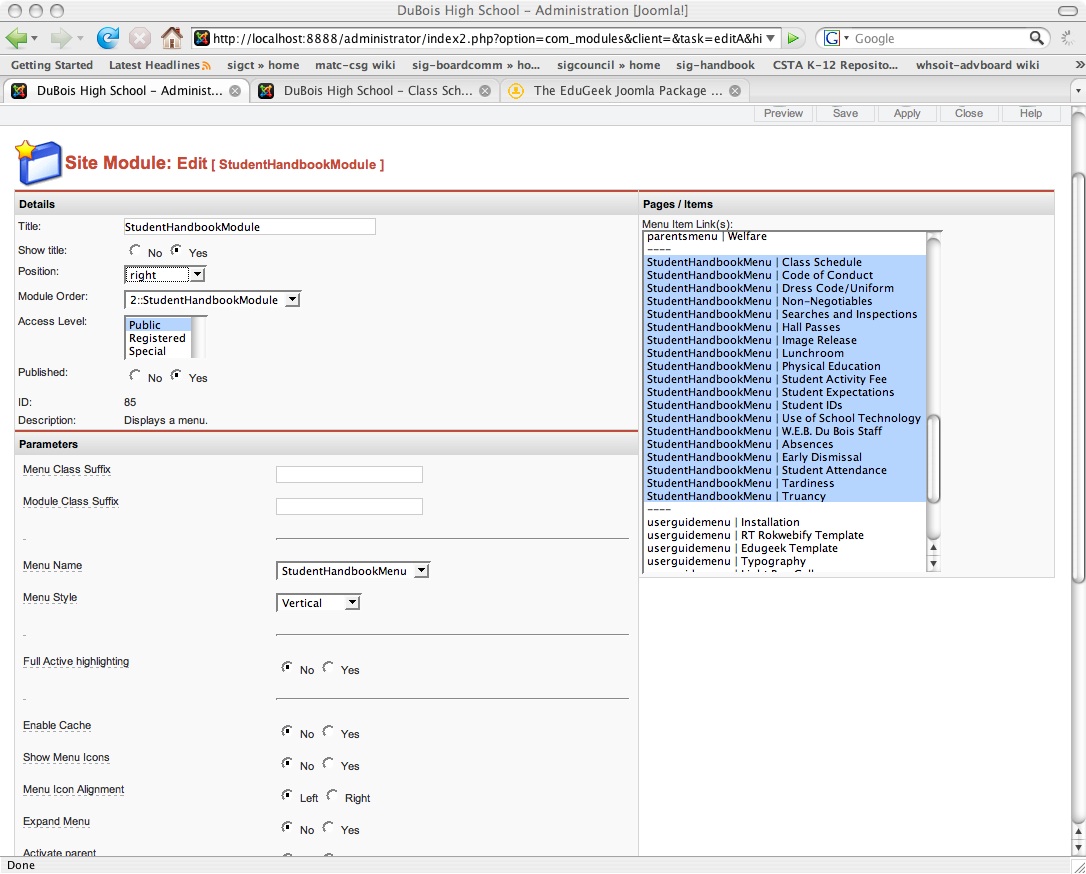
I found the 3-part description for creating a new menu. I was successful with part one and presumably with part 2. It also seems that I have correctly set up my new module (studenthandbookmodule) but it doesn't appear on the right . It may have something to do with the fact that I entered them in the order they were on the paper version of the handbook. However I really prefer them to be mostly in alpha order as indicated by the menu items themselves. I've attached a couple of window captures so you can see. I can't see what I'm missing, but obviously I am missing something. Thanks for whatever help you can provide. Joe