smarties11
-
Posts
645 -
Joined
-
Last visited
Content Type
Forums
News
20th
EduGeek EDIT Conference
Blogs
Everything posted by smarties11
-
[for sale] 35 x Dell OptiPlex 745 USFF with 17" Monitors
smarties11 replied to smarties11's topic in Classified Adverts
Still need this shifting - will take £2,000 for the 33 x 1GB machines and will keep the 2 x 4GB machines. That's £60 for an AIO design Core2Duo machine - bargain! If they don't go at this price they will be recycled. -
[for sale] 35 x Dell OptiPlex 745 USFF with 17" Monitors
smarties11 replied to smarties11's topic in Classified Adverts
OK, I really need these to go! I need the space and I also need the money for another project which I'd like to complete over the summer. The absolute lowest we'll take for the lot is £2,500. That's an absolute bargain at £71 a machine! Let me know if you are interested! -
Have a look at Backup Exec 2012 V-Ray edition. This might work out cheaper, as you license it per occupied socket in your virtual hosts (whether they be VMWare or Hyper-V) and then it covers unlimited data agents, application (exchange/sql/sharepoint etc) agents, dedupe agents within those hosts. List price is about £600 per socket and I'm sure there will be education discount to be deducted off this. I'm waiting for our quote now. We were planning to buy Veeam, but this will actually work out cheaper than buying Veeam and upgrading our Backup Exec media server to 2012 - and potentially give us a better solution as we can then backup our entire virtual and physical structure in one hit, with a Disk-Disk-Tape backup.
-
Hi All, Thanks for all the replies - they have all been really helpful. And aplogies for the delay in replying - mad week! I'm monitoring the IO now on our existing servers so will see what the results of that are and hopefully that will give me a better idea of whether the iSCSI SAN will cut it. At the moment I'm leaning towards going with local disks (but not going too mad on storage capacity to keep costs down) and then hopefully next year purchasing a SAS 6GBps SAN which we can use for centralised VM storage, and then use our exising iSCSI SAN for snapshots and as a failsafe should the new SAN go down. I'll be able to transfer the disks from the 3 hosts to the SAN, and then run the hosts diskless with ESXi on an SD card (or two!) I know we'll be losing the benefits of HA, however compared to what we have at present (physical servers only) we'll have far more redundancy and resilience, and this can be our stepping stone to having full redundancy via HA once funds allow. But lets see what the tests say first!
-
Hi All, We are looking to replace our aging server infrastructure this summer. I have quotes for a Dell R720 and a HP DL380p - both same spec - dual Xeon E5-2640's, 96GB RAM, internal SD card for hypervisor. We'll be buying three of these to use as ESXi hosts. We'll eventually be running around 15 or 16 Win2k8 R2 x64 VMs. Now, we also have a Dell MD3200i iSCSI SAN, which, at present is only connected to our fileserver and is used for data storage (user areas, shared storage etc). I can't make my mind up whether to either.... 1. Put 4 x 300GB SAS disks in each server in a RAID 10 array and keep VMs stored locally. We'd then only buy VMWare Essentials. We wouldn't have HA and vMotion, but as we will be taking snapshots with Veeam, if a host did fail we could restore snapshots back to the two remaining hosts - though this will take time and there would be a loss of data between the snapshot time and failure time. But we would be back up and running fairly quickly. I was hoping to get enough money to buy a second SAN this year, but that hasn't been possible, unfortunately. So my other option is.... 2. Use the Dell MD3200i to store our VMs centrally. Purchase VMWare Essentials Plus and make use of HA and vMotion. However, although the MD3200i has dual power supplies, dual quad port NICs, RAID and is cabled redundantly via two iSCSI switches so the chances or failure are *very* slim, there is still a very small chance that the MD3200i chassis could die, or have multiple disk failure, and I'd be left with no VMs at all! That's *really, really* scary! I'm not sure I like all my eggs in one basket. I'd save money on 15 300GB SAS disks here in the servers (4 in each plus a hot spare in each), though I still might have some in one server for Exchange. I'm also not entirely sure how the MD3200i will perform with this sort of load. It has 8 x 1GB ethernet links to the 2 x iSCSI switches (Dell PowerConnect 5424's), though I'd have to check they are all active when not in failover state. I think they are though. And each VM host could potentially have 4 x 1GB ethernet links to the iSCSI switches, and then 4 x 1GB back to the core. How would this compare to having local 10K SAS disks on the hosts? Price wise, there's not a lot in it - we'd save money on server disks, but spend more on VMWare licensing and additional quad port NICs. If I could get a second SAN, it'd be a no brainer (though I'm still sceptical of the iSCSI performance with the MD3200i hosting all the VMs) but as we only have one I'm in a quandry! Would really appreciate your thoughts on this, especially if you have gone down one road or the other and would be interested to hear how that has worked out for you! Thanks.
-
[for sale] 35 x Dell OptiPlex 745 USFF with 17" Monitors
smarties11 replied to smarties11's topic in Classified Adverts
Yes - Dell support is great. We've only had one or two minor issues with these and they were sorted under warranty within the 3 year period. Had no issues in years 4 and 5. -
[for sale] 35 x Dell OptiPlex 745 USFF with 17" Monitors
smarties11 replied to smarties11's topic in Classified Adverts
Definitely - we have found exactly the same - it's tricky to remove the cover and then when you do the plastic rails usually come out! To me the release mechanism is way over engineered and is too intricate and fiddly. We're moving away from Dell this time because of this, and the fact they can't get within our budget. -
[for sale] 35 x Dell OptiPlex 745 USFF with 17" Monitors
smarties11 replied to smarties11's topic in Classified Adverts
Yes, sorry, I meant the AIO design in general for the classroom, as we find it works well for us - but yes, you are correct, Dell changed the design when the 780 was released. Though I might add although the 780/790 design looks nicer it's certainly a lot more fiddly to put together!! -
[for sale] 35 x Dell OptiPlex 745 USFF with 17" Monitors
smarties11 posted a topic in Classified Adverts
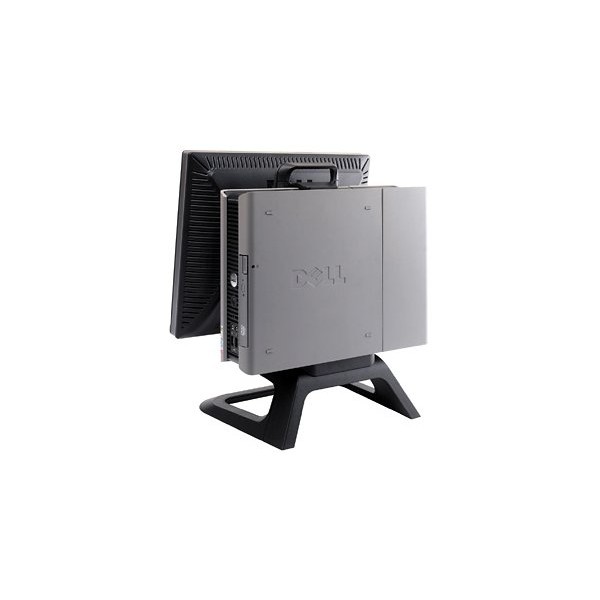
Hi All, We are upgrading an ICT Suite this summer and have 35 x Dell OptiPlex 745 USFF machines with 17" monitors. These are the All In One units with a bracket that holds both the monitor and base unit. They have been fantastic machines over the last 5 years, and we have kept with this same Dell AIO design since, buying 755, 760, 780 and more recently 790's. Spec as follows Intel Core 2 Duo E6300 1.86Ghz (dual core) 33 with 1GB RAM, 2 with 4GB RAM 80GB Sata HDDs DVD-ROM 17" Dell DVI monitor Keyboard Mouse NO OS Power supply units Over the last few months we've had a few need new BIOS batteries (CR2032) and we are replacing them as they go, but happy to supply 35 x CR2032s with these to cover the others. They will also all come with the original Dell DVI/VGA cable which allows you to run both a VGA and DVI screen from these (ideal for classrooms as saves having a VGA/DVI splitter box for the projector) They are in good condition, coming from a school with very few behavioural issues. We are looking for £100 each. You must be able to collect from Lincolnshire. As with anything second hand, no warranty of any kind. They will be available to collect after 15th August, but anyone is welcome to come and see them (in use!) beforehand. Thanks for looking!
-
[for sale] 30 x 1GB DDR2 PC-5300 667Mhz Memory Modules
smarties11 replied to smarties11's topic in Classified Adverts
I've now got 34 of these in total - still at the same price, £200 + P&P for the job lot, so now only £5.88 each! -
[for sale] 30 x 1GB DDR2 PC-5300 667Mhz Memory Modules
smarties11 posted a topic in Classified Adverts
Hi All, We have recently been upgrading the RAM in our machines - have bought some new and shifted older stuff about and consequently now have these available. ELPIDA 1GB 2Rx8 PC2-5300U-555 We have 30 of these available, all fully working and removed from Dell Optiplex 745 machines. They are about ~£14 each new, if someone can take them as a job lot then we'll take £200 + postage. A bargain at £6.66 each! Will only sell to another school / education institution and payment strictly via an invoice from us to you to keep it all above board. Will only split if we have to. Thanks! -
Problems with Windows XP / 7 GPOs & WMI Filters
smarties11 replied to smarties11's topic in Windows 7
Thanks for your reply! I have tried this one already, I've also tried Select * from Win32_OperatingSystem where Caption = "Microsoft Windows XP Professional" However all give the same result. They work fine on some machines, and not others. It's very strange since the machines are on the same image. It's as if they are refusing to process any filter, for whatever reason? -
Hi All, I'm new to the forum although have been lurking for a bit! We are currently planning and testing our Windows 7 deployment for the summer. Rather than inherit our existing GPOs, I'd like to start afresh in order to eliminate all the redundant settings in there...some going back to Windows 2000! So, I have created two new WMI filters, as follows... Windows 7 - select * from Win32_OperatingSystem where Version like "6.1%" Windows XP - select * from Win32_OperatingSystem where Version like "5.1%" I have assigned the XP WMI filter to our existing user GPOs, and then created new Windows 7 user GPOs and assigned the Windows 7 WMI filter. I have tested these and my Windows 7 test machines work fine - they pick up the settings from the new Windows 7 GPOs, and ignore everything in the XP ones. However, many of our Windows XP machines are not working! They are ignoring all user GPO settings, only applying computer GPOs (which I've left unfiltered as WinXP and Win7 machines will live in different OUs). Errors reported in the Application Log are 1090 - Userenv - Windows couldn't log the RSoP session status. An attempt to connect to WMI failed. 1104 - Userenv - Windows cannot perform filter check for Group Policy object cn={GUID}. The associated filter cannot be found. This Group Policy Object will be skipped. What is odd is that some of the XP machines are fine. Even within the same room - all machines on the same image - some work and some don't. I've checked the WMI service and it is running. I've researched those errors - two main solutions are a hotfix from MS which applies to XP SP2 and single label DNS domain (we are on XP SP3 which includes the hotfix, and our domain ISN'T a single label) and a fix which requires rebuilding the WMI repository on each affected workstation. I'm not convinced this will work, but will try it later on one machine. Has anyone else had these same issues that may be able to shed some light? We are running Windows Server 2003 on both of our DCs. Thanks!
-
Hi, We too are looking at options for open wireless for students. We have a managed wireless system in place (Xirrus) and can set up a new SSID on a separate VLAN to keep the traffic seperate. We'd probably then look at a new server to handle DHCP (to registered MACs only) with a transparent proxy. Our LEA use NetSweeper, hopefully we can utilise that somehow also. RADIUS and AD authentication would be good, so we can place all registered users in a group - and firewalling to allow only port 80 as someone suggested earlier is a great idea! My question - is there any product / appliance 'out of the box' that can do this at the moment (linking in to an existing wireless system)? I realise we can do all of this anyhow with various software and hardware but wondered if there was anything available? Thanks!