hdevine643
-
Posts
16 -
Joined
-
Last visited
Content Type
Forums
News
20th
EduGeek EDIT Conference
Blogs
Everything posted by hdevine643
-
Hello, Yes there was a user account in the tickets file which no longer exists. I have deleted and all is working again. Thanks for all your help.
-
Yes they have mapped home drives and up until a few days ago all admins were able to logon with no issues
-
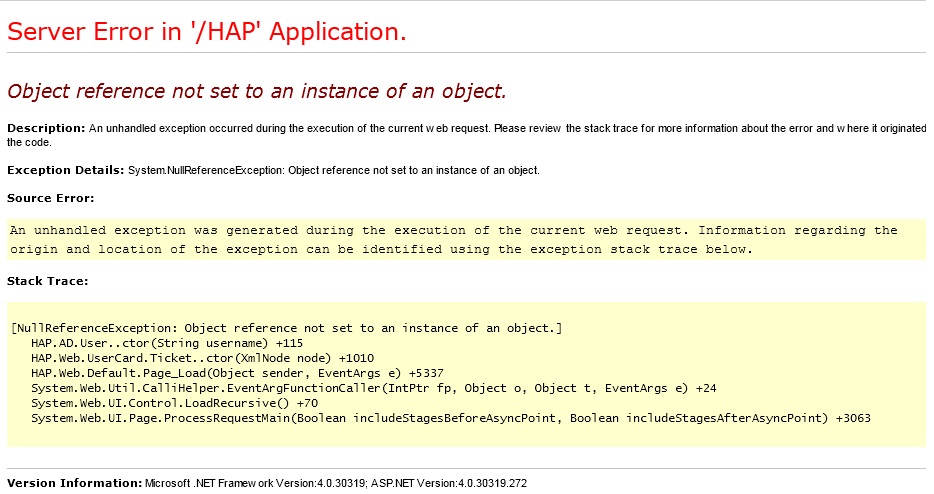
[[ATTACH=CONFIG]13227[/ATTACH] Event code: 3005 Event message: An unhandled exception has occurred. Event time: 29/02/2012 16:00:05 Event time (UTC): 29/02/2012 16:00:05 Event ID: 447d2041555b4b76bccf7142178506b0 Event sequence: 216 Event occurrence: 3 Event detail code: 0 Application information: Application domain: /LM/W3SVC/1/ROOT/HAP-1-129750024028686186 Trust level: Full Application Virtual Path: /HAP Application Path: C:\inetpub\wwwroot\HAP\ Machine name: WEBSERV Process information: Process ID: 7136 Process name: w3wp.exe Account name: IIS APPPOOL\HAP Exception information: Exception type: NullReferenceException Exception message: Object reference not set to an instance of an object. at HAP.AD.User..ctor(String username) at HAP.Web.UserCard.Ticket..ctor(XmlNode node) at HAP.Web.Default.Page_Load(Object sender, EventArgs e) at System.Web.Util.CalliHelper.EventArgFunctionCaller(IntPtr fp, Object o, Object t, EventArgs e) at System.Web.UI.Control.LoadRecursive() at System.Web.UI.Page.ProcessRequestMain(Boolean includeStagesBeforeAsyncPoint, Boolean includeStagesAfterAsyncPoint) Request information: Request URL: https://hap.omaghcbs.org:443/HAP/default.aspx Request path: /HAP/default.aspx User host address: 85.31.137.11 User: administrator Is authenticated: True Authentication Type: Forms Thread account name: IIS APPPOOL\HAP Thread information: Thread ID: 163 Thread account name: IIS APPPOOL\HAP Is impersonating: False Stack trace: at HAP.AD.User..ctor(String username) at HAP.Web.UserCard.Ticket..ctor(XmlNode node) at HAP.Web.Default.Page_Load(Object sender, EventArgs e) at System.Web.Util.CalliHelper.EventArgFunctionCaller(IntPtr fp, Object o, Object t, EventArgs e) at System.Web.UI.Control.LoadRecursive() at System.Web.UI.Page.ProcessRequestMain(Boolean includeStagesBeforeAsyncPoint, Boolean includeStagesAfterAsyncPoint) Custom event details:
-
Hello, just wondering if anyone has any furhter ideas on why my admins are unable to gain access to the main Hap page?
-
Yes I am able to access Setup page & drives by pasting in the correct url. On the settings page there is a red x against 'Active Directory Connection' The password field is blank, when I enter the administrator password and press save it states that the config is saved but the red x still shows. As for Easylink, is this something available in all AD versions or just C2K perhaps?
-
administrator
-
Staff & Students can still logon with no issues. I tested by logging on as a techer, they were able to logon ok, then I added the teacher to the Domain Admins group, logged on again & got the same message. When I removed them from Domain Admins Group & logon they can again access with no errors. As far as I can tell the issue just happens for Domain Admins
-
Hello, Until a few days ago all users could logon to HAP with no issues. Now when any Domain Admin logs on they are presented with the following Server Error I have checked and at the same time an event is logged in the Event Viewer (Event: 1309, ASP.NET 4.0.30319.0). Any advise would be much appreciated. Event code: 3005 Event message: An unhandled exception has occurred. Event time: 29/02/2012 16:00:05 Event time (UTC): 29/02/2012 16:00:05 Event ID: 447d2041555b4b76bccf7142178506b0 Event sequence: 216 Event occurrence: 3 Event detail code: 0 Application information: Application domain: /LM/W3SVC/1/ROOT/HAP-1-129750024028686186 Trust level: Full Application Virtual Path: /HAP Application Path: C:\inetpub\wwwroot\HAP\ Machine name: WEBSERV Process information: Process ID: 7136 Process name: w3wp.exe Account name: IIS APPPOOL\HAP Exception information: Exception type: NullReferenceException Exception message: Object reference not set to an instance of an object. at HAP.AD.User..ctor(String username) at HAP.Web.UserCard.Ticket..ctor(XmlNode node) at HAP.Web.Default.Page_Load(Object sender, EventArgs e) at System.Web.Util.CalliHelper.EventArgFunctionCaller(IntPtr fp, Object o, Object t, EventArgs e) at System.Web.UI.Control.LoadRecursive() at System.Web.UI.Page.ProcessRequestMain(Boolean includeStagesBeforeAsyncPoint, Boolean includeStagesAfterAsyncPoint) Request information: Request URL: https://hap.omaghcbs.org:443/HAP/default.aspx Request path: /HAP/default.aspx User host address: 85.31.137.11 User: administrator Is authenticated: True Authentication Type: Forms Thread account name: IIS APPPOOL\HAP Thread information: Thread ID: 163 Thread account name: IIS APPPOOL\HAP Is impersonating: False Stack trace: at HAP.AD.User..ctor(String username) at HAP.Web.UserCard.Ticket..ctor(XmlNode node) at HAP.Web.Default.Page_Load(Object sender, EventArgs e) at System.Web.Util.CalliHelper.EventArgFunctionCaller(IntPtr fp, Object o, Object t, EventArgs e) at System.Web.UI.Control.LoadRecursive() at System.Web.UI.Page.ProcessRequestMain(Boolean includeStagesBeforeAsyncPoint, Boolean includeStagesAfterAsyncPoint) Custom event details:

-
Hello There, I am having terrible problems in configure HAP on my server. Can someone provide more detailed config documentaion? I have previously posted screen shots of errors and anticipated problems but have had no replies, please help as I would love to get this up and running. Also, I also seemk to be accessing HAP via http & not https, how can I change this????
-
Hello, I am now able to access HAP+ Setup, but still getting some errors when going through config When I enter AD details and click on Students Group I get the mst'Message From WebPage' Then AD Broswer Appears as in 'Active Directory Browser' Also when I press Save I get the following message Please help. Also can anyone point me to a config guide for 'Home Drives' etc. In our school we have two file servers for students, home drive paths somthing like \\servername\students\year\%username% How can I define this in HAP+????
-
Remote Access to Students Home Drive
hdevine643 replied to hdevine643's topic in Windows Server 2008 R2
Hello, I am now able to access HAP+ Setup, but still getting some errors when going through config When I enter AD details and click on Students Group I get the mst'Message From WebPage' Then AD Broswer Appears as in 'Active Directory Browser' Please help. Also can anyone point me to a config guide for 'Home Drives' etc. In our school we have two file servers for students, home drive paths somthing like \\servername\students\year\%username% How can I define this in HAP+????
-
Remote Access to Students Home Drive
hdevine643 replied to hdevine643's topic in Windows Server 2008 R2
I have deleted the line and now get a Server Error regarding ASP ????
-
Remote Access to Students Home Drive
hdevine643 replied to hdevine643's topic in Windows Server 2008 R2
Hello, I am working through v7 Documentation for setup on IIS7. On step 34. I get an error msg as in the attachment 'Mime Error' Also when I try browsing to the application / website I get the an error as in attachment 'Application Errror' Please help.
-
Remote Access to Students Home Drive
hdevine643 replied to hdevine643's topic in Windows Server 2008 R2
Sound Good. Any documentation on TMG side of things? How do your Students / Staff rate the HAP+ experience???? -
Remote Access to Students Home Drive
hdevine643 replied to hdevine643's topic in Windows Server 2008 R2
How Secure is HAP+ -
Hello, Our School runs its own network with Server 2008 R2 servers hosting Students home directories and other network drives. We also have TMG configured as a proxy server. We have been looking into VLE solutions for the school but after requirements gathering it seems that the greatest requirement is for Students and Staff to be able to access their 'Home Drives' external to the School. Can someone please advise on the best & most secure solution for this.