ErDT
-
Posts
19 -
Joined
-
Last visited
Content Type
Forums
News
20th
EduGeek EDIT Conference
Blogs
Everything posted by ErDT
-
Generally yes this is what i have found. I'm only aware of 2 machines out of hundreds where they were on 24H2 where this wasn't the case but as they were previously on 23H2 I'm fairly sure their Kerberos issue somehow followed them into 24H2 where for 99% of the machines it has not once upgraded.
-
Also i think worth noting is I'm not pushing 2025 to the other 30+ DC's we have because we have too many desktops/laptops across our network on 23H2 still. Its a slow old process getting them up to 24H2 because a lot are not considered compliant and so will not automatically push up to 24H2 therefore need hands on rebuilds. So i would lend caution to doing it if you are a large organisation. If a single site single/double DC then the risk is a lot lower as long as you are confident your estate is primarily off 23H2.
-
If 2022 then definitely get the latest iso from March 25, shouldn't ever use old ones unless there's a known issue with the latest. 2022 shouldn't have any significant risk to upgrade to, i did it to 30+ DC's a couple of years ago. 2025 i think still has some risks if your estate is not on 24H2. The thread linked to below by Dr Cheese is actually mine, so i have done a significant amount of testing and would suggest the above. https://learn.microsoft.com/en-us/answers/questions/2185050/server-2025-domain-controllers-trust-relationship
-
If your workstations are on 24H2 then you shouldn't have many problems (we have seen 2 devices on 24h2 have an issue still), i am circa 30 days on from moving workstations to 24H2 with 2025 DC's and this morning saw 50+ devices onsite reset their workstation password correctly. Do not do it if you are on 23H2 as im no longer even testing this once i was aware 24H2 was a fix so the issue could still be present.
-
So the site i focused on over the break is as per below 2x DC's on 2025 with Feb update, majority of devices on 24H2, some on 23H2 (these continue to receive the script to manually reset their passwords) a few on W10 22H2 (these have always been fine), iMacs (these have always been fine) I disabled the script to manually reset their machine passwords during the break for all devices barring the ones on 23H2, the majority of devices haven't reset their passwords yet. But i have seen 10-20 of the machines on 24H2 correctly reset their passwords and am not aware of anyone coming to the office with an issue. So if you are having this issue i would recommend pushing your devices up to 24H2, obviously i wont know its fully sorted until more than 30 days after half term so the majority of the devices attempt to reset their passwords through the normal mechanism, but as I've seen a good handful do it I'm fairly confident it sorts it "Touches Wood".
-
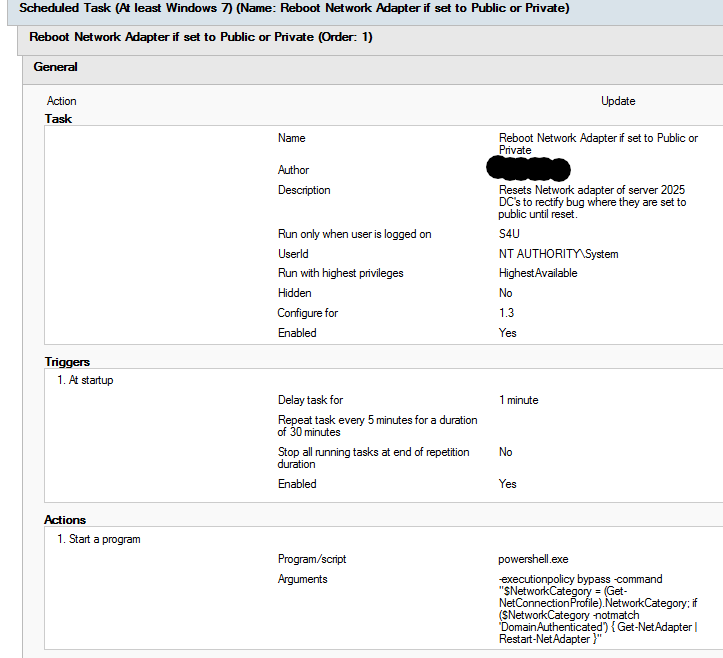
Hi Stephen Code executed is below along with screenshot of the scheduled task. However i would have expected your manual reset to have rectified the issue so i am not confident that this would rectify your issue as i suspect you have a secondary problem also blocking the adapter being picked up as domain. -executionpolicy bypass -command "$NetworkCategory = (Get-NetConnectionProfile).NetworkCategory; if ($NetworkCategory -notmatch 'DomainAuthenticated') { Get-NetAdapter | Restart-NetAdapter }"

-
Hi The Kerberos local key distribution center service on "start pending" is expected behavior apparently at the moment. Saw a forum post where the person who apparently coded it says its not yet active and in use so it being in that state doesn't cause any issue. Defender firewall setting itself to public is a bug with 2025 Domain Controllers they have not rectified yet, i have a script in place via task scheduler that on power up if the DC's ethernet port is set to anything other than domain it resets the network, this rectifies the issue and sets it to domain within a min or 2 of the DC power on after reboot. Only way i'm aware of to rectify it currently. Your 3rd issue I'm not sure the underlying cause as ive not come across it.
-
Hi Martin If you still have windows 11 23H2 in your environment then no i wouldn't recommend you enable it again, you need to either upgrade all of them to 24H2 or wait out for the next cumulative update or possibly the one in March to hopefully have a real fix in. I am finalising all remaining 23H2 devices at one site up to 24H2 during the next break and re-enabling normal behaviour (disabling my script that runs the repair channel command each day). So will know a bit more after the break if 24H2 is a total fix or not in spite of the server side fix not being out yet.
-
Having said what i said above, i realised i had a 24H2 client at another site which i built fresh and was testing as well which is updating its password correctly, so i think my 24h2 test machine at the first site may have a further separate issue.
-
So putting the below setting on the DC appears to have allowed my 23H2 test device to update its password as expected again yesterday, 24h2 continues to not update but also not break itself.
-
Hi So i am only testing with a couple of devices (1 on 23h2 and 1 on 24h2) at the moment as i roll out 24h2 to the machines at the effected sites because all the rest of the machines i have scripts auto running on them to run the manual process to keep them in trust for the moment. I have found that 24h2 doesn't appear to lock out the machine as of yet but it also doesnt change the password on the machine or AD at least not with the 1 test device I'm using. 24H2 appears to correctly interpret that the password hasn't been updated on AD via the 2025 DC and so doesn't finalize the machine password reset on itself. I have recently added the setting below to my testing on DC's at my test site which appears to have allowed my 23h2 device to update its password yesterday (i need to see it do a few more times to be confident it is actually doing it). My 24H2 client still hasn't reset its password now for a week so it may not have any effect on 24h2 which i would assume is because it has increased security requirements that 23h2 does not. It could also have been related to updating the DC to the latest cumulative update but i doubt it based on the thread i saw with a couple of Microsoft developers suggesting the underlying issue wont be rectified until the Feb or March CU.
-
Hi I'm actually the person who suggested that one in that thread, it would be pretty funny if that was the fix as it was the one thing i didn't actually make changes regarding to test but stood out to me as a possibility when reading through the 2025 change logs. Will have to test it and see if any effect on our side.
-
The same behaviour continues on our environment where on my 2 test machines 23H2 breaks every 24/48 hours but 24H2 continues to work. My colleagues Test environment also behaves in the same way where 23H2 breaks but 24H2 (upgraded from 23H2) and 24H2 direct builds work correctly. Also obviously within our production environment i have seen Windows 10 and iMacs embedded into windows continue to work as expected so I'm fairly confident its a 23H2 bug. I cant be 100% sure that there aren't other bugs that then also effect other operating systems but to me 23H2 is the most affected. Unfortunately the sites where I moved our DC's onto 2025 were primarily 23H2 because i had been delaying 24H2 due to all the bugs that Microsoft were fixing which is ironic (though from what i have read of the bugs i don't think they will effect us greatly). I am moving all of our 23H2 clients up to 24H2 now as i think this is likely to help at the very least as 24H2 and 2025 are based upon the same underlying operating system build. I dont believe Microsoft are likely to have fixed the issue in the January cumulative update as whilst i saw some CVE fixes that could relate i don't personally think they are the fix. The Microsoft forum thread i created, the Microsoft employee once they confirmed it was an issue then asked us to report it via "Feedback Hub", which is beyond ridiculous considering all the legwork had been done in the thread that she wasn't going to escalate it considering the severity of the issue. Thread is below if interested. https://answers.microsoft.com/en-us/windowserver/forum/all/server-2025-domain-controllers-trust-relationship/4ef17f8e-8677-4ecd-a675-e5df1f4b48cf?page=1
-
Hi My colleague has tested further and now done a second stand alone domain setup as per the below. Setup fresh server 2025 Domain controller (forest/domain functional level at 2025) Install 2 workstations on windows 11 23h2 Set machine account password max age to 1 day no GPO's added other than to set max machine account password age to 1 day. Both workstations have now trust relationshiped themselves into oblivion, so upgrade or fresh the issue is still there on 2025. ------------------------------------------------------------------------------------------------------------------------------------------------------------ I have also separately on my 2 test machines within our production environment (where the issue was first found) done the below. Both machines have machine account password max age set to 1 day. Test Machine 1 Upgrade from 23H2 to 24H2 - This was done on the 09/01/2025 Rebooted daily to ensure the machine account password change process runs (believe it should anyways but just in case). Local Machine account password on the workstation has stayed on 09/01/2025 on the workstation and stayed 09/01/2025 in AD Trust relationship has yet to break 4 days on from this change but the local and AD passwords are not updating. Test Machine 2 Kept device on 23H2 Rebooted daily to ensure the machine account password change process runs (believe it should anyways but just in case). Local machine account password on workstation updated yesterday to be 12/01/2025 on the workstations but stayed at 09/01/2025 in AD Trust relationship broke as we are seeing within our environment more generally. Code used to find local machine account password date on device to compare to AD is below (may need to be run as system) Get-date –date ([DateTime]::FromFileTime([system.BitConverter]::ToInt64((Get-ItemProperty -path "HKLM:\SECURITY\Policy\Secrets\`$MACHINE.ACC\CupdTime").'(default)',0))) -Format 'dd-MM-yyyy' My best guess at the moment is 23H2/Server 2025 is broken and so makes a change to the local machine account password when its not being done in AD where 24H2 is aware that the machine account password hasn't updated in AD and so keeps the local password. What's more concerning is that on 24H2 while the machine isn't trust relationshipping itself into oblivion (yet) it also isn't correctly updating the passwords, they are just sitting at the old values. But i need a few more days to ensure the above continues to behave as described. I have also asked my colleague to move a machine in each of his test instances up to 24H2 and leave one at 23H2 to further test the above from a totally empty environment.
-
In a different thread i have on microsoft forums one of microsoft people is testing that, so will see what they come back with. The only difference i could see with that would be the domain and forest functional level would be at 2025 where my colleague tested to mimic ours and left it at 2016 because we cannot lift it to 2025 as of yet. Other than obviously the possibility a relic setting is being kept throughout the upgrade process that breaks a function in server 2025.
-
So my colleague setup a clean infrastructure, process was as below and shows this is a legitimate issue with something on one of the operating systems. Install Server 2019, upgrade to server 2022, upgrade to server 2025 (this follows the setup for most of our DC's though we have seen same behaviour at 1 of our sites that was freshly built to 2025 due to a hardware failure) Install 2 workstations with windows 11 23H2 Set machine account password max age for the machines to 1 day. NO GPO's added or amended, only the default domain controller and domain policy are in place + the 1 setting to amend machine password max age. First workstation has just trust relationshipped itself into oblivion. We expect the second one to do so shortly as it passes the 1 day mark.
-
So issue showing itself again following another 30 days, the script i posted before will fix the connection to AD of the device but all it does is reset the computer objects lstpwdset clock to 30 days again because for whatever reason the method in the script works to reset the computer objects password where its primary method doesn't. There is some bug in the way the computer (W11 23H2) is attempting to change the computer account password and what the 2025 DC's do with that information, it seems so far the machine sends the request to reset the password, either updates its local password but the 2025 DC's don't accept the change so its out of sync or the password just doesn't change and so the password on the machine and DC are out of date so its no longer trusted. Still trying to decipher a full fix as there are security hardenings on server 2025 that relate to it but not found the setting yet that rectifies it. This appears to happen when upgrading a server from 2022 to 2025 or when building a brand new 2025 server and making it a DC. Also this only happens on sites with 2025, we have 3 upgraded. The other 30+ on 2022 are behaving fine so theres either a bug with the OS or a security change that goes into effect but just doesn't seem to work within our environment. .
-
I have had the same issue and found so far the simplest method is to push the below script out to all machines via Senso, you would need to use an account you are happy with (this may have to be the account used to build the machine as it would be owner of the machine object, or a general admin may work, not tested that aspect) and replace the values. This will reset the securechannel from the machine to the DC. I'm not yet sure this will be a forever fix as still investigating. but you can push out to your machines and for us has rectified them at least for now. Microsoft guidance on this process is here https://learn.microsoft.com/en-us/troubleshoot/windows-server/windows-security/active-directory-has-newer-password-value-than-client-device $username = "domain\yourusername" $password = "yourpassword" | ConvertTo-SecureString -AsPlainText -Force $credential = [PSCredential]::new($username, $password) Test-ComputerSecureChannel -Repair -Credential $credential