tayyab12
-
Posts
23 -
Joined
-
Last visited
About tayyab12

-
Nice to know my thread is still an issue a year later🤣 my god Microsoft are that clueless even their own techs are saying it. We`ve just stuck on server 2022 till MS actually find a proved solution that these issues are no longer there. Support is till 2031 so does not bother us at all.
-
Windows 11 24H2 802.1X Authentication not working
tayyab12 replied to tayyab12's topic in Windows 11
https://www.youtube.com/watch?v=SgAjEuCAFzE&ab_channel=OsborneProTV Fixed. Works like a charm now. Guy in the video straight to the point and was only missing a few things. -
Windows 11 24H2 802.1X Authentication not working
tayyab12 replied to tayyab12's topic in Windows 11
Yes i have the certificates within the trusted root certification authorities pushed out via gpo however they need to be in the personal store on the devices. i know there isnt a gpo to import certificates into the personal store but most likely a script. How did you do it? -
Windows 11 24H2 802.1X Authentication not working
tayyab12 replied to tayyab12's topic in Windows 11
Yep turning VBS off fixed it however with EAP-TLS ready to go. am i to just turn on certificate based authentication on the gpo and technically should just work? -
Windows 11 24H2 802.1X Authentication not working
tayyab12 replied to tayyab12's topic in Windows 11
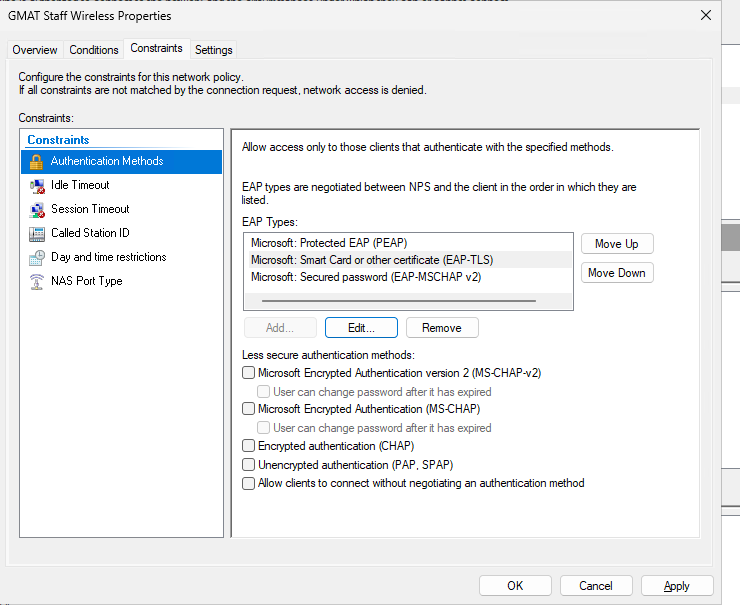
Right we do use computer based authentication anyway. is it the case of changing the gpo? nps is set to use eap-tls the certificates there. do i need to change gpo peap setting? what would i change it too.
-
Hi Guys back with another issue with the lovely 24h2 update. We use radius to authenticate our wireless which has been working fine with 23h2. however when ive imaged a machine to 24h2 just stops working. says cant connect to network. checked NPS logs and event viewer nothing is appearing, checked my aruba logs nothing there either. ive had a google and seen something about changing the order of ECC Curve which i have done but not fixed anything. Everything is working fine rn with 23h2 no issues in general but 24h2 is just something special. i literally waited for a while so all the bugs could get sorted but guess ms have done it again. any help would be appreciated guys
-
Fixed from that article TIMBO343 although a messy fix which ms need to fix asap. Had to run the commands below to kick start it. it should automatically just start creating the WIM but 24h2 is a pain along with many other issues. Cheers guys Run Diskpart Run List disk Run Select Disk 0 Run List Part (to show the partitions - this is optional) Run Select Part 3 (which is the primary partition) Run assign letter=c Run Exit Run startnet.cmd to kick capture of sysprepped machine.
-
Right a step closer, thanks for your help guys but now another issue is that it reboots into litetouch again. like it does the loading files screen but then goes into the litetouch login as if it was imaging a pc. usually on my current build it goes on to the next step of Create WIM. Not sure what is going on here. everything like the custom ini file and ts is the same as it has been with 23h2 so not sure what else i need to change. Custom ini file: [Settings] Priority=Default Properties=MyCustomProperty [Default] UserExit=UserExit.vbs OSDComputername=#GetOfflineComputername()# FinishAction=REBOOT OSInstall=Y SkipCapture=NO DoCapture=YES SkipTaskSequence=NO SkipAdminPassword=YES SkipProductKey=YES SkipComputerBackup=YES SkipBitLocker=YES SkipComputerName=NO SkipDeploymentType=NO SkipDomainMembership=NO SkipUserData=YES SkipLocaleSelection=YES SkipSummary=YES SkipTimeZone=YES SkipFinalSummary=YES EventService=http://SERVERNAME:9800
-
MDT / WDS - ADK update for Windows 11 ??
tayyab12 replied to timbo343's topic in How do you do....it?
Right a step closer, thanks for your help guys but now another issue is that it reboots into litetouch again. like it does the loading files screen but then goes into the litetouch login as if it was imaging a pc. usually on my current build it goes on to the next step of Create WIM. Not sure what is going on here. everything like the custom ini file and ts is the same as it has been with 23h2 so not sure what else i need to change. Custom ini file: [Settings] Priority=Default Properties=MyCustomProperty [Default] UserExit=UserExit.vbs OSDComputername=#GetOfflineComputername()# FinishAction=REBOOT OSInstall=Y SkipCapture=NO DoCapture=YES SkipTaskSequence=NO SkipAdminPassword=YES SkipProductKey=YES SkipComputerBackup=YES SkipBitLocker=YES SkipComputerName=NO SkipDeploymentType=NO SkipDomainMembership=NO SkipUserData=YES SkipLocaleSelection=YES SkipSummary=YES SkipTimeZone=YES SkipFinalSummary=YES EventService=http://SERVERNAME:9800
-
Hi everyone i am about to launch myself out the window over this. i have been working on upgrading my image to 24h2 from 23h2. i have upgraded the ADK tools. Done a fresh install of windows 11 education. i have updated it and added all the apps i needed. all done via vmware. i use MDT to sysprep and capture the image. so i go ahead and sysprep the machine. a window pops up saying processing sysprep plugins etc then after a while an error pops up with "Can not find script file "\\servername\d$\deploymentshare\scripts\LTIcleanup.wsf" Done some research but found very little information on this. if i was to sysprep my current image of 23h2 it works fine. just 24h2 dosent seem to wanna work at all. Everything is being done the same i usually do it. i would really appreciate any help
-
Pushed the gpo for the default machine passwords being enabled again since ms decided to have it randomized. Fingers crossed.
-
Functional levels been set to server 2025 both forest and domain levels. Cant seem to find anything relating to the trust relationship errors on event viewer
-
They aren`t the most helpful with bad previous experiences and ended up fixing it ourselves with weeks of their help. Just want to see if anyone's had this issue here first.
-
Hi All We have upgraded our 2 DCs to Windows Server 2025. We have noticed that about 20 client devices so far have been dropping off the domain and coming up with trust relationship errors when trying to login. Seems to happen when a user is already logged in as well and the user notices problems since the Radius wifi drops off which needs to be able to see AD/DCs. Did some googling and found some possible solutions but none of have worked. We have ran dcdiag on both dcs and checked replication statuses and all seems good. We dont really want to revert back to 2022 since theres 3 days worth of AD changes made. Quick fix for now is having to rejoin them to the domain but with a 1000+ devices its not ideal. Has anyone else experienced this as of yet? #Nonegativevibesguys, i see you:shocked:
-
Hi Server 2025 got released a few days back and just wondering if anyone has an idea of what product/classification to choose in WSUS for it. i know server 2022 came up as Microsoft Server operating system-21h2 and i can now see 24h2 and might think that might be the one needed for server 2025 but i cant find a definite answer anywhere