killmasta93
-
Posts
8 -
Joined
-
Last visited
About killmasta93

-
printer redirection vanishing print test page
killmasta93 replied to killmasta93's topic in Windows Server 2012
Hey Thanks for the reply great blog but I just ended up installing a virtual machine with windows 8.1 and worked perfect no drivers no nothing. Maybe windows server has its weird thing. Thank again -
Hi, I was wondering if someone could help me out with this issue im having with printing redirection. On my workstation computer I have installed an HP printer which works perfectly. Now I wanted to try Remote desktop printing redirection on my windows server 2012r2, it recognizes but when i try to send a print test page it would sent it then immediately vanishes i then tried giving the folder spool full permission which i did.I am completely stumped. I was wondering if someone had this issue or if someone could guide me what im doing wrong Thank you.

-
DNS error while trying to connect to AD
killmasta93 replied to killmasta93's topic in Windows Server 2012
Hi thank you for your response. I ended up starting clean again my mistake at the beginning was installing DNS first. The order in installing is crucial. First install Active directory domain services (which it also installs DNS) as soon as it finishes a yellow flag icon will appear and you need to promote the computer to the directory. After promoting (adding the domain name) you need to restart so when it start it should show domain\administrator log back in and install DHCP then reboot. After that configure the DNS server which now shows the missing files i had the issue with after configuring the DNS then configure the DHCP server and if your router is handling the DHCP turn if off so windows can handle it. Hope this helps someone else Thank you again -
DNS error while trying to connect to AD
killmasta93 replied to killmasta93's topic in Windows Server 2012
allright so something happened really weird..When I put on the client computer in the domain section to connect casa.local it wont work but if i only put the casa and not the.local it connects Soo odd. Then WIFI now shows connected to the local domain not sure what happened. Could anyone explain why it didn't work with casa.local instead with casa? also i run dcdiag on the server and get everything passed besides this error Testing server: Default-First-Site-Name\ZEUS Starting test: Connectivity The host 8dd8e9a2-e109-46d3-9978-1f085bac3f8d._msdcs.casa.local could not be resolved to an IP address. Check the DNS server, DHCP, server name, etc. Got error while checking LDAP and RPC connectivity. Please check your firewall settings. ......................... ZEUS failed test Connectivity -
DNS error while trying to connect to AD
killmasta93 replied to killmasta93's topic in Windows Server 2012
I also noticed something weird, usually when i connect to wifi in another domain it would show domain.local on the network settings while mine just show as private. Maybe that has something to do with? and if I do nslookup it finds the dns
-
DNS error while trying to connect to AD
killmasta93 replied to killmasta93's topic in Windows Server 2012
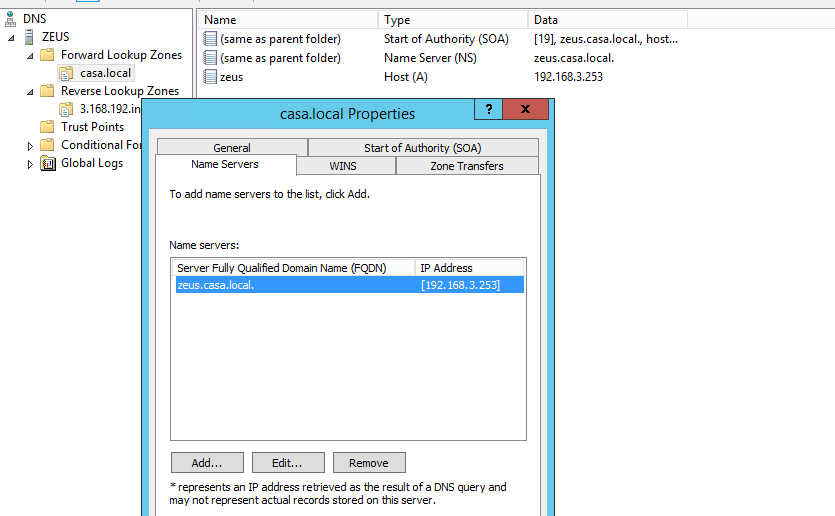
Hi Michael Thank you for your reply. You are correct i just changed it but still getting the same error see picture for new config whats funny is that i have another server and I did the same setup but what i realized on the other server it has a file msdcs not sure if thats important or not Thank you
-
DNS error while trying to connect to AD
killmasta93 replied to killmasta93's topic in Windows Server 2012
Hi, Thank you for your response. Currently I have pfSense DHCP server off and use my windows server for DHCP, DNS, and AD. On the client computer I type in CMD ipconfig/all it shows the DNS Of the server. I have configured the scope with the range 192.168.3. I was wondering how come all those errors when i type dcdiag /test:dns ?so in my case theres something wrong with the DHCP instead of my configuration on the DNS? Thank you -
Hi, So Im fairly new to installing Windows Server 2012 r2. So my issue is when a computer tries to connect to the domain it says domain could not be contacted. So my server ip is 192.168.3.253 it has DNS and DHCP with AD and my gateway is 192.168.3.254. So i ran a ipconfig/all everything seems to be good. I then ran nslookup and was good too. But then i ran dcdiag /test:dns and i got an error. I was wondeing if someone could tell me what i did wrong? heres the link to see the error photos Postimage.org / gallery - Clipboarder 2015 05 18 021, Clipboarder 2015 05 18 022, Clipboarder 2015 05 18 025 Thank you Testing server: Default-First-Site-Name\ZEUS Starting test: Connectivity The host 8dd8e9a2-e109-46d3-9978-1f085bac3f8d._msdcs.casa.local could not be resolved to an IP address. Check the DNS server, DHCP, server name, etc. Got error while checking LDAP and RPC connectivity. Please check your firewall settings. TEST: Basic (Basc) Error: No LDAP connectivity Warning: adapter [00000010] NVIDIA nForce Networking Controller has invalid DNS server: 192.168.3.253 (ZEUS) Error: all DNS servers are invalid No host records (A or AAAA) were found for this DC TEST: Records registration (RReg) Error: Record registrations cannot be found for all the network adapters Summary of test results for DNS servers used by the above domain controllers: DNS server: 192.168.3.253 (ZEUS) 1 test failure on this DNS server Name resolution is not functional. _ldap._tcp.casa.local. failed on the DNS server 192.168.3.253 Summary of DNS test results: Auth Basc Forw Del Dyn RReg Ext _________________________________________________________________ Domain: casa.local Zeus PASS FAIL PASS PASS WARN FAIL n/a ......................... casa.local failed test DNS