kenw232
-
Posts
21 -
Joined
-
Last visited
About kenw232

-
I need a RAID 1 config for my new production server. It has to be rock solid. Can someone recommend an SSD? What is the difference between PCI Express NVMe 4.0 x4 and Sas-24gbps? PCI seems to be cheaper, is that bad? Why? What does the x4 mean for PCI anyway? Do they just plug-in like any other SATA or SAS drive? I see its NVMe but in a 2.5" form factor, is that all? eg. https://www.newegg.com/p/N82E16820147857 https://www.serversupply.com/SSD/SAS-24GBPS/1.92TB/SAMSUNG/MZILG1T9HCJR_354473.htm
-
Does anyone know why my Ease of Access "Make text bigger" font size selection doesn't stick on my laptop? Whenever I have my USBC hub plugged in with the external HDMI monitor the machine always starts up with a small font even know I already and previously selected 134% font size. See: https://snipboard.io/lrb4nI.jpg But the font is still small. I then just do the same thing and Apply and the font goes larger like it should have already done on bootup. See: https://snipboard.io/jf7zce.jpg Why? Why won't it save? Same with ScrollWidth in the registry, I want my scrollbar width to be like -400, not the default -260. Yet it keep resetting. Windows 10 (1903 Build 18362.418) will never make these changes stick. Anyone know why? Note the hard drive was move to a different laptop if that matters, it was fixed in the shop.
-
central(/temp): dir drwxr-xr-x 4 root root 4.0K Aug 19 11:42 ./ drwxr-xr-x 25 root root 4.0K Nov 8 2015 ../ -rw------- 1 root root 1.5M Aug 19 11:42 dfu7J19Poi021379 -rw------- 1 root root 1.4K Aug 19 11:42 qfu7J19Poi021379 How do I email that sendmail queue file to a different email address on linux? I just want to send it somewhere.
-
For normal Remote Desktop Users in Windows Server 2012 R2, they get this dialog when they try to do something they are not allowed? Is there a way to stop this? I've disabled the policy "User Account Control: Run all administrators in Admin Approval Mode" but it does not help.

-
Is it possible under Windows Server 2012 R2 to change the label for all directed drives to something like "Local Disk"? Its using the computer name which can be strange sometimes. I'm only using this within my rdp file right now - "drivestoredirect:s:C:;" This is using RDP 8 obviously. I guess the format changed a while back.
-
Java won't work for normal RDP users, only admin?
kenw232 replied to kenw232's topic in Windows Server 2012
I found it, the Java Control Panel settings are per user, not per machine. So it was still turned off for normal users. Does anyone know where these Java Control panel settings are saved? I need a GPO policy or something. -
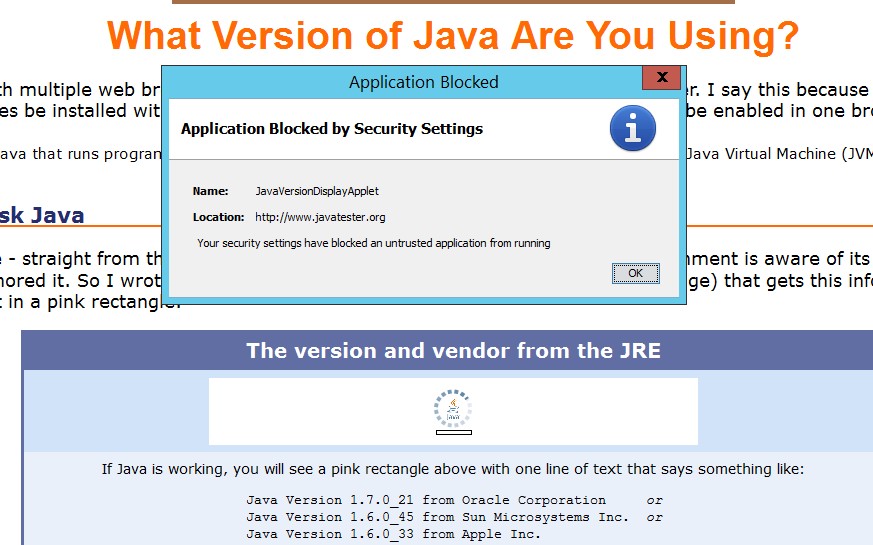
No matter what I do Java always says "Application Blocked by Security Settings" when I try to run a java applet in a webpage for normal Remote Desktop users under Firefox 27. As the Administrator it works fine though. This is under Windows Server 2012 R2. I've tried everything including the exception list, does anyone know what I have to do to get Java to work for normal users?
-
Common bookmarks for all firefox users?
kenw232 replied to kenw232's topic in Internet Related/Filtering/Firewall
It's ongoing maintenance that is the thing. I still have to update 35 bookmark files. -
I'm rolling out Firefox 27 in Windows Server 2012 R2 Remote Desktop Services for several RDP users. I've locked firefox down well, but don't know what the best way is to get all the firefox installations for all the users to share a common bookmarks file. It does not have to be writable, readonly is fine. Anyone have any ideas?
-
I have a program installed on my Windows Server 2012 R2 server that when I remove its shortcut from the start menu it wants to self-repair everytime I run it. Does anyone know how to completely turn off this installer self-repairing?
-
I'm running Windows Server 2012 R2 with Remote Desktop Sessions. I know I can go into the control panel to set my default associations but that seems to only apply to the Administrator. Does anyone know how to change it for everyone on the server?
-
Can't properly add ADM templates for office 2013
kenw232 replied to kenw232's topic in Office Software
I found it in the Trust Center under Privacy. -
Can't properly add ADM templates for office 2013
kenw232 replied to kenw232's topic in Office Software
Anyone know how to stop this dialog from coming in first run using the ADM policies? I can't find anything in there about it.
-
Can't properly add ADM templates for office 2013
kenw232 replied to kenw232's topic in Office Software
%systemroot%\PolicyDefinitions worked. I was previously using en-us and all the adml files are in there. I tried to put the files at \\terminalserver.ad.mydomain.com\SYSVOL\ad.mydomain.com\Policies\PolicyDefinition and C:\Windows\SYSVOL\domain\Policies\PolicyDefinition and it looses the other definitions in both cases. Thanks. -
I'm trying to add the Office 2013 policy templates from admintemplates_64bit.exe to Window Server 2012 R2 running active directory. When I add them to the Windows\SYSVOL\domain\Policies\PolicyDefinition it removes to cancels out my other normal Windows Server ADM options. As you can see in the screenshots it finds the new Microsoft Office 2013 templates, but I can't see anything else anymore. Anyknow know whats going on here?