Jwebb
-
Posts
28 -
Joined
-
Last visited
About Jwebb

-
I've been using an email setup on our own exchange server and not a personal email The page to change the heads details will not load - I received an email saying it had failed and to change the details however every time I went to change the details the page wouldn't load and would cycle me back to the page that has DEP and VPP.
-
Hopefully an easy fix, I've tried setting up a VPP account however it failed I needed to add someone higher than myself which I missed I dont know how I was rushing. But anyway I got an email back from apple saying that it was incorrect and to go back and change my details. However ever time I click the 'additional details required' under Pending from the 'https://deploy.apple.com/qforms/web/index/avs' page it takes me to a black page and then loops me back to the page I previously mentioned. The email sent was from a no-reply address is there anything I need to do my end? / Anyone have details to get into contact with apple's DEP/VPP help department?
-
My laptop is the Toshiba Satellite Pro C660-2F5. I must have done something to my laptop but I can't figure for the life of me how i did it. Let me just say this, the touch pad works fine.. however only after turning it on. Every time i boot up i have to press the keys Fn + F9 to turn the touchpad on, however I actually have to press it twice almost like i'm turning it off then on again for windows to register it. It did not originally have this issue but I must have done something to it. I've reloaded windows on it and no luck there, even in a fresh windows the problem is still present. It's been a while but if i remember correctly it also happened during the windows install. I've also tried Ubuntu and Fedora on it both of which have the same issue. Any thoughts would be welcome i've been stuck on this for months now, if someone gets this right away i'm going to feel like a right lemon! Apologies if this is in the wrong section!
-
Yeah this in SCCM, sorry about that! Thanks I'll try that when I get time this afternoon and get back to you, cheers for your quick response.
-
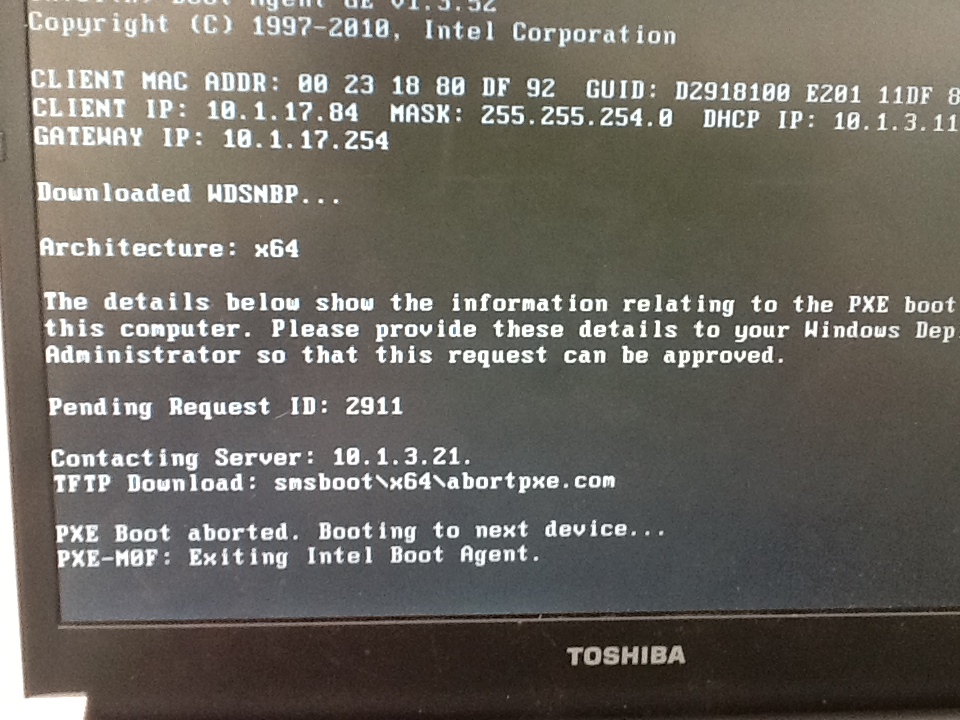
Been trying to reimage some of our laptops and have run into an issue, i've tried clearing the last advertisment to the laptops in question but thats aboout it as Im at a loss. The way we have circumvented this problem in the past is to attach the harddrive to another machine that we know works and image it, but I was wondering if there was a 'proper' fix to this issue. Any help here would be much appreciated.

-
Thanks for your responses and you were right this was as much about my learning as it was to be used in the work place.
-
this is what I got
-
Using [snmpwalk -v2c -On -c 'password here' 'Ip address here'] I have been able to find the OID for the device
-
Dont worry! Thanks for the input and pointers you've given me its been very helpful - i've gotten it further than I had it the day before yesterday (: I'm taking notes because i'll be using this as a work product xD - if i ever get this working I'll post exactly what i did for it to work on Ubuntu. I'm going to have a go at net-snmp to hunt down that OID then, wish me luck!
-
^im thinking that if you are correct in your hunch and it isn't being converted correctly it'd be simpler to cut out the middle man and use the number directly (only problem is I dont know that number)
-
./check_snmp -H 192.168.100.11 -C ****** -o .1.3.6.1.2.1.1.3.0 where you have the string of numbers after the "-o" what is that number called? do you think it would be better for me to set it up with that number as oppsoed to the ifOperStatus way? Is that number switch specific?
-
Here it is again, can you see it?
-
Using cd /usr/local/nagios/libexec ./check_snmp -H 10.1.3.40 -C ****** -o ifOperStatus.1 [ATTACH=CONFIG]17688[/ATTACH] These are the results
-
As you can see this has fixed the Uptime issues - which were red before and the error code for the ports has changed to "External command error: Error in packet" Any thoughts?