swpmre
-
Posts
116 -
Joined
-
Last visited
Content Type
Forums
News
20th
EduGeek EDIT Conference
Blogs
Everything posted by swpmre
-

Network storage question - how would you solve this?
swpmre replied to swpmre's topic in Wired Networks
Thanks for all the replies. I'd like to go the NAS box route, but that seems unlikely to happen due to the cost. We could create a new partition, but that might mean reimaging the classroom. Think we'll have to go the simple root of mapping a local area for each user, though I take the point that this means they always have to sit at the same PC. -
Network storage question - how would you solve this?
swpmre replied to swpmre's topic in Wired Networks
Hi, can't really answer the speed question easily, as this is a very wide area. The connection between this particular site and the File Print server is via various council connections, so it's a bit unpredictable. The building is physically around 12 miles away. The server storage disks are, from the specification SATA Models: Embedded SATA with integrated SATA RAID 0,1, SATA transfer rate 1.5Gbs Again, I suspect the limiting thing here is the slow network, rather than the drives. -
Hello everyone, Got a network query and wondered what others might do to solve this. Our network is used by Adult Education, so we have a number of different sites, with ICT classrooms across the city. We use Win Server 2008 and Active Directory. Because we have many different students doing lots of short courses, we don't assign specific logons, but generic logons at each site. These are very locked down. Students have access to some network shared drives, for saving work etc, but no access to local hard drives. One of our courses is on Photoshop. This requires students to edit very large image files. this is becoming impractical over the network - the files take too long to open / save and require enormous space to store. How can we let students edit these files, without allowing them to save to local drives. One solution might be to provide each student or PC with a USB hard disk. There are obvious cost issues and the drives might go walkies. Another might be some sort of NAS box, in the classroom. I've not got experience of this and worry that it is an expensive solution that might still be quite slow. Any other ideas? Anyone do something similar? Thanks in advance! Martin
-
Tearing my hair out over folder permissions in 2008
swpmre replied to swpmre's topic in Windows Server 2008
But the folders have been created by an administrator account. -
Tearing my hair out over folder permissions in 2008
swpmre replied to swpmre's topic in Windows Server 2008
Full Control, for this and sub-folders. -
Tearing my hair out over folder permissions in 2008
swpmre replied to swpmre's topic in Windows Server 2008
I've further noticed that even if I give explicit Read Only permissions to the user I am logged in as, I can still create / write files in that folder. -
Tearing my hair out over folder permissions in 2008
swpmre replied to swpmre's topic in Windows Server 2008
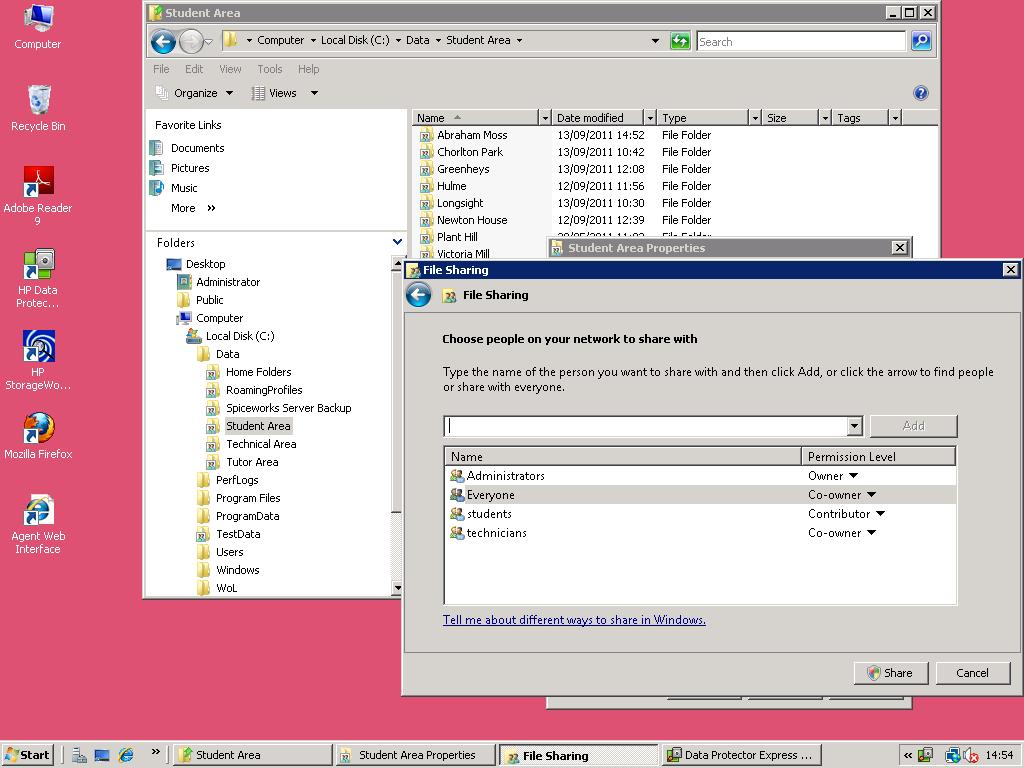
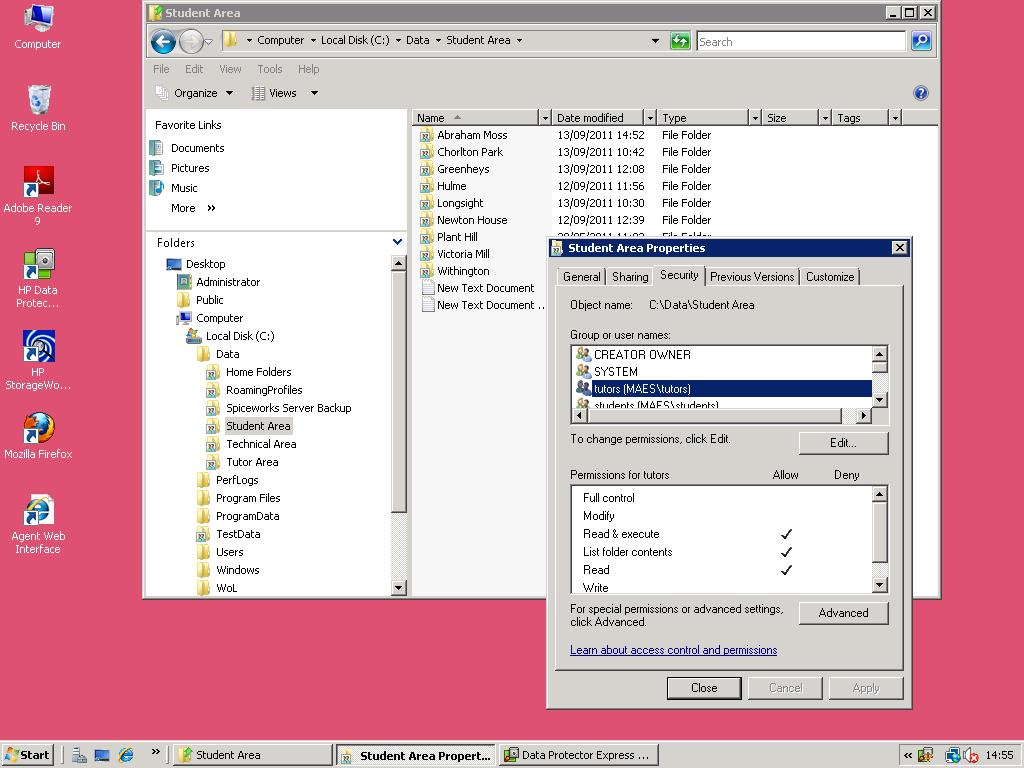
Ok, now I see what you mean. My mistake. I've done that. Instead of using the "Wizard" I have used the "advanced share". However this makes no difference at all. As it seems to me, I can either have (a) Read only access to the top level and all the sub-folders or (b) Read/Write etc access to the top level and all the sub-folders. Looking at this a different way. The ONLY thing that seems to effect the ability to Read or not Read is the Share permissions. the NTFS security settings seem to make NO difference on the top level shared folder. So I am back to asking, is it possible that for some reason AD is ignoring the security group that the tutor is part of? I just cannot believe it is so complex. Am I possibly missing something else? -
Tearing my hair out over folder permissions in 2008
swpmre replied to swpmre's topic in Windows Server 2008
Hi, We don't have Win 2008 R2, it's normal Win 2008. So we've not used the wizard. I've set up with Everyone having full share permissions and tried to control with NTFS, but it still doesn't work. See screenshots in my last post. -
Tearing my hair out over folder permissions in 2008
swpmre replied to swpmre's topic in Windows Server 2008
Thanks for the response and apologies for the delayed answer myself. Your description of the setup is correct and you spotted my mistake, I didn't mean a tutor folder, I meant a tutor security group in AD. Ok, I've tried your ideas. I set the top level folder to have SHARED permissions for EVERYONE to be Co-OWNER. I then restricted the permissions for the tutor AD security group (MAES\tutors) to be read-only. Yet despite this, when I logon as a user which is a member of the tutor group, I can create files in the top level folder. Note that to make these images I have used the STUDENT folder tree. This shows exactly the same behaviour and is setup identically to the TUTOR folders described before. A shared top level (in this case called Student Area) and within that Shared Folders for each centre. First image of the Shared Settings Second image of the security settings. Thanks for taking the time to look at this.
-
Tearing my hair out over folder permissions in 2008
swpmre replied to swpmre's topic in Windows Server 2008
Thanks for the response. I've tried that, and it still doesn't work. I've the tutor group permissions (shared: as co-owner) On the root of the share, I've given tutors NTFS permissions (set to this folder only) Traverse List Folder Read Attribs Read Extended Attribs Read Permissions Logging on as the tutor, I stil have write / delete / create access on the root. If I look at the EFFECTIVE permissions tab for that folder, when I look at the tutor group, the permissions are set correctly. However if I try to look for an individual user (indeed any user, staff, tutor or admin) I get the error "Windows cannot calculate effective permissions for [username]" So, I interpret this as meaning that for some reason, when I logon to the machine, my logon is not receiving proper permissions. -
Tearing my hair out over folder permissions in 2008
swpmre replied to swpmre's topic in Windows Server 2008
Could it be to do with the "Read Only" attribute on the properties dialog on the folder? Looking at KB articles about turning that off.... -
Tearing my hair out over folder permissions in 2008
swpmre replied to swpmre's topic in Windows Server 2008
EDIT: I answered that backwards. No. Well at least I think I explicitly turned that off. On the permissions for the sub-folders, the tutors group is set to "Full Control", "Not Inherited", "Apply to This folder, Subfolders & Files". -
Hopefully you guys can help me, I've got myself in a right muddle with some folder permissions on my Win Server 2008 / Windows XP network. Here's the setup. A top-level shared folder, called "staff". Contains several other shared folders called after our different sites. The reason the sub-folders are also shared, is that they are directly mapped for student, who are still using non-AD logons. I want everyone in the "tutors" group in AD to have read access to the top level, but not write/modify. I want them also to have full rights to the sub-folders. So, I've set the two types of sharing on the top level "staff" folder. In the File Sharing bit, the tutors group is set as READER. In the NTFS bit they have "Read & Exe, List, Read" rights. When I logon as a staff member (i.e. in the tutors folder) I can see the contents of the staff folder, access them, but not Read or Write. This is correct. I then set the permissions on the sub-folders, within Staff. In the File Sharing bit, I set the tutors group to be "Co-Owner" and in NTFS, I give them Full Control. If I now logon as Staff member I have correct rights for the top level staff folder, but cannot Write / Delete. It's like the top level is setting the rights for the lower levels, but I can't work out why. Any ideas?
-
Ah. Ok. That seems remarkably obvious now you point it out. Having looked at the "targeting" option on the mapping, I see that there is an option to do this on IP range. For our setup this might be better, any reasons why this might cause problems?
-
Further investigation has got some more info, which might be relevant. If I map a drive using preferences and apply it direct to an OU that is (say) a user group, the drive maps properly. It seems to not work if its applied to a OU that is a computer group. Is it possible that this is related? I'll investigate more.
-
Sorry, its Windows XP on the client and yes, Client Side Extensions are installed.
-
Hello all again, I'm trying to set up some mapped drives using Group Policies in Active Directory on Windows SErver 2008. I've created some logon scripts to map drives for particular user groups and these work fine. However I want to use Preferences to map some more drives for particular user groups and groups of computers. None of the drives I map like this work. I've run a RSOP and the output shows that while other things (such as security changes) in the GPO run, the drive maps don't. The way it is setup is that I have created a GPO for a particular Organisation Unit, which has a number of computers in it. I want to map drives to different locations dependent on each site (i.e. each different OU). Ideally, the drive will map for all users on a particular computer at a particular site. Despite following the technet guide, the mappings don't work. I can access the particular drive fine from the individual PCs and I can map the drives manually using exactly the same setup from the PC. Am I missing something obvious?
-
Problems creating a Domain Administrator Account in AD
swpmre replied to swpmre's topic in Windows Server 2008
Yeah, tried that too. I'm going to give up now. It is working on a client fine. Its only when I logon to the Domain Controller that I don't quite have full rights as I think I should have. So if I need to do certain things on the DC, I'll have to logon as the local administrator. Thanks everyone for your thoughts. -
Problems creating a Domain Administrator Account in AD
swpmre replied to swpmre's topic in Windows Server 2008
Hi sted, I understand that. But I am not getting any UAC prompts when logged on as the new administrator account on the DC. Even though the UAC is set to prompt for consent. -
Problems creating a Domain Administrator Account in AD
swpmre replied to swpmre's topic in Windows Server 2008
I haven't changed anything in secpol, so as far as I understand it, my rights should be correct? In UAC, behaviour for admin users is set to "prompt for consent". -
Problems creating a Domain Administrator Account in AD
swpmre replied to swpmre's topic in Windows Server 2008
Hi, There are no other active local policies. At the moment, I am not trying to logon to a client, I am only testing logging onto the DC. -
Problems creating a Domain Administrator Account in AD
swpmre replied to swpmre's topic in Windows Server 2008
Hi, Thanks for the response. I've run RSOP for both the new account and the default administrator accounts. There are no GP's being applied beyond the default Domain Policies. The response I get from RSOP is the same for the new admin account and the default admin account. Yet there are differences. Eg, if I go to Internet Options in IE, in the administrator account I can edit security settings, in the new admin account, I cannot. -
Hi, I am trying to create a Domain Administrator account so admins can logon to PCs and make changes. I've done this, by creating a new user on the DC in AD, then adding them to the "Domain Admins" group. However when I logon with this new account, I don't get full admin rights on the local machine OR on the DC - for instance, I can't change security settings in Internet Explorer. This is a fresh install of Windows Server 2008 Standard. There are no Group Policies that apply to this account (I've double checked) and no other restrictions that I can see. "Domain Admins" is definitely also a member of the Builtin/Administrators group. In order to check I've not gone mad, I've created another account using this very basic step by step video here YouTube - 𠊬reating a personal domain Administrator account Server 2008 - AD DS‬ And still I don't seem to have full local admin rights. Am I missing something obvious?
-
GPO not applying to organisation unit in Active Directory
swpmre replied to swpmre's topic in Windows Server 2008
Thanks FN-GN - That's the one. The laptop was not pointing to this server as the DNS. Seems to work ok now. Cheers everyone for all your positive and thoughtful suggestions. -
GPO not applying to organisation unit in Active Directory
swpmre replied to swpmre's topic in Windows Server 2008
Ah. No, made a minor change to the default domain policy and this hasn't been applied. Any ideas what this might indicate?