cher736
-
Posts
9 -
Joined
-
Last visited
Content Type
Forums
News
20th
EduGeek EDIT Conference
Blogs
Everything posted by cher736
-
When I download Postfix at ftp://ftp.is.co.za/networking/mail/mta/postfix/index.html the extension is tar.gz which is normally for linux is there not a windows one that you know of....
-
How do I check the queues or smtp logs what do I do to do that?
-
After Subject:Test I press Enter nothing happend. waited a while then I checked the junk mail box nothing there. This email does work with no problem I can send and receive normal emails with attachments but when I do it through telnet it does not want to work and in moodle it does not want to work.. Thanks again Regards Cheryl
-
No it did not show anything in my email or in cmd
-
Hi there I realised I had done something wrong so this is now what I did and the replies I got back. 220 rrba-ip-smtp-2-3.saix.net ESMTP Postfix Helo smtp.dsl.telkomsa.net 25 250 rrba-ip-smtp-2-3.saix.net mail from:[email protected] 250 2.1.0 Ok rcpt to: [email protected] 250 2.1.5 Ok Data 354 End data with . Subject:Test . This is a test message you will not see a response from this command. . 250 2.0.0 Ok: queued as A69101F63
-
I tried the telnet commands and this is a screenshot of what I got. I also set Moodle to smtp.dsl.telkomsa.net What else do I need to do. I tried again to set up account pretending to be a student in Moodle on the login screen and itsaid SMTP Error: Could not authenticate. ERROR: SMTP Error: Could not authenticate. SMTP server error: 5.5.2 Error: command not recognized Thank you Cheryl

-
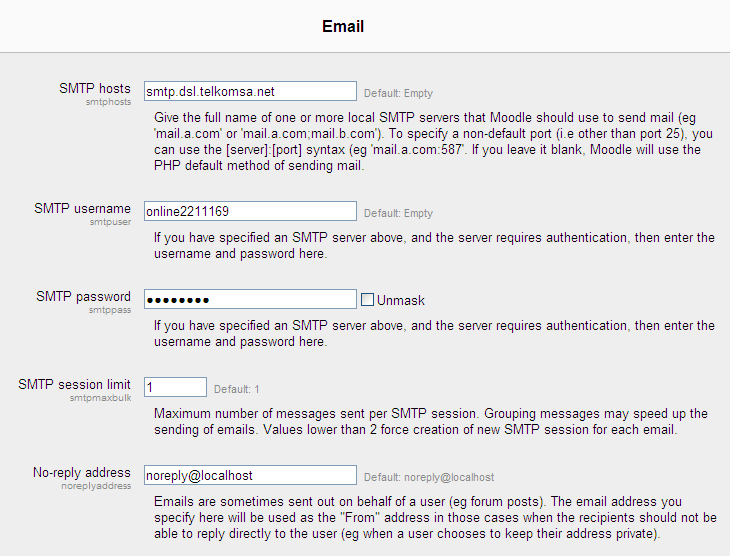
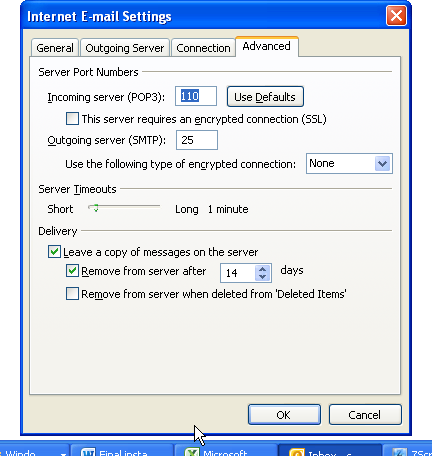
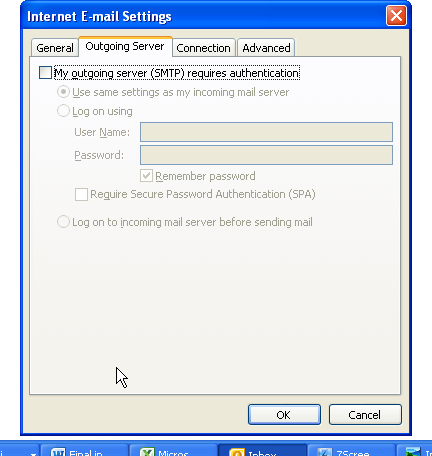
Hallo there The system I am using is windows xp sp2. The email works fine in microsoft outlook I do not use microsoft exchange. With these email settings I sent you. I sent you a screenshot of moodle to show you what I had typed in there for...smtp which is also used for the outlook email, which is smtp.dsl.telkomsa.net and my pop3 is pop3.telkomsa.net. What must i put in moodle 2.03 for email to work or how should I go about it? I am running moodle for windows as a localhost from pc. Yes it is the first time I am trying to set up moodle any help would be appreciated. Thank you
-
Thank you so much for your reply I appreciate it. I am new to this but I cannot get the email sorted out yet. Yes my smtp is smtp.dls.telkomsa.net What do you mean about allowing moodle to relay off this host. Could you walk me through the steps please. where do I check the logs on smtp.dsl.telkomsa.net and see what smtp logs are saying. do I have to change anything in php mailer Thank you again for helping me.
-
Hallo there I have been trying to find out how to set my email in Moodle 2. I am new to Moodle I like it very much and how you can make the quizzes and courses. My problem is when a student creates account it says message failed. Under Server and email I have set it like this. smtp hosts: smtp.dsl.telkomsa.net username: online2212355 Password: for email: ****** Everytime I create account for a new user pretending to be student to test the email it says message failed cannot send. Why is this? Thank you Regards Cheryl