NETKILLER
-
Posts
39 -
Joined
-
Last visited
About NETKILLER

-
issue resolved will try and put up how when i can
-
I am in the middle of setting up office365 for student access only. At the moment I have added the parent and the sub domain and have created some test users on the sub domain and they work fine with each other and other @DomAin accounts. However when I email the parent domain from an office365 sub domain account, it does not work. Error message Your message to “[email protected]” couldn't be delivered. parentusername wasn't found at parentdomain.org subdomainusername Office 365 parentusername Unknown TO address How to Fix It The address may be misspelled or may not exist. Try the following: • Retype the email address then resend the message. • Clear the recipient nickname cache in Outlook or Outlook Web App by following the steps in this article: NDR Response Code 5.1.10 in Exchange Online and Office 365. • Contact the recipient (by phone or instant messaging, for example) to check that the address is correct. • The recipient may have set up mail forwarding to an incorrect address. Ask them to check that any forwarding they've set up is working correctly. If the problem continues, forward this message to your email admin. I don’t want to set up office hybrid at the moment, so my question is, is there a way to setup some kind of mail flow or redirect for all “[email protected]” to our existing external mail filtering system?
-
The two factor authentication is still there the way i have it is the user goes to the url logs on with there system account and selects sims whitch then runs the full version of sims that then asks them for the password for sims. printing wise will have to run tests on that makeing sure they can not print anything at home from sims thank you for the advise
-
Hey I am looking to add SIMS to my RDweb solution, but I am thinking is there any safeguarding issues that I need to look out for and/or make sure are met? Any feedback will help Thank you
-
hey all I have fixed it. replace the for each with the following For Each objFile in colFiles Set objOption = Document.createElement("OPTION") objOption.Text = objFile.Name objOption.Value = objFile.Name mylistbox.Add(objOption) Next hope this helps some one and thank you for your reply Steve21
-
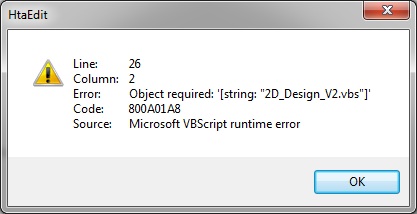
hi all I am working on making a list box in HTA making a manual list box is fine, making the list box that builds it self again fine but what I am trying to do is list all files in a folder and then use that info in the list box. this is what i have at this point My HTML application APPLICATIONNAME="My HTML application" ID="MyHTMLapplication" VERSION="1.0"/> Sub Window_OnLoad Dim FolderPath 'folder to be searched for files Dim objFSO Dim objFolder Dim colFiles Dim objFile Dim objOption FolderPath = "\\server\installscripts$" Set objFSO = CreateObject("Scripting.FileSystemObject") Set objFolder = objFSO.GetFolder(FolderPath) Set colFiles = objFolder.Files For Each objFile in colFiles Set objOption = objFile.Name objOption.text = objFile.Name objOption.Value = objFile.Name mylistbox.Add(objOption) Next End Sub the error i am getting is thank you

-
hey thank you all for your help i have come across this ExecuteGlobal, this looks to do what i want so will work on this
-
Hey all I have been able to write a script that will read the file and write variables; however I have come to the sad conclusion that I would still have to make changes to all the scripts if I was to add to the txt file, is there a “include” command / function in vbscript that works like in PHP? I will be doing a bit of searching to try and find out but if you can help Than kyou
-
Unfortunately ChrisH the txt file may change in the future and if it does then I would be back to square one of changing all the scripts, but thank you
-
thinking about it the values to the right of the = will not change but the values to the leeft of the = will not sure if i have made that clear very late and very tired
-
there are a lots of scripts so any change would mean lots of changes to the scripts the lines in the txt files would change / get added to over time and development so i would need the script to read / test the value to the right of the = and use the value to the left of the = as the variable each time to get the new value or current values. thank you
-
Hi Need some help? Need a vbscript to read a txt file and use the info in it as variables in the script. Example of txt file is below Package_location=\\server\packages SYSusername=sysbob SYSpassword=654321 DBlocation=DBserver DBUsername=dbbob SYSpassword=123456 I have got this script but not sure how to get it to do what I want to Const ForReading = 1 Set objFSO = CreateObject("Scripting.FileSystemObject") Set objTextFile = objFSO.OpenTextFile _ ("c:\scripts\name and value.txt", ForReading) Do Until objTextFile.AtEndOfStream strNextLine = objTextFile.Readline arrServiceList = Split(strNextLine , "=") Wscript.Echo "name: " & arrServiceList(0) For i = 1 to Ubound(arrServiceList) Wscript.Echo "value: " & arrServiceList(i) Next Loop What this does is loop through the txt file and displays it in an echo box So reading the first line it would show name: Package_location and then value:\\server\packages what I need it to do is take the value from let’s say Package_location and set that a variable, Hope this is clear thank you for any help you can provide
-
hey thank you but i have found what i cam looking for from Windows System Error Codes (exit codes) Description | Symantec Connect Community Dim oShell, MyApp, i Set oShell = CreateObject("WScript.Shell") MyApp = "msiexec /i \\server\software\mysql-5.5.15-winx64.msi /quiet /log \\server\software\mysql-5.5.15-winx64.txt" i = 0 i = oShell.Run(MyApp, 1 ,True) WScript.Echo "Exit Code is: " & (i) Set oShell = Nothing
-
hi i use this script to install my software Option Explicit Dim strComputer, objNetwork, wshshell Dim PCname Set objNetwork = WScript.CreateObject("WScript.Network") PCname = objNetwork.ComputerName Set WshShell = WScript.CreateObject("WScript.Shell") WshShell.Run "msiexec /i \\server\packages$\eset_client\esetclientwithconfigv2.msi /quiet /log \\server\packageinstalllogs$\" & PCname & "\eset_client.txt",0,True WScript.Quit using the /log switch built in to the msiexec i can get a log file telling me if it has worked or not but what i want to do is grab result code and echo the result any ideas how to do this thank you
-
please find below the script that will search in files for a string value in folder and its sub folders Dim FSO, LogFile, rdFile Dim bFound, srtContents, installed Set FSO = CreateObject ("Scripting.FileSystemObject") 'This part of the code will get the current date and time this 'will be used for adding to the log file name so to create a unique name 'So that the name can conform to windows name convention 'it will then proceed to remove the / in the date and then the : in the time 'this will then leave you with the following DDMMYYYY HHMMSS 'start of date and time formatting 'gets the current system time and date datentime = Now() 'removes the / from the date part of the string dateformated = Replace(datentime, "/", "") 'removes the : from the time part of the string datentimeformated = Replace(dateformated, ":", "") 'end of date and time formatting 'set the server and package log locations here 'set server server = "server name" 'set package log location packagelogs = "packageinstalllogs$" 'this uses the preset server and package log location from above objStartFolder = "\\" & server & "\" & packagelogs 'set the location of the applogchecker log file ' applogcheckerlocation = "appdeployment\applogchecker" Set LogFile = FSO.CreateTextFile("\\" & server & "\" & applogcheckerlocation & "\appinstallcheckerlog" & " " & datentimeformated & ".txt",True) Set objFolder = FSO.GetFolder(objStartFolder) LogFile.writeLine objFolder.Path Set colFiles = objFolder.Files For Each objFile in colFiles LogFile.writeLine objFile.Name Next LogFile.writeLine Echo ShowSubfolders FSO.GetFolder(objStartFolder) Sub ShowSubFolders(Folder) For Each Subfolder in Folder.SubFolders LogFile.writeLine Subfolder.Path Set objFolder = FSO.GetFolder(Subfolder.Path) Set colFiles = objFolder.Files For Each objFile in colFiles LogFile.Write Subfolder.Path & objFile.Name Set rdFile = FSO.OpenTextFile(objFile.Path, 1, TristateFalse, -1) bFound = "False" installed = "success or error status: 0." Do Until rdFile.AtEndOfStream srtContents = rdFile.ReadLine If inStr(1, srtContents, installed) > 0 Then bFound = "True" Exit Do end If Loop rdFile.Close if bFound = "True" Then LogFile.Write ", Yes" & Chr(10) LogFile.WriteLine Echo else LogFile.Write ", No" & Chr(10) LogFile.WriteLine Echo end if Next LogFile.writeLine Echo ShowSubFolders Subfolder Next End Sub WScript.Echo "log complete"