tom84
-
Posts
8 -
Joined
-
Last visited
Content Type
Forums
News
20th
EduGeek EDIT Conference
Blogs
Everything posted by tom84
-
Steve, you've picked up on a good point. I've decided to deploy both printers via one .VBS with the original code I posted- which works great. Having thought about it further, I don't need to get that granular with group policy. If they need one they'll want the other (basically one is single sided and one is duplex). mac_shinobi, let me know if you remember anymore Thanks for your efforts.
-
I'll rephrase! It only seems to install 1 printer per login, and it isn't always the same printer out of the 2 applied via GPO. E.G Sometimes it'll connect Printer1 on 1st logon, then if I logoff/logon it'll connect to Printer2. Sometimes it'll connect Printer2 on 1st logon, then if iI logoff/logon it'll connect to Printer1. I don't see any errors or reasons as to why.
-
Just the 32bit drivers, as both server and client OS are 32bit.
-
Sure: Set WshNetwork = CreateObject("WScript.Network") WshNetwork.AddWindowsPrinterConnection "\\dc1\3rd Floor - 1 DUPLEX" I've creating a separate GPO per printer, and I'm testing in an OU with two GPOs applied at the moment. I can consistently replicate this by removing both printers + driver. First logon installs 1 of the printers, 2nd logon installs the next and I seem to be getting this regardless of deployment method (pushprinterconnections.exe or .vbs).
-
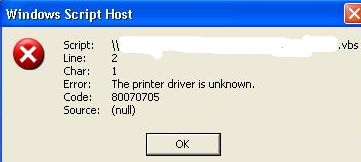
All Trying to deploy printers via group policy. Background: 2003 R2 with all printers installed and shared, clients XP SP3 I've tried using pushprinterconnections.exe with 2003 R2 Printer console but the results are far from consistent (sometimes it took two reboots to add all printers, sometimes it just didn't add them), so I thought I'd switch to a simple .vbs script: Add a Printer Connection This gives a similar experience. If I have two GPOs each with a single printer, it takes two logins for them both to be added. Any ideas? The XP machines don't have CSE installed yet, so I can't use GPP. Ignore the attached image, I seem to have resolved that.

-
Mods please delete
-
Haven't had the issue since I made the changes above!
-
Found this thread last night after troubleshooting one of our file servers (2k3 Datacenter). It had been running fine for months until I moved our main fileshare and files across to it, I've been seeing random lockouts at different times in the day. I can telnet to SMB/RDP and ping the guest (it's running under vSphere) but these services are unresponsive. I also can't login via the vSphere console. I've upgraded to nod32 v.4.2.35.0 from 4.0.474.0, followed the exclusions/tweak guide as outlined by NOD32. I'll let you know how I get on...