

Office 2010 , Windows 7 and OWA

Entry posted by kevin_lane
19,661 views
Hello and welcome to another one of my blogs.
Now after spending hours looking at group policy and scowling the internet for a solution I finally cracked it. The problem is when you try and view an attached from excel and power point presentation, the excel file would say "this is corrupt" and when trying to view a power point it wasn’t able to open it and wanted you to try and repair it.
The settings that needed to be apply on the GPO, which is applied to our teaching staff and pupils (enforced)
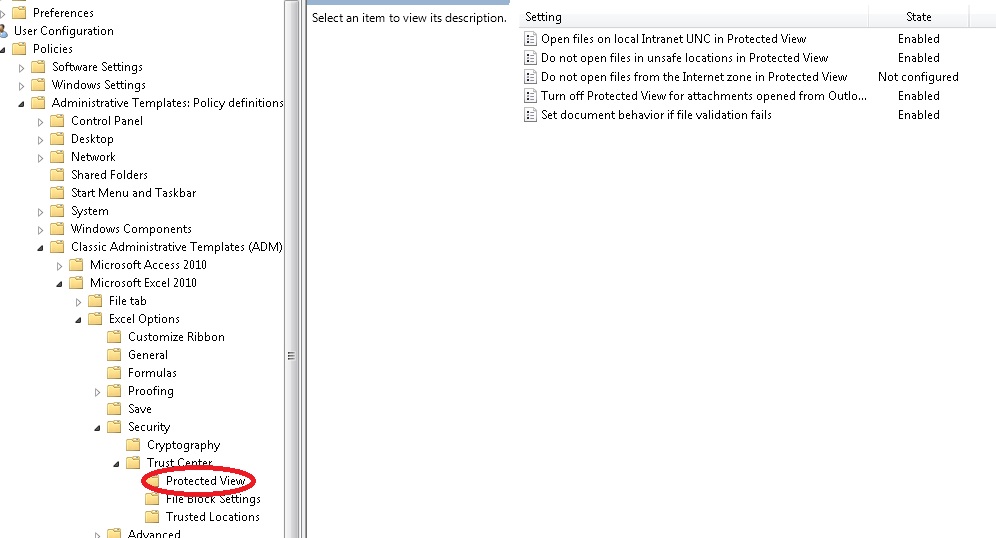
you will also need to apply them for the power point level as well.
what’s even more strange now looking back at the settings, is in the trust center under protected view these are the settings that are applied now.
"Enable Protected View for files originating from the internet" = Ticked
"Enable Protected view for file located in potentially unsafe locations" = greyed out and Un-ticked
"Enable Protected View for Outlook attachments" = greyed out and Un-ticked
Strange
were as before I un-ticked the 3 tick boxes and went through each one by one it didn’t make a difference, until it worked when nothing was selected strange
no matter how I placed the user or computer account the issue would not go away, however for some reason it work on windows xp how strange
conclusion
I officially hate office 2010 lol for the time being but i must say that trust centre was a hard one to crack. but hey I guess if it was going to be easy then I’m in the wrong job. Now im off home to have a well-earned cup of tea
0 Comments
Recommended Comments
There are no comments to display.
Create an account or sign in to comment
You need to be a member in order to leave a comment
Create an account
Sign up for a new account in our community. It's easy!
Register a new accountSign in
Already have an account? Sign in here.
Sign In Now