

Refurbished Vs New - How much Laptop does your money get you?

Entry posted by ICTDirect_Joe in Laptops
261 views
So, you’ve got a budget of £350 per laptop and you’re weighing up whether it’s better to buy new or buy refurbished. Right now, HP have got some cracking deals on. You can pick up a brand-new, and imaginatively named, HP Laptop 14” with Windows 11 for around £340 ex.VAT. Meanwhile, at ICT Direct we’ve got a refurbished HP 14” Windows 11 laptop priced at £310 ex.VAT.
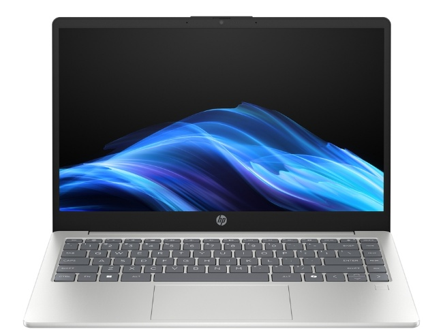
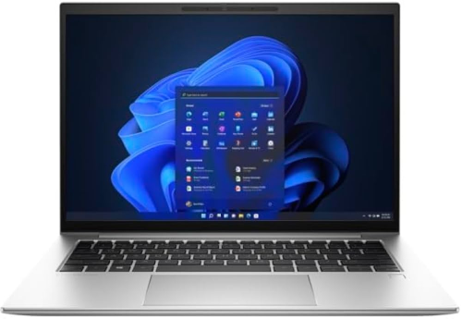
(Left/Top) NEW HP Laptop 14" (14-ep1010nax) £340.83 ex.VAT | (Right/Bottom) REFURBISHED HP Elitebook 840 G9 £310 ex.VAT
£30 more for a brand-new laptop? It’s surely a no brainer, right? They have the same size screen, they both have Intel CPU’s, 8GB of RAM, 256GB of storage. At first glance, they’re almost identical, and even photos of them look the same. But one is a 4-year old business class laptop, and the other is a brand-new consumer laptop.
So, for comparison’s sake, let’s throw in the most affordable, new, HP Business-Class laptop money can buy too, again with an Intel Processor, 8GB of RAM and 256GB Storage:
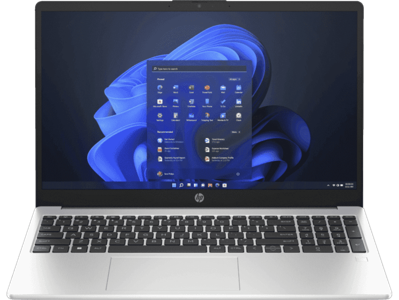
NEW HP 250R G10 £555.99 ex.VAT
Eek! That price is a fair way beyond our budget! All because we added “business-class” to the description? This is taken from Misco’s website, as HP are only selling their most premium business class devices directly, but it is still a readily available budget business device. Unlike the other 2 devices, this has a 15.6” screen – the new 14” business-class laptops available all cost more than this, so I deemed the 250R a good comparison machine regardless.
Somehow, you have to navigate which of these options is actually best value for money, so I’ve thrown them head-to-head (to-head?) in a breakdown based purely off HP’s datasheet’s and website, and third-party CPU performance benchmarks, and ranked them 1st, 2nd and 3rd.
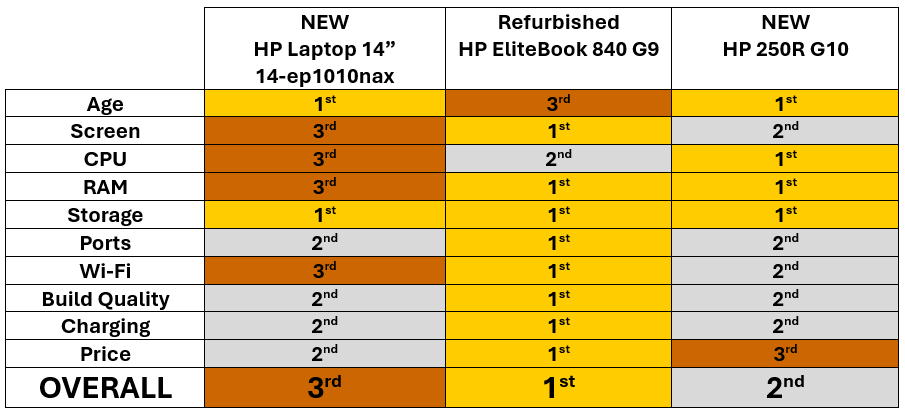

Surprise, surprise – in a blog written by a refurbished IT Salesperson, the refurb unit wins! So, don’t just take my word for it based on this chart alone, let’s get into the details of what this all means.
Screen:
|
NEW |
Refurbished |
NEW HP 250R G10 |
|
14” 1366x768 TN Panel 3rd |
14” 1920x1200 IPS 1st |
15.6” 1920x1080 IPS 2nd |
The HP Laptop 14” is the biggest loser here – IPS displays are far superior to TN Panels, and the Refurb 830 G9 unit pips the 250R with its extra screen real-estate, pixel density and much brighter screen. In fact, it has over double the number of pixels of the HP Laptop 14”! As I mentioned the 250R does have the larger display and if that is important to you, then it’s worth keeping in mind.
CPU:
|
NEW |
Refurbished |
NEW HP 250R G10 |
|
Intel Core 3 – 100U 3rd |
Intel Core i5 – 1245U |
Intel Core 5 – 120U |
This turned out to be very close; there is not a lot of difference between these three. They all have a TDP of 15W; both the Core 5 and i5 have 10 cores and 12 threads; both the newer CPUs Turbo higher, but the Refurb has the higher base clock speed. Based on comparisons on cpubenchmark.net and technical.city, these are our results.
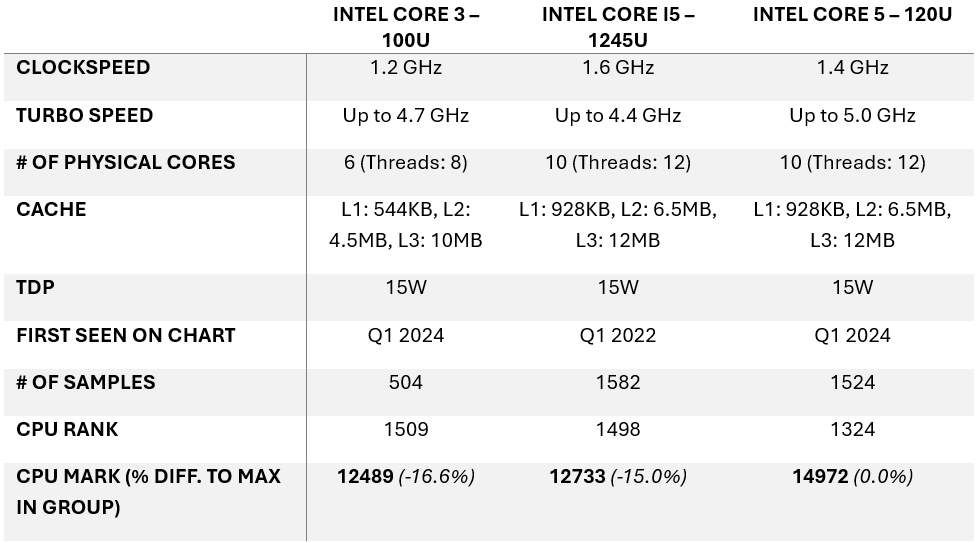
Table data taken directly from https://www.cpubenchmark.net/compare/5948vs4733vs5892/Intel-3-100U-vs-Intel-i5-1245U-vs-Intel-5-120U
RAM:
|
NEW |
Refurbished |
NEW HP 250R G10 |
|
8GB DDR4 3200MT/s 2nd |
8GB DDR5 4800MT/s |
8GB DDR5 5600MT/s |
Another clear loser here – despite being 4 years newer than the 840 G9, the New HP Laptop 14” is using slower DDR4 memory, plus it’s not upgradable and is soldered to the motherboard! Given the RAM shortages of 2025/26 this is a tactical way to keep costs down. The 2 business-class devices are tied in 1st place as they both use much faster DDR5. If you need 64GB of RAM, the 840 G9 wins. If you don’t, the 250R supports faster RAM, so comes out on top.
Storage:
A 3-way tie! They all have 256GB M.2 NVMe drives, they’re all user-upgradable, they all support PCIe Gen 4.
Ports:
|
NEW |
Refurbished |
NEW HP 250R G10 |
|
1x USB Type-C (10Gbps, Power Delivery, DisplayPort 1.4b) 1x HDMI 1.4b Joint 2nd |
2x Thunderbolt 4 USB Type-C (40Gbps, PD, DisplayPort 1.4b)
1x HDMI 2.0 |
1x USB Type-C (10Gbps, Power Delivery, DisplayPort 1.4b)
1x HDMI 1.4b |
They all have 2x USB Type-A (5Gbps) ports, and they all have a headphone/microphone jack too. But the 840 G9 has the higher spec HDMI port, and 2x Thunderbolt 4 ports, that’s double the USB-C and quadruple the speed in each!
Wi-Fi:
|
NEW |
Refurbished |
NEW HP 250R G10 |
|
Realtek Wi-Fi 6 3rd |
Intel AX211 Wi-Fi 6e |
Intel AX201 Wi-Fi 6 |
This one is straight forward. Intel Wi-Fi cards are better (and more expensive) than Realtek ones, and Wi-Fi 6e can support faster speeds than Wi-Fi 6. HP don't actually do us the courtesy of including what model of Wi-Fi card the Realtek one is!
Build Quality:
|
NEW |
Refurbished |
NEW HP 250R G10 |
|
Plastic Chassis Joint 2nd |
All-aluminium chassis |
Plastic Chassis |
Both new laptops are built of plastic – they’ve got a lovely silver coat of paint to look much like their EliteBook counterpart, but the 840 G9 is all Aluminium and built to last. It’s a premium feeling product, and there’s no paint to chip off.
Charging:
|
NEW |
Refurbished |
NEW HP 250R G10 |
|
45 W AC power adapter (recommended, sold separately Joint 2nd |
45 W AC power adapter 1st |
45 W AC power adapter (recommended, sold separately Joint 2nd |
I honestly hadn’t realised the whole laptop market was onboard with charging extra for power supplies and lucky for you, ICT Direct still isn’t onboard with it. All our laptops come with a charging brick.
Price:
|
HP Laptop 14” |
HP EliteBook 840 G9 |
HP 250R G10 |
|
NEW RRP: £499.17 Offer Price: £340.83 |
NEW RRP: £1000 Our Price: £310 |
NEW RRP: £555.99 Misco Price: £555.99 |
The RRP should tell you all you need to know – it may be 4 years old but the 840 G9 was valued at around the price of the other 2 laptops combined. It remains a top-end business class laptop, and the clear winner. HP’s top-end laptops today will set you back at least £1000, if not more, but they’re designed to last. That’s why we provide a 3-year Advance Replace Warranty to our managed customers, also included in the price, rather than as a paid return-to-base add-on from new.
So, is the EliteBook 840 G9 the best offering for you? It’s the cheapest, and it wins by far the most categories when put head-to-head against new alternatives. It’s the toughest, with an aluminium chassis designed to survive the daily combat of school warfare. It’s easily customisable both at purchase and once in your hands – we can configure it to more RAM, or a larger NVMe; or you can upgrade it yourself further along the line. It feels daft to be typing this but... IT COMES WITH A CHARGER.
There is only one more question to ask.
How many can I put you down for?
Edited by ICTDirect_Joe
-
 1
1
0 Comments
Recommended Comments
There are no comments to display.
Create an account or sign in to comment
You need to be a member in order to leave a comment
Create an account
Sign up for a new account in our community. It's easy!
Register a new accountSign in
Already have an account? Sign in here.
Sign In Now