

Lesson Monitor capabilities - for reference

As has been said above, it's easy to do in SIMS and makes sense to keep the info tied in to the student's record.
Some screen shots so you can visualise it.
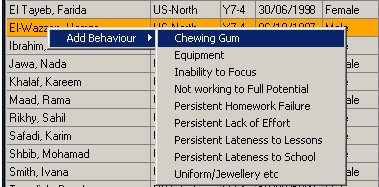
We only use these quick clicks for behaviour (i.e. negative behaviour) at the moment:
For achievements you'd get a similar menu to this one.
All you have to do is set up your behaviour / achievement types, and give them a points value.
It uses the regular behaviour management engine from SIMS and creates the normal record just without the form filling. If the teacher then wanted to add notes or further info, they could go into the incident manually.
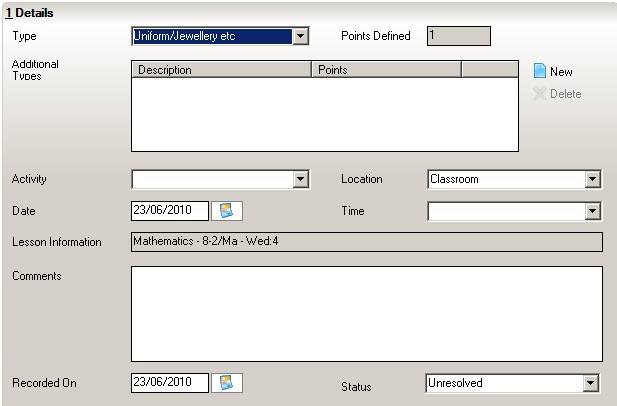
The basic info is like this, with a really useful lesson information field:
The field is reportable and comes up as 3 separate fields with a drop down box, showing all your subjects / all the classes in your system, so it's very powerful. Period is the only free text field, but should be fixed by your system e.g. Wed: 4
The only thing i think you should investigate is the combination of these points. SIMs show these separately, behaviour / achievement. We don't combine these, but i know other schools do, and there are reports that will do that for you. I don't know if SIMS can do an overall figure for you, but depending on what end result you want, you may have to tweak how you implement the system. So instead of a -1 for bad behaviour, they get 1 behaviour point, and this would cancel out a 1 achievement point. I'm not really sure but there's quite a bit on supportnet regarding this and using pivot tables etc, so it's defo usable and hopefully prevents you from writing an app.
)
 )
)
0 Comments
Recommended Comments
There are no comments to display.
Create an account or sign in to comment
You need to be a member in order to leave a comment
Create an account
Sign up for a new account in our community. It's easy!
Register a new accountSign in
Already have an account? Sign in here.
Sign In Now