PaulO99
-
Posts
52 -
Joined
-
Last visited
Content Type
Forums
News
20th
EduGeek EDIT Conference
Blogs
Everything posted by PaulO99
-
Decommissioning Exchange 2003 after Exchange 2010 Install
PaulO99 replied to PaulO99's topic in Enterprise Software
I have uninstalled Exchange 2003, mail is still flowing to and from Exchange 2010 but Exchange 2010 still thinks 2003 exists when running the analyser. What have I failed to do? -
Decommissioning Exchange 2003 after Exchange 2010 Install
PaulO99 replied to PaulO99's topic in Enterprise Software
sukh, I fear I still need your assistance if possible. Items 1 & 2 from the original post are still as was, although I will try and uninstall Exchange 2003 tomorrow. Regards, -
Decommissioning Exchange 2003 after Exchange 2010 Install
PaulO99 replied to PaulO99's topic in Enterprise Software
I have cleared Item 3. The 2003 Connector has be deleted and outgoing emails are still outgoing. Many Thanks -
Decommissioning Exchange 2003 after Exchange 2010 Install
PaulO99 replied to PaulO99's topic in Enterprise Software
1. PF1-EX01 is 2010 2. At present only 1 2010 server 3. Will do -
Decommissioning Exchange 2003 after Exchange 2010 Install
PaulO99 replied to PaulO99's topic in Enterprise Software
1. I have attached view of another PF. Dates relate to a reboot of the exchange 2003 server when I lost outgoing mail 2. There are no users of Outlook 2003. They have all be moved to Outlook 2010 3. Will PM you the result 4. I only need one for the internet. I assumed the other was to do with Exch 2003. I have tried disabling via EMC but it wouldn't let me, so I will have to try the delete. I will PM the result of the script.
-
Decommissioning Exchange 2003 after Exchange 2010 Install
PaulO99 replied to PaulO99's topic in Enterprise Software
1. Both 2010 send connectors use * as address space 2. Both use DNS for routing 3. PF were replicated as part of install of 2010 but because of issues with replication and because users were still using Outlook 2003 I went no further 4. See attachments 5. 2010 PF is 776Mb, 2003 PF is 171Mb 6. I used the ESM Many Thanks for your assistance. pf.txt
-
Decommissioning Exchange 2003 after Exchange 2010 Install
PaulO99 replied to PaulO99's topic in Enterprise Software
1. There are 2 send connectors, identical except that one has the new exchange server defined as 'Source Server' while the other has no source server defined. 2. GFI uses public folders but I have reinstalled it and assumed it created PF in exchange 2010 from scratch. -
During the school summer break I have (with support and advice from this forum) upgraded our system to 2008 R2 and installed Exchange 2010 to the point including Move Public Folder Replicas. I have now finally moved all users to Outlook 2010 and so want to remove all traces of Exchange 2003. So appears to begin my problems. 1 - Public Folders is not empty and when I try to repeat Move Replicas I get an access denied message (see attached Public Folders) 2 - The old exchange server is still identified as a Master (see attached Master 2) 3 - To see what would happen, I stopped all exchange services on the old exchange server. Mail was still received from external and was correctly sending / receiving internally but the system would not send to external. AFAIK I have set up the connectors correctly during the changeover but I am at a loss as to what the problem is although I'm sure it is Connector related. Unless it is my impatience and once PF and RUS is all resolved then the system will function correctly. (see atached Connectors) What can I do to resolve the issues. All advice gratefully received. PS. I get no errors when running the Exchange Analyser on my Exchange 2010 server.
-
Exchange 2003 to Exchange 2010 Migration - Final Issues
PaulO99 replied to PaulO99's topic in Enterprise Software
Thanks for the response sukh. 1 - We haven't used PF with Exch 2003 2 - There is no data that we require 3 - There are still Outlook 2003 clients but they are be upgraded to Windows 7 / Outlook 2010 Do we need to keep the PF database because Outlook 2003 requires free/busy or because we might be using free/busy? Regards, PaulO99 -
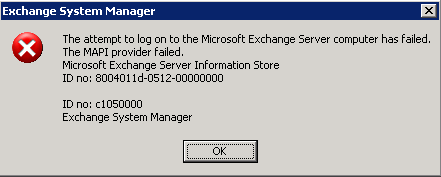
Thanks to the excellent support from this forum (Sukh) I have completed most of the migration successfully. However, I am stuggling to complete the final elements beacuse I cannot move the Public Folder replicas. When I attempt the move I get an error that The MAPI provider failed because of a log on failure (see attachment) Is it possible to just 'cut the ties' between Exchange 2010 and Exchange 2003 as I don't need the existing public folders and what would I need to do? If not, how can I overcome this issue? Thanks and Regards, PaulO99
-
Many thanks to sukh and his colleagues, but espcially to sukh, for the help installing Exchange 2010 onto our 2003 domain. The solution was to move ISA Server 2004 off of the domain controller (it has been working successfully for 5 years) to another server although that did introduce issues with the ISA configuration (I initially lost access to the internet due NIC configuration and firewall rules). Once that was resolved and with judicial use of dcdiag, repadmin and netdiag I was able to complete the pre-checks successfully. I made use of the very helpful screencasts from Net-o-Meter to carry out the Exchange 2010 install and Stage 1 (mail services are still running through 2003) was completed yesterday. Final stage to go - to be fully 2008 R2. My thanks again, I wouldn't have done it without the help from the EduGeek experts.
-
For sukh I have attached a password protected zip file containing the latest log files. Password as before. Diagnostic Logs.zip
-
I have attached a password protected zip file containing the log files. I will PM the password to you. Diagnostic Logs.zip
-
The setup was inherited and as well as being a DC there are 2 Nics, 1 Lan, 1 Wan connected to the ADSL Modem.
-
1. It is the firewall software used by the school but I was coming round to the idea of isolating the system from the outside world by temporarily disabling ISA, carrying out the necessary diagnostics, resolving issues (although I would be unable to seek assistance from the www) and then completing the migration. 2. Thanks for the offer, I will take you up on that.
-
I am making advances but it is like pulling teeth!!!!! I have carried out the DNS diagnostics completed with errors but resolved as below and I have completed Replication diagnostics also completed with errors but resolved as below. But then.......this is the short story. I am in the process of migrating Exchange 2003 to Exchange 2010 and part of that process is to carry out checks on Active Directory and File Replication. I have 2 domain controllers, one also has ISA 2004 and the other also has Exchange 2003 (I inherited the configuration) The first command tested DNS for both servers. 'dcdiag /test:dns /e /v /f:logfile' It failed because the ISA 2004 machine was not accepting RCP protocol due to the default RCP Filter being enabled. I found a Microsoft Knowledgebase article that said the resolution was to install ISA 2004 SP1. I installed SP3 (latest service pack) but the problem was still there. I disabled the default RCP Filter and and then the command completed with no errors. The next command tested replication for both servers 'repadmin /showrepl * >logfile' It failed because of RPC issues between servers. As a shortcut test I used 'ntfrsutl version which was successful from the Exchange server but not from the ISA 2004 server. While looking at ISA 2004 Firewall Client Settings I found the following 'rpcss disable set to 1. According to Microsoft TechNet numerous services depend on 'rpcss' so I set 'rpcss disable to 0 (hopefully enable). However the 'ntfrs' command still failed from ISA 2004 server until I enabled the ISA 2004 Server default RPC Filter. Then the 'ntfrs' command worked from either machine. My joy was short lived because when I retried the 'dcdiag' command it failed as before. What is going on, what do I have to do in order to resolve this problem? Somebody................please
-
Will do. Many thanks. Paul
-
Many thanks for the reply sukh. I don't need to answer all the questions because suggestion 3 has identified that our ISA 2004 software is the problem. I did not realise there was an inbuilt RPC Filter which once disabled (only option available) allowed me to use computer management to access remote machines. The dcdiag command 'dcdiag /test:dns /e /v /f:logfile' now completes successfully from either domain controller. Disabling the RPC Filter is only a workaround and implementing the Microsoft resolution (update to latest ISA 2004 service pack) has not resolved the basic problem which is an issue with ISA 2004 and RPC Server. Adding firewall rules does not make any difference either. Hopefully though, I will be able to continue with the upgrade from Exchange 2003 to Exchange 2010 (as an aside do I need to ensure Exchange 2003 is at latest service pack?) Thanks again sukh.
-
I am in the process of upgrading our Exchange 2003 to Exchange 2010. As part of that process I am running "dcdiag /test:dns" etc. I have 2 DC and whichever machine I run the diagnostic from the other machine will fail at the 'Basic' test stage. Initially the problem was flagged up as 'WMI' not implemented but after resolving that I have a 'WMI Successfully Installed' message displayed. However, I now get the error message 'Win32: RPC Server not Available'. Using Computer Management I can successfully connect to a remote server but cannot get data. If I use a workstation to remotely connect I can only get success from another workstation not the servers. From the servers I cannot get any success. I have been trawling the net all day but seem to be no closer to identifying the problem. Have any of you any new ideas? Thanks and Regards
-
sukh, I'm sorry I haven't replied earlier but I have been 'up to my ears' in rack components in preparation for the changeover. Many thanks for your advice and as you say 'quite a bit to think about'. There are moments when I think I have a clear picture in my head and then the 'fog rolls in'. PaulO99
-
I am preparing to replace our existing 2003 domain with a 2008 R2 setup. We have brand new hardware and I would like to get it up and running without connecting to the exisiting setup because I don't want to take across any crud that inevitably exists in a 6 yr old system. The two major challenges that I can see are moving over the user profiles (<100 users) and email (Exchange 2003 <100 users) I have been asked to provide Exchange 2010 with high availability hence the Enterprise version of 2008 R2. What recommendations / advice would you give and please be gentle because it isn't an ideal world and reality rules The existing setup is Server 1 - DC (GC) AD DNS DHCP Remote Access/VPN FileServer PrintServer (no longer used) ISA 2004 Server 2 - DC (GC) AD DNS DHCP CA FileServer Application Server Exchange 2003 + OWA AntiSpam Server 3 FileServer Application Server PrintServer (in use) AntiVirus
-
Does anyone have any experience of Snap Appliance NAS in particular 2200, 4200 and 4500? I want to know if I can just change the existing 76Gb 235Gb IDE drives (x 4) for 500Gb IDE drives or is there some built in software limit? Thanks and Regards,
-
Thanks Synack, that is my understanding of DFS but what I cannot definitively find is what, if any, user files associated with logons / profiles can be (or need to be) placed within DFS.
-
I have 2 servers each running Windows 2003 with AD. the 1st is installed with ISA 2004, is configured for RRAS and runs the DNS service. The 2nd is installed with Exchange Server 2003 + GFI, runs the DNS service and also runs the DHCP. If both machines are up and running there are no problems but if one or the other fails then staff cannot log on to the network and access their data. Q1 - What needs to be configured to allow staff to log on to the network regardless of one or the other servers failing (obviously not both ? Q2 - What part can DFS play in allowing staff to logon, access their profiles, personal and common school data? I have intentionally left the questions broad based because although I am familiar with setting up a single server domain I have no experience with multiple server domains . Many Thanks in anticipation
-
Thanks All. Your responses have boosted my confidence a notch or three. The only hardware changes will be additional ram and the replacement hard drives. As far as the backups are concerned I will have to rely on being able to 'mount' them and then access and read folders and files